11
12
9 10
16
15
13
14
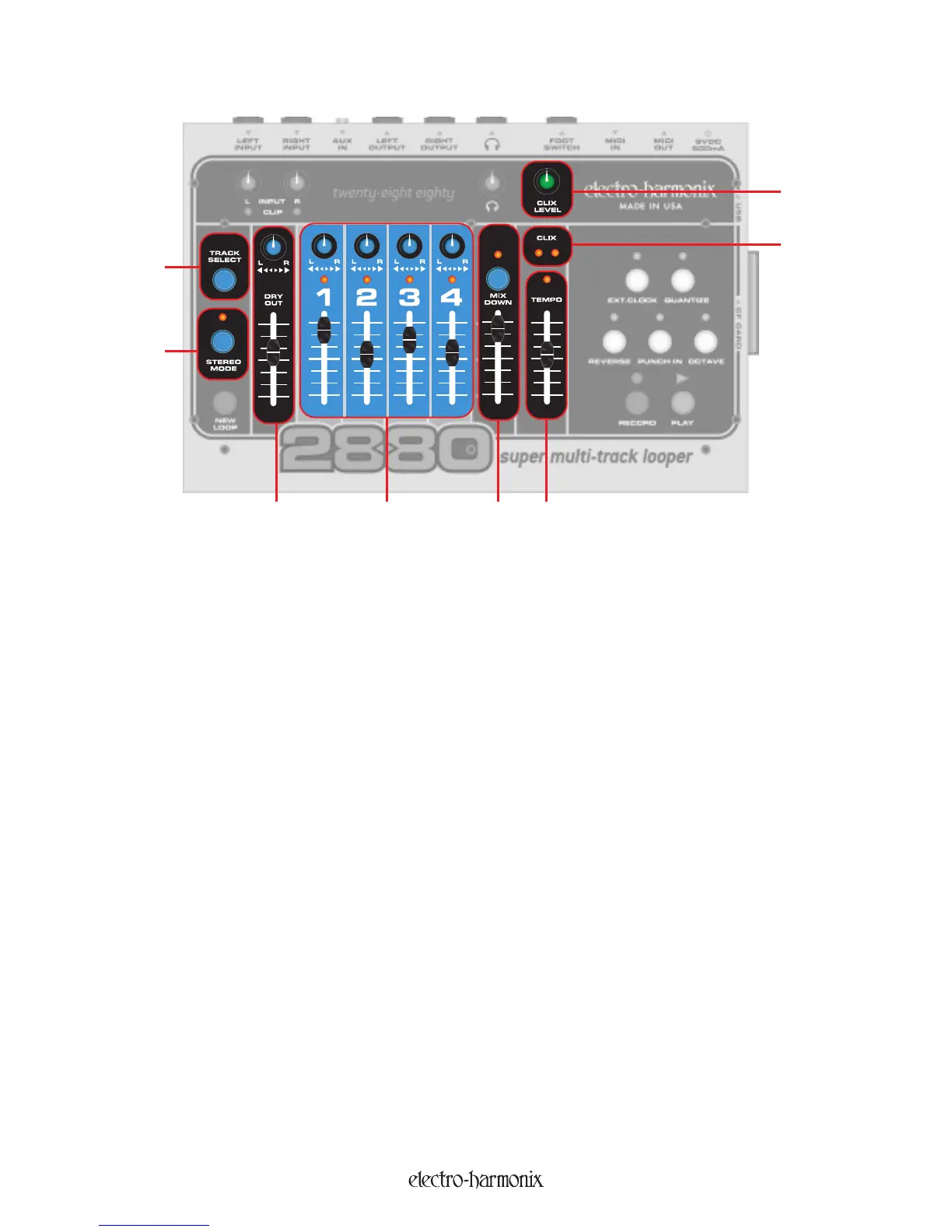
9. DRY OUT Fader and Pan Pot: The DRY OUT Fader and Pan Pot give you the ability to monitor your
instrument when recording or to play along with a loop you have already recorded. Adjust the output volume of your
instrument using the DRY OUT Fader. Use the Pan Pot to direct the Left and Right Inputs to the Left and Right Outputs.
When Pan is set to the CCW position, the Left Input is monitored at the Left Output and the Right Input is monitored at
the Right Output. When Pan is set to the CW position, the Left Input is monitored at the Right Output and the Right
Input is monitored at the Left Output. When Pan is set to the middle, both Inputs are mixed to both Outputs. The
setting of the DRY OUT Fader and the Pan Pot have no influence on the signal that is recorded.
10. RECORD Tracks: There are 4 tracks available for you to record your instruments onto. You can record at most
2 tr
acks simultaneously. Each of the 4 tracks contain a pan pot and a level fader. This allows you to balance your
volumes as well as locate your tracks within the stereo spectrum. Each track also contains an activation LED above the
track number. When the LED is lit, that particular track is activated for recording. When you hit the RECORD button
from the Idle state, the active track will be recorded or overdubbed onto.
The tracks are available in mono or stereo pairs (1 & 2 or 3 & 4). The recording levels are set with the INPUT knobs.
TRACK Faders: The 4 track faders serve a dual purpose: during Playback they are the volume control for each
track, during Overdubbing they act like a Feedback control from a delay effect. So when you are Overdubbing, the
level of the previously recorded audio on the active track is multiplied by the position of the track's fader. If the fader
is set to 1
00%, the previously recorded audio will remain at the volume it was recorded at. If the fader is set anywhere
belo
w 100%, with each pass of the loop, the volume of the previously recorded audio will attenuate according to the
setting of the fader. Using this function, it is possible to use the 2880 as a very long delay pedal.
11.
TRACK SELECT
Button:
This button is used to select the active tr
ack. Pressing the TR
A
C
K SELECT button will
cycle through the 4 tracks.
12. STEREO MODE Button and LED: This button toggles the 2880 in/out of Stereo Mode. When the STEREO
MODE LED is lit, you are in Stereo Mode, when it is off, you are in Mono Mode. When Stereo Mode is activated, the
stereo pairs (1 & 2 or 3 & 4) will be recorded simultaneously. The LEFT Input will always be sent to Tracks 1 or 3. The
RIGHT Input goes to Tracks 2 or 4.
Tracks, Track Selection and Mixdown
9


 To Next Page