11
OCT – Using Secondary Knob Mode, it is possible to get ascending
octaves, descending octaves, or both with the CANYON. The DELAY knob
controls the Up Octave (ascending). Factory default is the maximum
position. The FEEDBACK controls the Sub Octave (descending). Factory
default is the minimum position, in which the Sub Octave is muted.
SHIM – The DELAY knob controls a low pass filter on the shimmer effect.
Factory default is set to maximum (filter wide open). Turn this knob down
to get a warmer shimmer sound. The FEEDBACK knob controls modulation
depth. Factory default is set to 9 o’clock.
S/H – Similarly to MULTI mode, the DELAY knob controls volume
decay/swell on Sample/Hold mode. Factory default is set to 12 o’clock with
no decay or swell. If the knob is turned above 12 o’clock, the echoes will
begin silent and increase in volume until the level set by the FX LVL knob.
As the knob is turned up, the amount of time it takes to reach full volume
increases. If this knob is turned below 12 o’clock, the repeats will decay.
As the knob is turned down, the amount of time it takes to reach silence
decreases.
LOOP – No secondary knob functions.
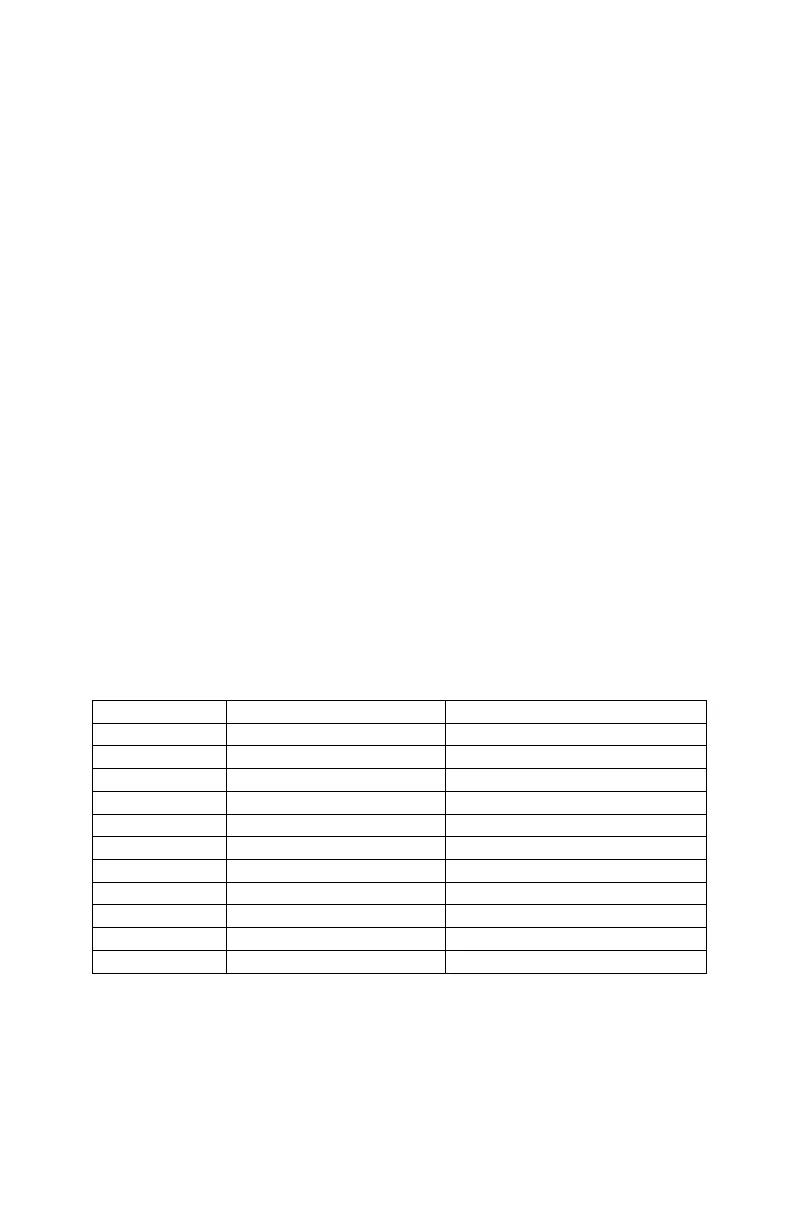
SECONDARY KNOBS CHART
Tip: cut out this chart as a handy go-to reference for the Canyon’s
Secondary Knob Controls.







 To Next Page