9
USING OTHER CONTROLS IN SECONDARY KNOB MODE
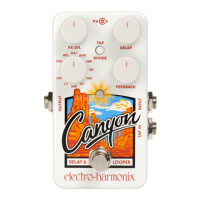
1. The FX LVL and MODE knobs always function normally in Secondary
Knob Mode. The FEEDBACK knob functions normally if there is no
secondary knob function for that knob (in MULTI, REVRS, and S/H
delay modes). Turning the MODE knob to ECHO or LOOP will exit
Secondary Knob Mode.
2. When using the DELAY or FEEDBACK knob to set a secondary knob
function, the delay time and feedback amount that was set by those
knobs before entering Secondary Knob Mode is preserved.
3. The footswitch functions normally in Secondary Knob Mode. If the
footswitch is used to put the CANYON in bypass mode, Secondary
Knob Mode will remain active, and moving the knobs will change their
secondary knob functions. The LED will blink in a shorter version of
the Secondary Knob Mode pattern. If tap tempo mode is enabled, you
can use the footswitch to tap in a new delay time.
4. Secondary knob settings are preserved when switching away from a
particular delay mode, and are preserved when power cycling the
CANYON. When secondary knob functions are set in one delay mode,
they do not affect the secondary knob functions of another mode
(example: changing the modulation depth of MOD mode does not
change the modulation depth of DMM mode).
ERASING SECONDARY KNOB SETTINGS
1. To erase the secondary knob settings of a particular mode, press and
hold the TAP/DIVIDE switch. Then, while holding TAP/DIVIDE, press
and hold the footswitch for 2 seconds. The LED will blink quickly
indicating that the secondary knob settings of the current mode have
been reset to the default factory settings.
2. To erase the secondary knob settings of every mode and restore them
all to factory defaults, first unplug the CANYON from power. Press and
hold the TAP/DIVIDE switch. Then, while holding TAP/DIVIDE, plug
power back in to the CANYON. The LED will blink quickly, indicating
that all secondary knob functions have been restored to the factory
default.
3. To erase the secondary knob settings of every mode and reset the
internal footswitch’s tap tempo to the factory default, first unplug the
CANYON from power. Press and hold both the TAP/DIVIDE switch and
the footswitch. Then, while holding both switches, plug power back in
to the CANYON. The LED will cycle through red, orange and green to
indicate that the CANYON has been restored to factory default
secondary knob settings and tap tempo settings.







 To Next Page