EasyManua.ls Logo

Electro-Voice ELX200-18SP-AP - User Manual

Electro-Voice ELX200-18SP-AP
3 pages
Print Icon
To Next Page IconTo Next Page
Loading...
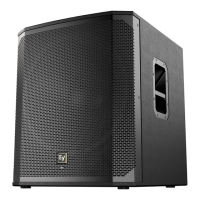
Electro-Voice | ELX200-18SP 18" powered subwoofer
www.trungchinhaudio.vn
ELX200-18SP 18" pow-
ered subwoofer
EV QuickSmart Mobile application: quickly and
wirelessly configure, control and monitor up to six
ELX200 loudspeakers simultaneously, and receive
immediate notification during critical performance
conditions. Bluetooth® is available in select countries.
QuickSmartDSP features best-in-class processing. Easy
setup via three presets, sub/top system-match, five user-
programmable presets, visual monitoring of limiter
status, input level control and meters, and master
volume control to optimize gain structure, all via LCD.
High-efficiency 1200 W Class-D power amplifier
delivers up to 132 dB peak SPL utilizing ultra-
efficient, high-sensitivity transducer designed and
engineered by EV.
Ideal for portable and installed applications.
Professional-grade hardware: integrated M20
threaded pole mount plate and two-handle design for
easy lifting.
ELX200-18SP features high-efficiency Class-D power
amplifiers (up to 1200 W) with integrated QuickSmartDSP,
and delivers up to 132 dB SPL utilizing transducers
designed and engineered by EV (18-inch EVS-18L woofer).
Powered subwoofer models allow easy setup via three
presets (Music, Live, Club), sub/top system-match
crossovers, three-band EQ, five user-programmable
presets (Store and Recall settings), visual monitoring of
limiter status, input level control and meters, and master
volume control to ensure optimal gain structure. ELX200
powered models are ideal for portable and installed
applications, with lightweight and compact 15-mm wood
enclosures, integrated M20 threaded pole pole-mount
plate, and two-handle design for easy lifting. The new
QuickSmart Mobile wireless control and monitoring
application, using Bluetooth® Low Energy (BTLE)
technology, allows intuitive system control, configuration
and monitoring of up to six powered ELX200 loudspeakers
simultaneously. Receive alerts
when your system is being overdriven, and control
your system while in front of your speakers, not
behind. Bluetooth® is available in select countries.
Technical specifications
Frequency response (-3 dB):
47 Hz 105 Hz1
Frequency range (-10 dB):
40 Hz 145 Hz1
Maximum SPL:
132 dB2
Power rating:
1200 W
LF transducer:
EVS-18L 457 mm (18 in)
Low-Pass frequency:
Adjustable: 80 Hz, 100 Hz,
120 Hz, 150 Hz
Connectors:
(2) XLR/TRS combo jacks and
(2) XLR link outputs
Enclosure:
15 mm plywood with EVCoat

Other manuals for Electro-Voice ELX200-18SP-AP

Questions and Answers

  • R
    Robert AndradeAug 19, 2025
    Why do my Electro-Voice ELX200-18SP-AP Speakers have no sound?
    • D
      Danielle MartinezSep 12, 2025
      If your Electro-Voice speakers aren't producing sound, there could be several reasons. First, verify that all electronic components are powered on, the signal routing is correctly configured, the audio source is active, and the volume is appropriately adjusted. If there is still no sound, the issue might stem from the wiring. Make sure the correct cables are connected to the amplifier. Play audio at a low level through the amplifier, then connect a test loudspeaker in parallel with the malfunctioning line. If the sound disappears or becomes very weak, the line likely has a short circuit. Use the test loudspeaker to check each connection until you identify and fix the problem, ensuring correct polarity.
  • N
    Nancy SmithAug 21, 2025
    How to stop acoustic feedback from Electro-Voice ELX200-18SP-AP when using a microphone?
    • R
      reesegregoryAug 21, 2025
      To stop acoustic feedback from your Electro-Voice speakers when using a microphone, you can take several steps. First, reduce the microphone levels at the mixing console or input source. If the microphone is directly connected to the speaker, lower the input level on the speaker. Positioning the microphone closer to the sound source can increase gain-before-feedback. Also, if the MODE is set to MUSIC, change it to LIVE or SPEECH. Finally, position the loudspeakers so the microphone is behind them whenever possible. If using the loudspeaker in a monitor position, aim the loudspeaker to the back of the microphone.
  • V
    Vanessa JohnsonAug 23, 2025
    Why are my Electro-Voice ELX200-18SP-AP making a constant buzzing noise?
    • W
      watkinscrystalAug 23, 2025
      Constant noise such as buzzing, hissing, or humming from your Electro-Voice speakers can stem from several causes. It could be a defective source or another electronic device; if the noise is present even when no program material is playing, evaluate each component to isolate the problem, as there's likely a break in the signal path. Poor system grounding or a ground loop can also cause this issue, so check and correct the system grounding as needed. Additionally, ensure the input gain knob is properly adjusted; slowly increase the input gain knob level to engage the microphone pre-amp.
  • H
    hannah53Aug 26, 2025
    Why do my Electro-Voice Speakers have intermittent cracking?
    • T
      Trevor ReidAug 26, 2025
      Intermittent output, such as cracking or distortion in your Electro-Voice speakers, is often due to a faulty connection. Check all connections at the amplifier and loudspeakers to ensure they are clean and tight. If the problem persists, inspect the wiring.
  • J
    Jared SuttonAug 27, 2025
    Why is there no sound from my Electro-Voice ELX200-18SP-AP when using a microphone?
    • C
      Charles UnderwoodAug 27, 2025
      If no sound is produced when a microphone is connected to INPUT 1 or INPUT 2 on your Electro-Voice speakers, it could be due to a couple of reasons. The microphone might require phantom power; if so, use a dynamic microphone that doesn't need it, or use an external phantom power source. Also, ensure the input gain knob is properly adjusted by slowly increasing the input gain knob level to engage the microphone pre-amp.
  • A
    Amy PalmerAug 29, 2025
    How to unlock the DSP menu on Electro-Voice Speakers?
    • T
      Teresa GonzalezAug 30, 2025
      If the DSP menu on your Electro-Voice speakers is locked (indicated by a lock symbol on the LCD screen), it means the Menu Lock function has been activated. To unlock it, press and hold the MASTER VOL knob for 5 seconds.
  • M
    Michael SparksSep 1, 2025
    Why do my Electro-Voice ELX200-18SP-AP produce acoustic feedback?
    • K
      Kristen MarshallSep 1, 2025
      If your Electro-Voice Speakers produce acoustic feedback when the input level is amplified, there are several potential causes. First, the gain structure may be incorrect; try reducing the microphone levels at the mixing console or input source, or if the microphone is directly connected to the speaker, reduce the input level on the speaker. Positioning the microphone closer to the sound source can also help increase gain-before-feedback. Second, ensure the MODE is set to LIVE or SPEECH, not MUSIC. Finally, adjust the loudspeaker setup so the microphone is behind them, or if using the loudspeaker in a monitor position, aim the loudspeaker to the back of the microphone.
  • B
    Beth MooreSep 3, 2025
    Why are my Electro-Voice Speakers hissing?
    • M
      Morgan FoxSep 3, 2025
      If your Electro-Voice Speakers produce a constant noise such as buzzing, hissing, or humming, several factors could be responsible. The noise could be caused by a defective source or other electronic device; evaluate each component to isolate the problem, as there is likely a break in the signal path. Alternatively, the issue could stem from poor system grounding or a ground loop, so check and correct the system grounding as required. Also, ensure the input gain knob is not in the MIC position; slowly increase the input gain knob level to engage the microphone pre-amp.
  • M
    Michelle RogersSep 5, 2025
    What to do if Electro-Voice ELX200-18SP-AP have no sound with microphone?
    • M
      Melanie OconnorSep 5, 2025
      If your Electro-Voice Speakers aren't producing sound when a microphone is connected to INPUT 1 or INPUT 2, the issue might be related to the microphone itself or the input settings. If the microphone requires phantom power, either use a dynamic microphone that doesn't need it, or use an external phantom power source. Also, make sure the input gain knob is not in the MIC position; slowly increase the input gain knob level to engage the microphone pre-amp.
  • A
    Austin RussellSep 7, 2025
    How to fix Electro-Voice Speakers with cracking sound?
    • T
      Tony CameronSep 7, 2025
      If your Electro-Voice Speakers have intermittent output with cracking or distortion, a faulty connection could be the cause. Check all connections at the amplifier and loudspeakers to ensure they are clean and tight. If the problem persists, inspect the wiring as described in the 'No Sound' troubleshooting section.

Summary

Electro-Voice ELX200-18 SP Subwoofer Features

QuickSmart Mobile Application

Wireless configuration, control, and monitoring for up to six ELX200 loudspeakers simultaneously.

QuickSmartDSP Processing

Best-in-class processing with presets, system-match, EQ, and visual monitoring via LCD.

High-Efficiency Amplifier

1200 W Class-D amplifier delivering up to 132 dB SPL with ultra-efficient transducers.

Professional-Grade Hardware

Integrated M20 threaded pole mount and two-handle design for portability and easy lifting.

Technical Specifications

Frequency Response

Specifies the frequency range of the subwoofer: -3 dB at 47 Hz – 105 Hz and -10 dB at 40 Hz – 145 Hz.

Maximum SPL

Details the maximum Sound Pressure Level, measured at 132 dB.

Power Rating

States the amplifier's power output: 1200 W.

LF Transducer

Identifies the low-frequency transducer as EVS-18L, 457 mm (18 in).

Low-Pass Frequency

Adjustable crossover frequencies for the low-pass filter: 80, 100, 120, 150 Hz.

Connectors

Lists input and output connections: (2) XLR/TRS combo jacks and (2) XLR link outputs.

Enclosure

Describes the enclosure material: 15 mm plywood with EVCoat.

System Overview

Subwoofer Amplifier Panel Layout

Identification and description of controls and connectors on the amplifier panel.

Connection Details

Explanation of input signals, output links, and power connections.

Dimensions and Ordering Information

Product Dimensions

Provides detailed physical dimensions of the subwoofer in millimeters and inches.

Ordering Options

Lists product variations (US, EU, AP, GL cords) and associated order numbers.

Accessories

Details available accessories, such as padded covers, with their respective order numbers.

Electro-Voice ELX200-18SP-AP Specifications

General IconGeneral
TypePowered Subwoofer
PoweredYes
Max Peak SPL132 dB
Output ConnectorsXLR
Driver Size18 in
Maximum SPL132 dB
Input ConnectorsXLR/TRS Combo
Inputs2 x XLR/TRS combo
Outputs2 x XLR
Enclosure MaterialPlywood
Crossover Frequency100 Hz
FinishBlack
Weight27.7 kg (61 lbs)

Related product manuals