16
DETAILED COMPONENT DESCRIPTIONS
2.2 | Handheld Transmitter Setup & Operation
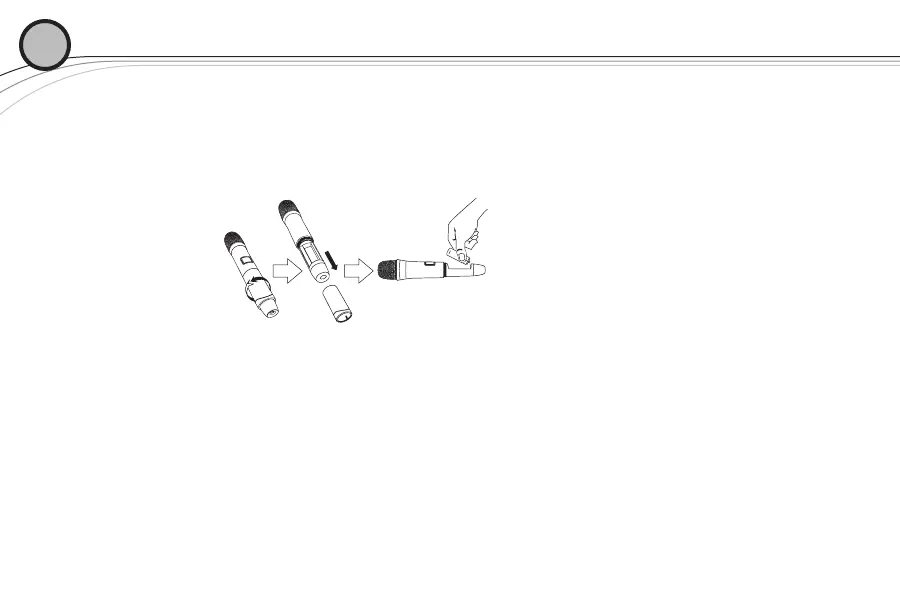
1. Insert Batteries.
a. Remove the battery compartment cover by unscrewing it completely.
b. Insert two AA batteries as shown, sliding one up into the housing to make room for
the other making sure to follow polarity, as marked.
2. Turn the unit on by pressing and holding the on/off button for 3 seconds, and the display will
light up.
3. If a new channel is desired, use EZsync as in Section 2.1 and close battery compartment.
4. Verify reception.
a. With the transmitter and receiver on a matching Channel, the main receiver display
should be indicating a RF signal on the bar graph.
b. Speak into the microphone and the Audio Meter bar graph should indicate audio
signal presence.
c. If the level meters do not show reception, make sure the channels are matching and
refer to the troubleshooting section.
02








 To Next Page