23
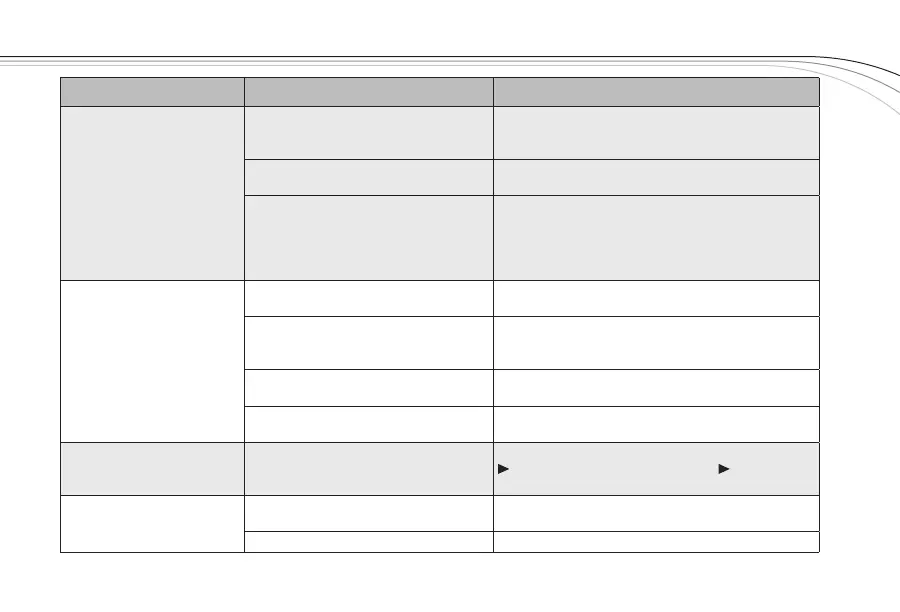
Problem Possible Causes Solutions
Interference
Another wireless product in the area is
on the same frequency or the signals
are mixing
Use ClearScan to change the operating frequency.
Receiver is too close to digital signal
processor or similar device
Move the receiver to a different location.
Strong electromagnetic field from
stage lighting or other source near
the transmitter or receiver, which may
be producing RF noise at or near the
operating frequency
Use ClearScan to change the operating frequency.
Repair or remove the source of interference. Move
the receiver to a different location.
Short range or drop-outs
RF reflective metal obstacles between
the transmitter and receiver
Move the obstacles, or reposition the
receiver/antennas.
Poorly oriented beltpack antenna
Check the antenna connection and reorient the
bodypack so the antenna is vertical (up and down)
and facing the receiver, if possible.
Squelch set too high
Check squelch setting, higher numerical settings
mean shorter range (see page 13).
Faulty receiving antenna system
Check all antenna connections and reposition to be
in line-of-sight with the transmitter.
Can't change settings
on receiver
Lockout feature is enabled
Disable lockout by pressing SET for 3 seconds, press
to display LOCK, press SET, press to
turn lock off, press SET.
Transmitter will not sync with
receiver
Battery cover on handheld
Remove battery cover, see page 15 for location of
EZsync window.
Lighting in environment is too bright Shadow infrared ports from light.



 To Next Page