EasyManua.ls Logo

Electro-Voice ZXA1 Series - User Manual

Electro-Voice ZXA1 Series
28 pages
Print Icon
To Next Page IconTo Next Page
Loading...
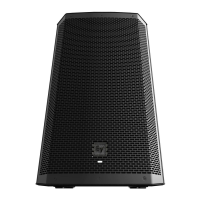
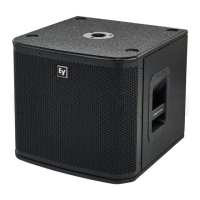
ZXA1 Series Loudspeaker
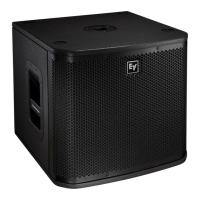
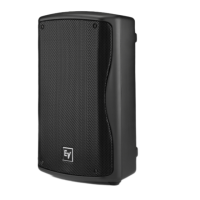
ZXA1‑90, ZXA1‑SUB
en
User manual

Questions and Answers

  • M
    Madison MillerAug 14, 2025
    Why is my Electro-Voice Speakers sound distorted and the LIMIT LED is constantly on?
    • R
      Robert PerezAug 15, 2025
      If the sound from your Electro-Voice Speakers is distorted and the LIMIT LED is constantly on or flashing regularly, it could be due to an excessive input level. To resolve this, reduce the MASTER level or loudspeaker level knobs to prevent limiting. Alternatively, a line-level source might be incorrectly plugged into the MIC IN. Ensure that you plug the line-level source into the LINE IN.
  • C
    Christopher SchwartzAug 18, 2025
    What to do if my Electro-Voice ZXA1 produce constant noise?
    • L
      Lonnie BrownAug 18, 2025
      If your Electro-Voice Speakers are producing constant noise such as buzzing, hissing, or humming, the issue could stem from several causes. It might be a defective source or another electronic device. If noise is present even without program material playing, evaluate each component to isolate the problem. Poor system grounding or a ground loop could also be the cause; check and correct the system grounding as needed. Finally, verify that the level controls of the source are properly structured, as an incorrect gain structure can also lead to constant noise.
  • H
    hjohnsonAug 21, 2025
    How to fix intermittent output such as cracking or distortion on Electro-Voice ZXA1?
    • X
      xwalshAug 21, 2025
      To fix intermittent output issues like cracking or distortion with your Electro-Voice Speakers, check all connections in the signal chain. Ensure they are clean and tight, as a faulty connection or damaged cable can cause these problems.
  • C
    Charles CollierAug 25, 2025
    Why is my Electro-Voice ZXA1 sound distorted even though the LIMIT LED is not blinking?
    • A
      Anita JohnsonAug 25, 2025
      If your Electro-Voice Speakers' sound is distorted but the LIMIT LED is not blinking, the source input (mixing console/preamp) might be overdriven. Verify the level controls of the source are properly structured to resolve this issue.
  • J
    Jesse RobinsonAug 28, 2025
    Why do Electro-Voice ZXA1 have acoustic feedback when the microphone input level is amplified?
    • F
      Frank MiddletonAug 28, 2025
      Acoustic feedback from your Electro-Voice Speakers when the microphone input level is amplified can occur due to a few reasons. First, there might be an incorrect gain structure; reduce the microphone levels at the mixing console or input source. Second, the microphone position may be too close to the front of the speaker. Set up the speakers so the microphone is behind them to mitigate feedback.
  • J
    Jean WolfAug 31, 2025
    What to do if Electro-Voice ZXA1 produce no sound?
    • M
      Melvin ChandlerAug 31, 2025
      If your Electro-Voice Speakers are producing no sound, it could be due to the amplifier or wiring. Connect a known working signal source to the amplifier inputs. Also, verify you have connected the correct cables to the amplifier.
  • C
    Cody WagnerSep 3, 2025
    Why is there no sound produced with a microphone connected to MIC IN on Electro-Voice ZXA1 Speakers?
    • J
      Joseph VasquezSep 3, 2025
      If no sound is produced when a microphone is connected to the MIC IN on your Electro-Voice Speakers, the microphone may require phantom power. Use a dynamic microphone that does not require phantom power.
  • T
    Taylor EvansSep 7, 2025
    What causes poor low-frequency response with Electro-Voice ZXA1 Speakers?
    • S
      Sara PollardSep 7, 2025
      Poor low-frequency response with Electro-Voice ZXA1 Speakers can occur if the WITH SUB switch is activated. Set the FULL RANGE/WITH SUB switch to the FULL RANGE position.
  • T
    Teresa WhitakerSep 10, 2025
    What causes poor low-frequency response with Electro-Voice ZXA1-SUB Speakers?
    • G
      George PatrickSep 10, 2025
      If you are experiencing poor low-frequency response with your Electro-Voice ZXA1-SUB speakers, the issue might be due to incorrect polarity. Set the NORMAL/REVERSE POLARITY switch to the opposite position.

Summary

Safety and Precautions

Important Safety Instructions

Critical warnings for safe operation to prevent fire, electric shock, and equipment damage.

FCC Compliance Information

Details FCC rules compliance for digital devices and potential radio frequency interference.

Operational Precautions

Precautions for outdoor use, temperature limits, and hearing protection from high sound levels.

Product Description and Features

Quick Setup Guide

Step-by-step instructions for the initial setup and operation of the ZXA1 and ZXA1-SUB.

Product Features

Highlights key features and specifications of the ZXA1 loudspeaker and ZXA1-SUB subwoofer.

Installation Procedures

Mounting Options

Guidance on positioning as a floor monitor or mounting on a tripod stand.

Pole Mount Installation

Instructions for mounting the ZXA1 loudspeaker on a pole, often with a ZXA1-SUB.

Suspending Loudspeakers

Safety warnings and procedures for suspending loudspeakers using appropriate kits or adaptors.

Rotating the Horn

Steps to rotate the ZXA1 horn assembly for optimal sound coverage and aiming.

Rotating the Logo Badge

Instructions on how to rotate the ZXA1 logo badge for different orientation needs.

Amplifier Controls

ZXA1 Amplifier Panel Controls

Details controls for the ZXA1 amplifier, including Master, Mic, and input/output connections.

ZXA1-SUB Amplifier Panel Controls

Details controls for the ZXA1-SUB amplifier, including Level, Boost, Polarity, and input/output.

Recommended Configurations

Daisy-Chaining Full-Range Systems

Illustrates connecting multiple ZXA1 loudspeakers in a daisy-chain setup.

Using Systems as Monitors

Configuration guide for using ZXA1 loudspeakers as stage monitors.

Stereo Systems with Subwoofers

Setup for stereo systems combining ZXA1 speakers with ZXA1-SUB subwoofers.

Stereo Systems with Mono Subwoofer

Setup for stereo systems using ZXA1 speakers and a single ZXA1-SUB.

Troubleshooting Common Issues

No Sound Issues

Addresses no audio output from amplifier or wiring problems.

Poor Low-Frequency Response

Troubleshooting steps for poor low-frequency response with ZXA1 and ZXA1-SUB.

Intermittent Output & Noise

Resolves cracking, distortion, noise, buzzing, hissing, or humming issues.

Microphone & Input Issues

Covers sound distortion, feedback, phantom power, and gain structure for microphones.

Technical Data and Specifications

Model Specifications

Detailed specifications for ZXA1-90 and ZXA1-SUB models: frequency, SPL, power, drivers, connectors.

Physical Dimensions

Provides detailed physical dimensions for the ZXA1 and ZXA1-SUB models.

Frequency Response Graphs

Presents frequency response graphs for the ZXA1-90 and ZXA1-SUB.

Models and Accessories

Lists ZXA1 system models, coverage, finish, voltage, and related accessories.

Warranty Information

Electro-Voice ZXA1 Series Specifications

General IconGeneral
Power Rating800 W
Max SPL126 dB
Coverage90° x 50°
Enclosure MaterialPolypropylene
Input ConnectionsXLR, 1/4" combo jack
Speaker TypePowered loudspeaker
Output ConnectorsXLR
HF Transducer1-inch titanium compression driver

Related product manuals