- 19 -
10.2003 R.K. 599 518 355
Panel
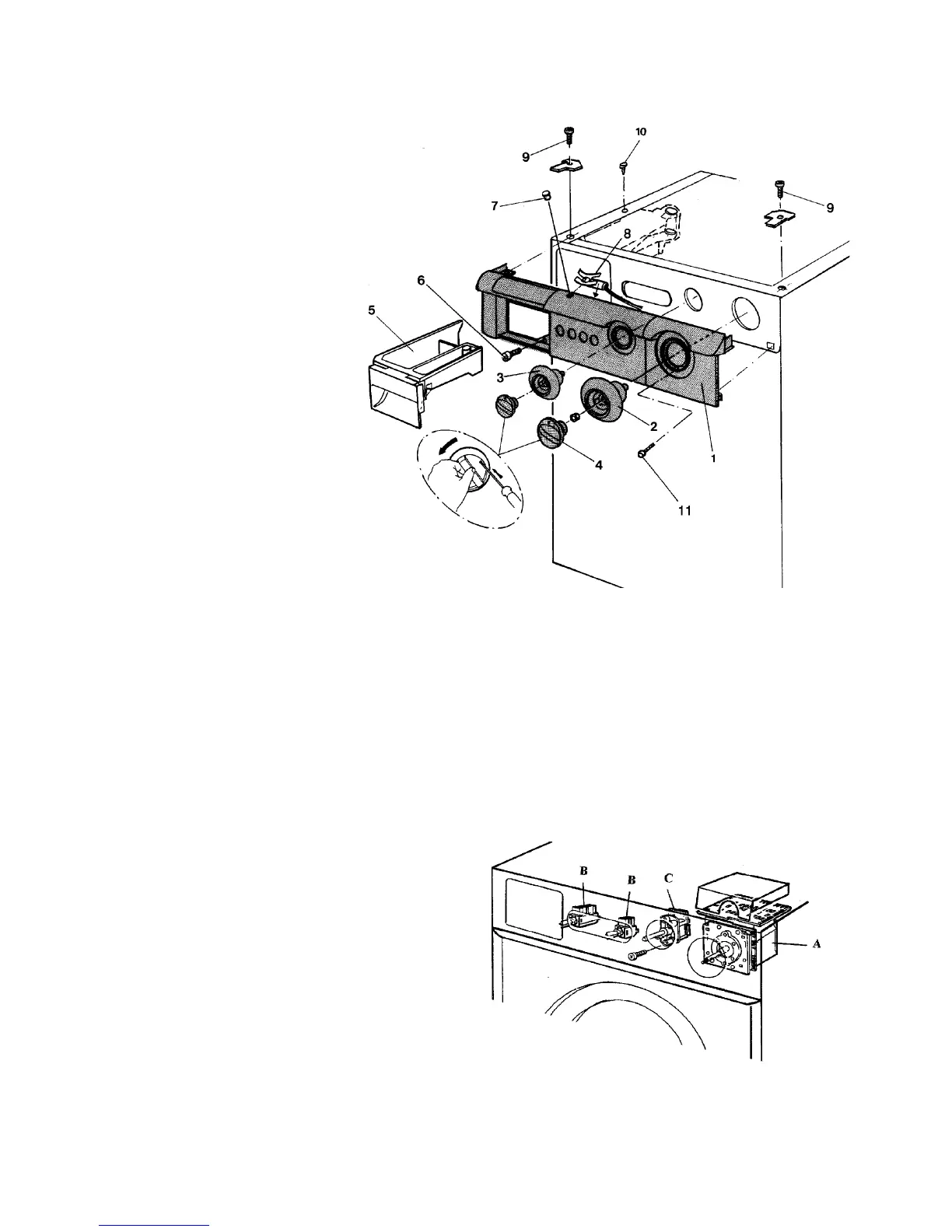
1 Remove the top plate
2 Remove the 2 screws (9).
3 Remove the knob (4).
Unlock the holding catch
by msertmg a fine screwdriver
(or equivalent) straight through
the hole, rotating the knob
anti clockwise at the same
time until the knob can
be removed.
4 Remove the temperature
scale (3) by llfting the lock
on the plastlc shaft and
with-drawing the scale.
5 Remove the program scale after
removmg the nut.
Remove the screw behlnd the
program scale.
6 Remove the detergent hatch (5) by jerking iIt past a stop.
Remove the screw (6) inside the hatch.
7 Remove the screw (10) to free the detergent dispenser and llft the panel away
from the front edge of the detergent hatch.
Accessibility:
A Programmed control unit
B Press-operated switch
C Potentiometer, temperature setting
(Not provided on all modeis)




 To Next Page