electrolux operation
128
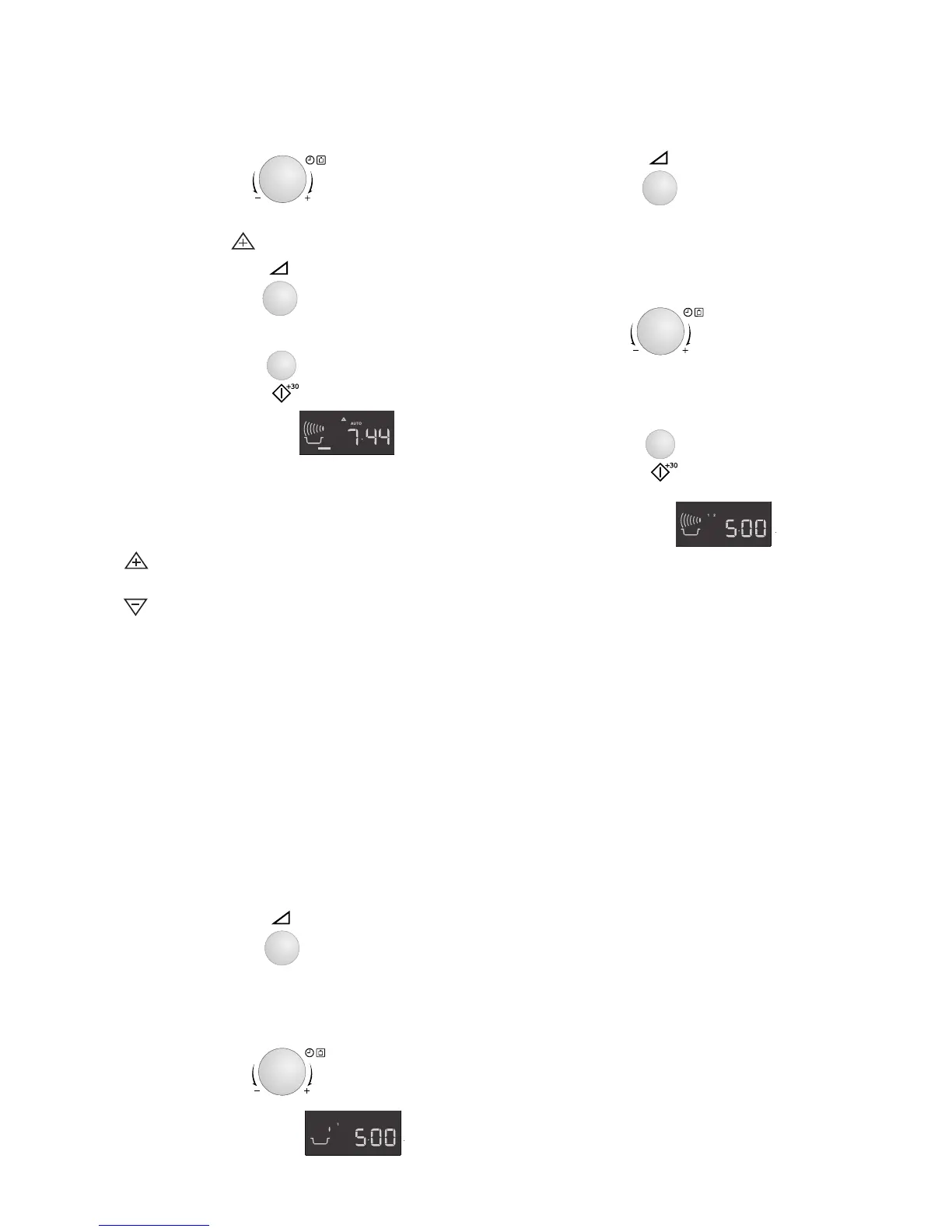
2. Turn the TIMER/WEIGHT knob until
0.3 kg is displayed.
3. Press the power button once to select
the PLUS adjustment.
4. Press the START/+30 button.
5. Check the display:
Note:
To cancel PLUS / MINUS, press the
power level key 3 times.
If you select PLUS the display will show
.
If you select MINUS, the display will show
.
Multiple sequence cooking
A sequence of 3 stages (maximum) can
be programmed using MICROWAVE.
Example: To cook:
5 minutes on 800 W power (Stage 1)
16 minutes on 240 W (Stage 2)
Stage 1
1. Press the power button once.
2. Enter the desired time by rotating the
TIMER/WEIGHT knob clockwise until
5:00 is displayed.
3. Check the display:
Stage 2
1. Press the power button 4 times.
2. Enter the desired cooking time by
rotating the TIMER/WEIGHT knob
clockwise until 16:00 is displayed.
3. Press the START/+30 button once to
begin cooking.
4. Check the display:
The oven will begin to cook for 5
minutes at 800 W, and then for 16
minutes at 240 W.
x1
x1







 To Next Page