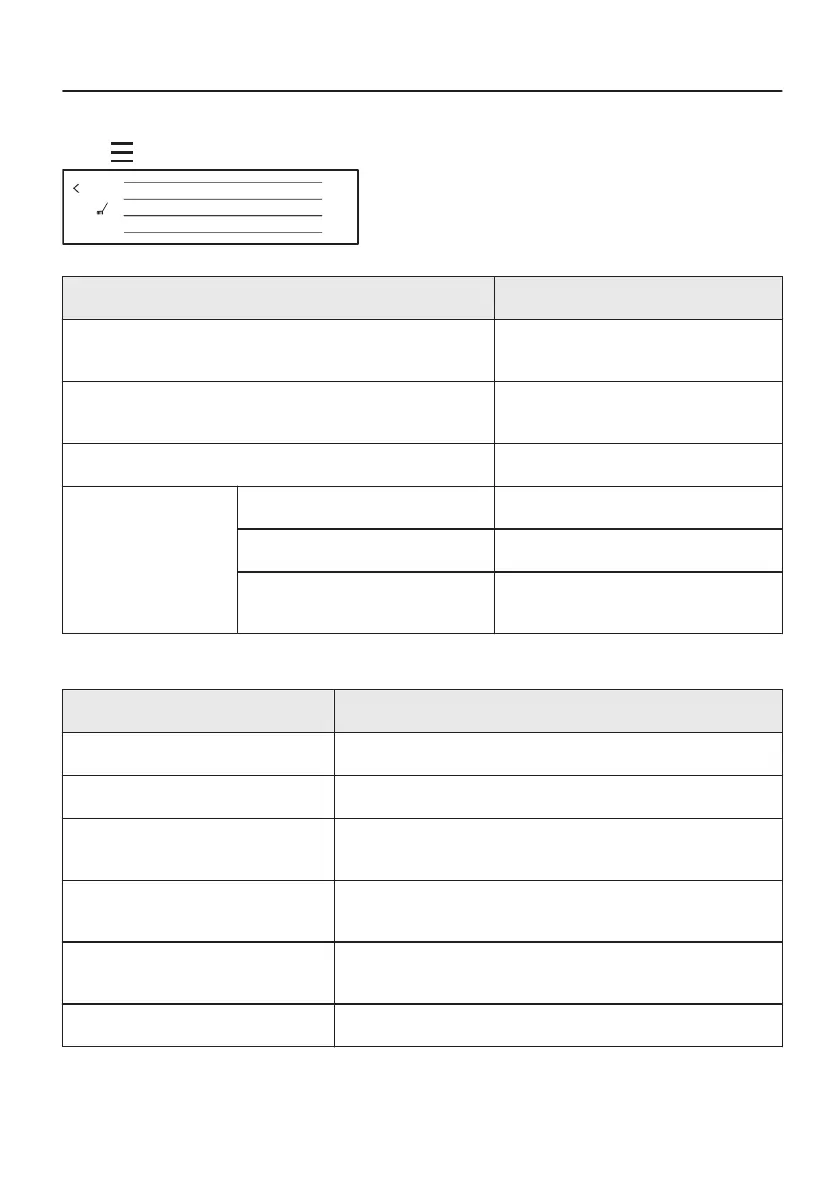
14. MENU STRUCTURE
14.1 Menu
Press on the display to open Menu.
Options
Cleaning
Choose dish
Menu
Menu item Application
Assisted Cooking Contains a list of automatic pro‐
grammes.
Cleaning Contains a list of cleaning pro‐
grammes.
Options To set the oven configuration.
Settings Connections To set the network configuration.
Setup To set the oven configuration.
Service Shows the software version and con‐
figuration.
14.2 Submenu for: Cleaning
Submenu Application
Steam Cleaning Light cleaning.
Steam Cleaning Plus Thorough cleaning.
Descaling Cleaning of the steam generation circuit from residual lime‐
stone.
Rinsing Cleaning of the steam generation circuit. Use rinsing after
frequent steam cooking.
Drying Procedure for drying the cavity from the condensation re‐
maining after a use of the steam functions.
Cleaning Reminder Reminds you when to clean the oven.
55/64




 To Next Page