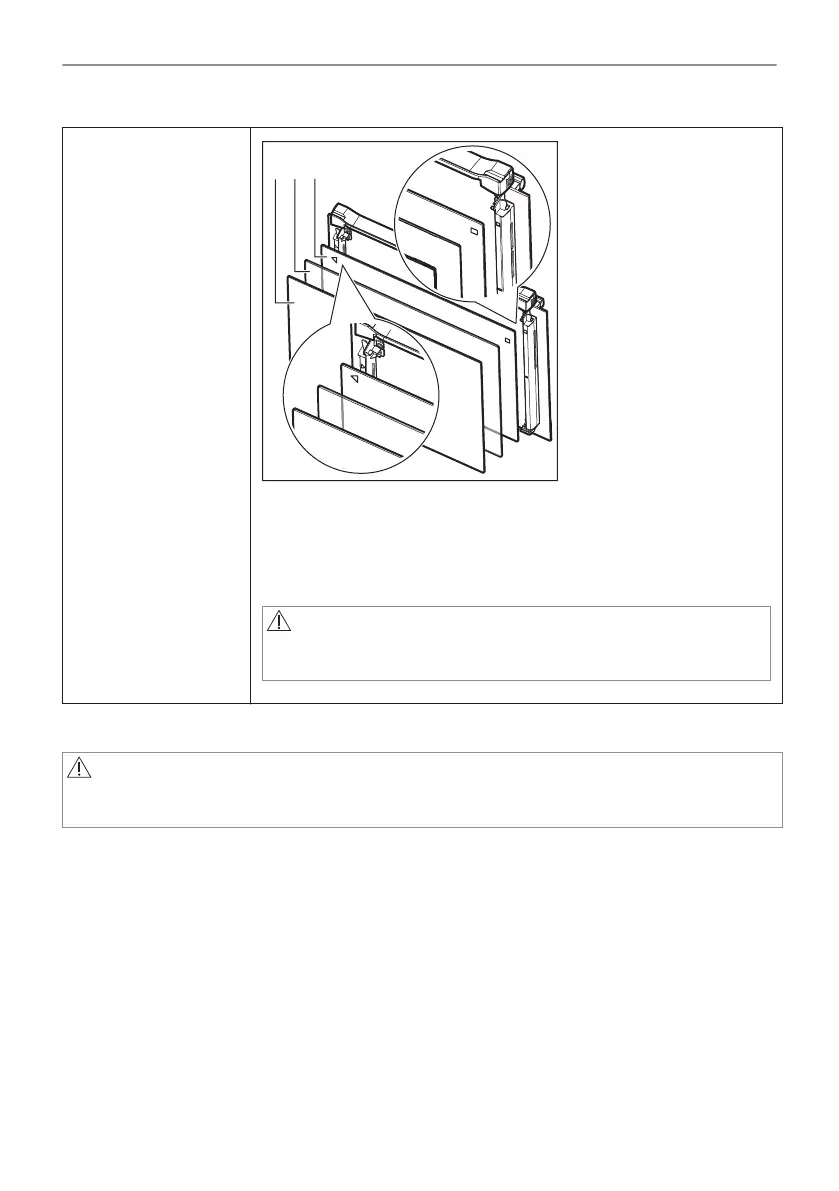
Step 10
Make sure that you put the glass panels (C, B and A) back in the cor‐
rect sequence. First, insert panel C, which has a square printed on the
left side and a triangle on the right side. You will also find those sym‐
bols embossed on the door frame. The triangle symbol on the glass
must match the triangle on the door frame, and the square symbol must
match the square. After that insert the other two glass panels.
WARNING!
Make sure that the glasses are inserted in the correct position
otherwise the surface of the door may overheat.
11.12 How to replace: Lamp
WARNING!
Risk of electric shock.
The lamp can be hot.
1. Turn off the oven.
Wait until the oven is cooled down.
2. Disconnect the oven from the mains.
3. Put a cloth on the bottom of the cavity.
47/64
CARE AND CLEANING




 To Next Page