EasyManua.ls Logo

Electrolux EOB944 - The Electronic Programmer; Setting the Time of Day; Using Countdown (Minute Minder); Semi Automatic Programming of Cooking

Electrolux EOB944
30 pages
Print Icon
To Next Page IconTo Next Page
To Previous Page IconTo Previous Page
Loading...
THE
ELECTRONIC
PROGRAMMER
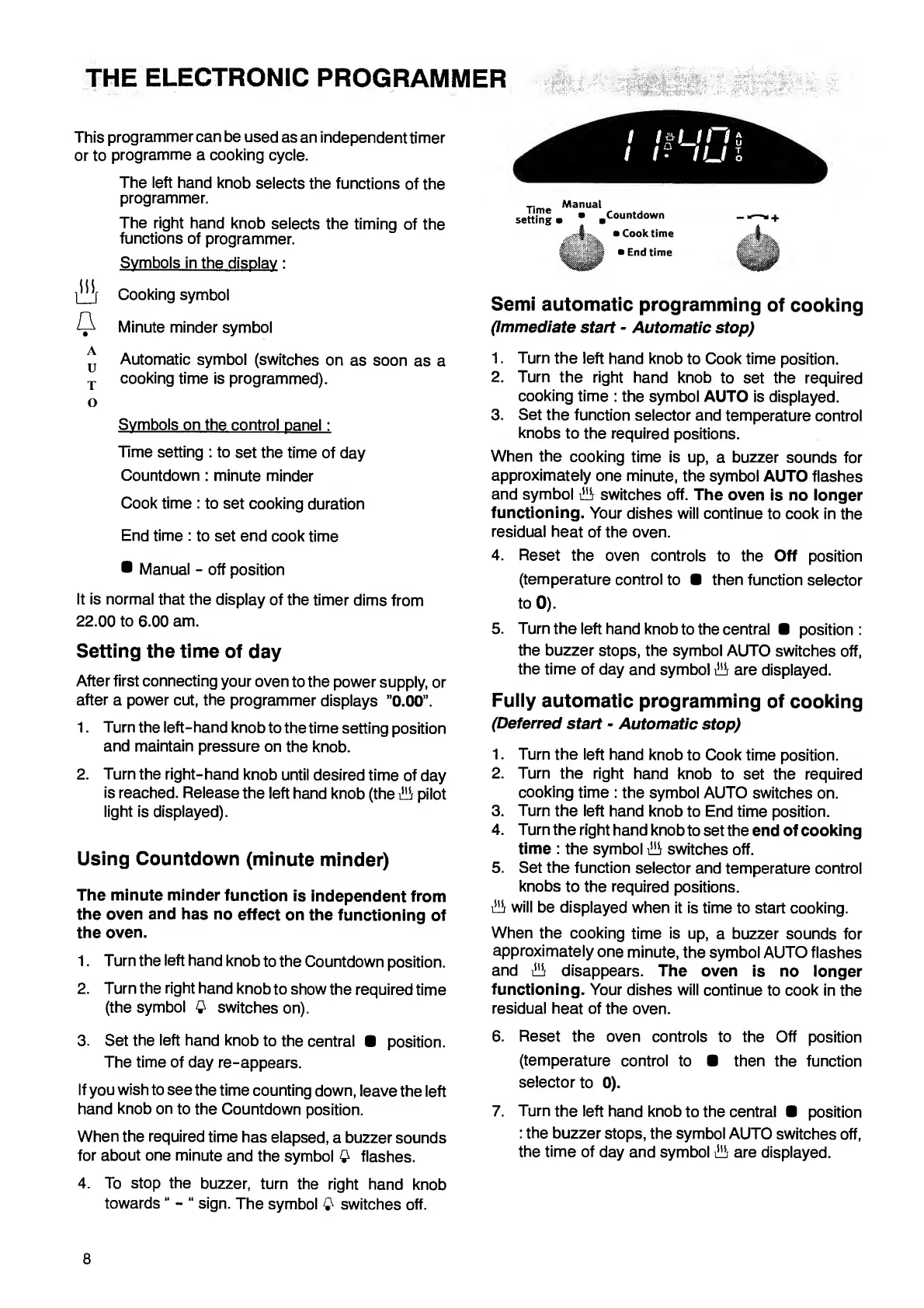
This
programmer
can
be
used
as
an
independent
timer
or
to
programme
a
cooking
cycle.
The
left
hand
knob
selects
the
functions
of
the
programmer.
The
right
hand
knob
selects
the
timing
of
the
functions
of
programmer.
Symbols
in
the
display
:
Cooking
symbol
Q
Minute
minder
symbol
Automatic
symbol
(switches
on
as
soon
as
a
T
cooking
time
is
programmed).
o
Symbols
on
the
control
panel:
Time
setting
:
to
set
the
time
of
day
Countdown
:
minute
minder
Cook
time
:
to
set
cooking
duration
End
time
:
to
set
end
cook
time
Manual
-
off
position
It
is
normal
that
the
display
of
the
timer
dims
from
22.00
to
6.00
am.
Setting
the
time
of
day
After
first
connecting
your
oven
to
the
power
supply,
or
after
a
power
cut,
the
programmer
displays
0
.
0
0
”.
1.
Turn
the
left-hand
knob
to
the
time
setting
position
and
maintain
pressure
on
the
knob.
2.
Turn
the
right-hand
knob
until
desired
time
of
day
is
reached.
Release
the
left
hand
knob
(the
W
pilot
light
is
displayed).
Using
Countdown
(minute
minder)
The
minute
minder
function
is
independent
from
the
oven
and
has
no
effect
on
the
functioning
of
the
oven.
1.
Turn
the
left
hand
knob
to
the
Countdown
position.
2.
Turn
the
right
hand
knob
to
show
the
required
time
(the
symbol
£
switches
on).
Time
Ma
"
ual
setting
Countdown
Cook
time
End
time
Semi
automatic
programming
of
cooking
(Immediate
start
-
Automatic
stop)
1.
Turn
the
left
hand
knob
to
Cook
time
position.
2.
Turn
the
right
hand
knob
to
set
the
required
cooking
time
:
the
symbol
AUTO
is
displayed.
3.
Set
the
function
selector
and
temperature
control
knobs
to
the
required
positions.
When
the
cooking
time
is
up,
a
buzzer
sounds
for
approximately
one
minute,
the
symbol
AUTO
flashes
and
symbol
switches
off.
The
oven
is
no
longer
functioning.
Your
dishes
will
continue
to
cook
in
the
residual
heat
of
the
oven.
4.
Reset
the
oven
controls
to
the
Off
position
(temperature
control
to
0
then
function
selector
to
0
).
5.
Turn
the
left
hand
knob
to
the
central
position
:
the
buzzer
stops,
the
symbol
AUTO
switches
off,
the
time
of
day
and
symbol
iH!r
are
displayed.
Fully
automatic
programming
of
cooking
(Deferred
start
-
Automatic
stop)
1.
Turn
the
left
hand
knob
to
Cook
time
position.
2.
Turn
the
right
hand
knob
to
set
the
required
cooking
time
:
the
symbol
AUTO
switches
on.
3.
Turn
the
left
hand
knob
to
End
time
position.
4.
Turn
the
right
hand
knob
to
set
the
end
of
cooking
time
:
the
symbol
illi
switches
off.
5.
Set
the
function
selector
and
temperature
control
knobs
to
the
required
positions.
will
be
displayed
when
it
is
time
to
start
cooking.
When
the
cooking
time
is
up,
a
buzzer
sounds
for
approximately
one
minute,
the
symbol
AUTO
flashes
and
disappears.
The
oven
is
no
longer
functioning.
Your
dishes
will
continue
to
cook
in
the
residual
heat
of
the
oven.
3.
Set
the
left
hand
knob
to
the
central
position.
The
time
of
day
re-appears.
If
you
wish
to
see
the
time
counting
down,
leave
the
left
hand
knob
on
to
the
Countdown
position.
When
the
required
time
has
elapsed,
a
buzzer
sounds
for
about
one
minute
and
the
symbol
Q
flashes.
4.
To
stop
the
buzzer,
turn
the
right
hand
knob
towards
-
sign.
The
symbol
Q
switches
off.
6.
Reset
the
oven
controls
to
the
Off
position
(temperature
control
to
then
the
function
selector
to
0).
7.
Turn
the
left
hand
knob
to
the
central
position
:
the
buzzer
stops,
the
symbol
AUTO
switches
off,
the
time
of
day
and
symbol
ill!-
are
displayed.
8

Related product manuals