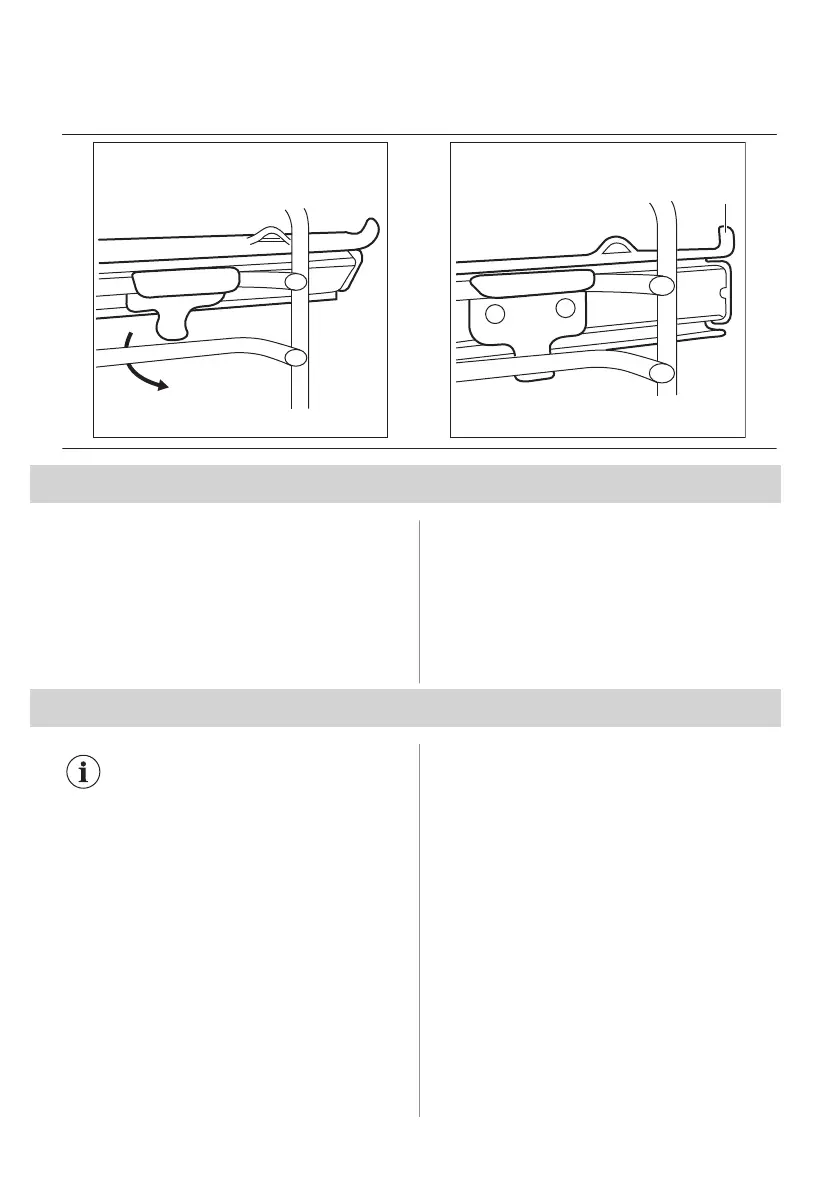
Step 1 Mount the telescopic runners on the shelf
supports.
Step 2 Make sure that the telescopic runner's
tip (A) points upward.
10. ADDITIONAL FUNCTIONS
10.1 Cooling fan
When the appliance operates, the cooling fan
turns on automatically to keep the surfaces of
the appliance cool. If you turn off the
appliance, the cooling fan can continue to
operate until the appliance cools down.
10.2 Safety thermostat
Incorrect operation of the oven or defective
components can cause dangerous
overheating. To prevent this, the oven has a
safety thermostat which interrupts the power
supply. The oven turns on again
automatically when the temperature drops.
11. HINTS AND TIPS
Refer to Safety chapters.
11.1 Cooking recommendations
The oven has four shelf positions.
Count the shelf positions from the bottom of
the oven floor.
Your oven may bake or roast differently to
the oven you had before.
Baking cakes
Do not open the oven door before 3/4 of the
set cooking time is up.
If you use two baking trays at the same time,
keep one empty level between them.
Cooking meat and fish
Use a deep pan for very fatty food to prevent
the oven from stains that can be permanent.
Leave the meat for approximately 15 minutes
before carving so that the juice does not
seep out.
To prevent too much smoke in the oven
during roasting, add some water into the
deep pan. To prevent the smoke
condensation, add water each time after it
dries up.
Cooking times
Cooking times depend on the type of food, its
consistency, and volume.
Initially, monitor the performance when you
cook. Find the best settings (heat setting,
14 ENGLISH



 To Next Page