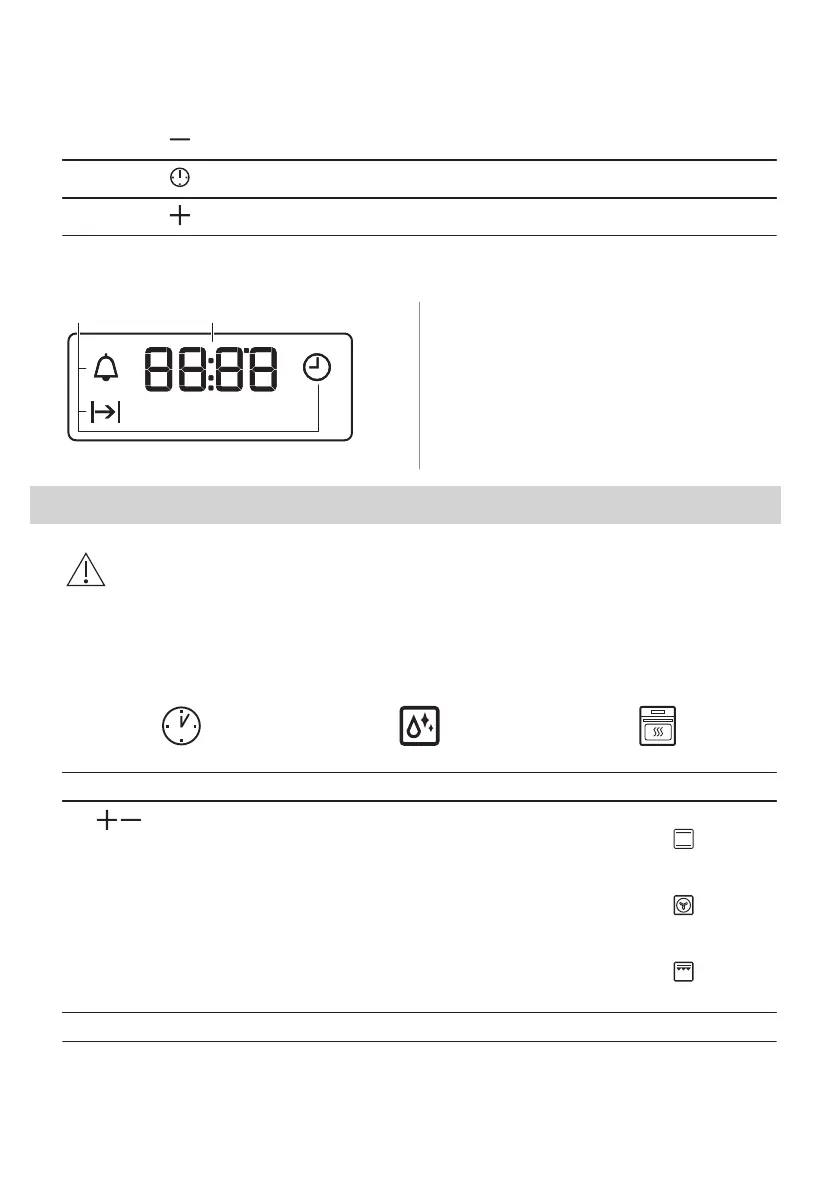
5.2 Sensor fields / Buttons
To set the time.
To set a clock function.
To set the time.
5.3 Display
A. Clock functions
B. Timer
6. BEFORE FIRST USE
WARNING!
Refer to Safety chapters.
6.1 Before first use
The oven can emit an odour and smoke during preheating. Make sure that the room is
ventilated.
Step 1 Step 2
Step 3
Set the clock Clean the oven Preheat the empty oven
1. , - press to set the time.
After approximately 5 sec., the
flashing stops and the display
shows the time.
1. Remove all accessories and re‐
movable shelf supports from
the oven.
2. Clean the oven and the acces‐
sories with a microfibre cloth,
warm water and a mild deter‐
gent.
1. Set the maximum temperature
for the function: .
Time: 1 h.
2. Set the maximum temperature
for the function: .
Time: 15 min.
3. Set the maximum temperature
for the function: .
Time: 15 min.
Turn off the oven and wait until it is cold. Place the accessories and the removable shelf supports in the oven.
ENGLISH 9



 To Next Page