For cakes and biscuits.
• Grill- / Roasting pan
To bake and roast or as pan to collect fat.
• Food sensor
To measure how far the food is cooked.
• Telescopic runners
With the telescopic runners you can put in and remove the shelves more easily.
5. HOW TO TURN APPLIANCE ON AND OFF
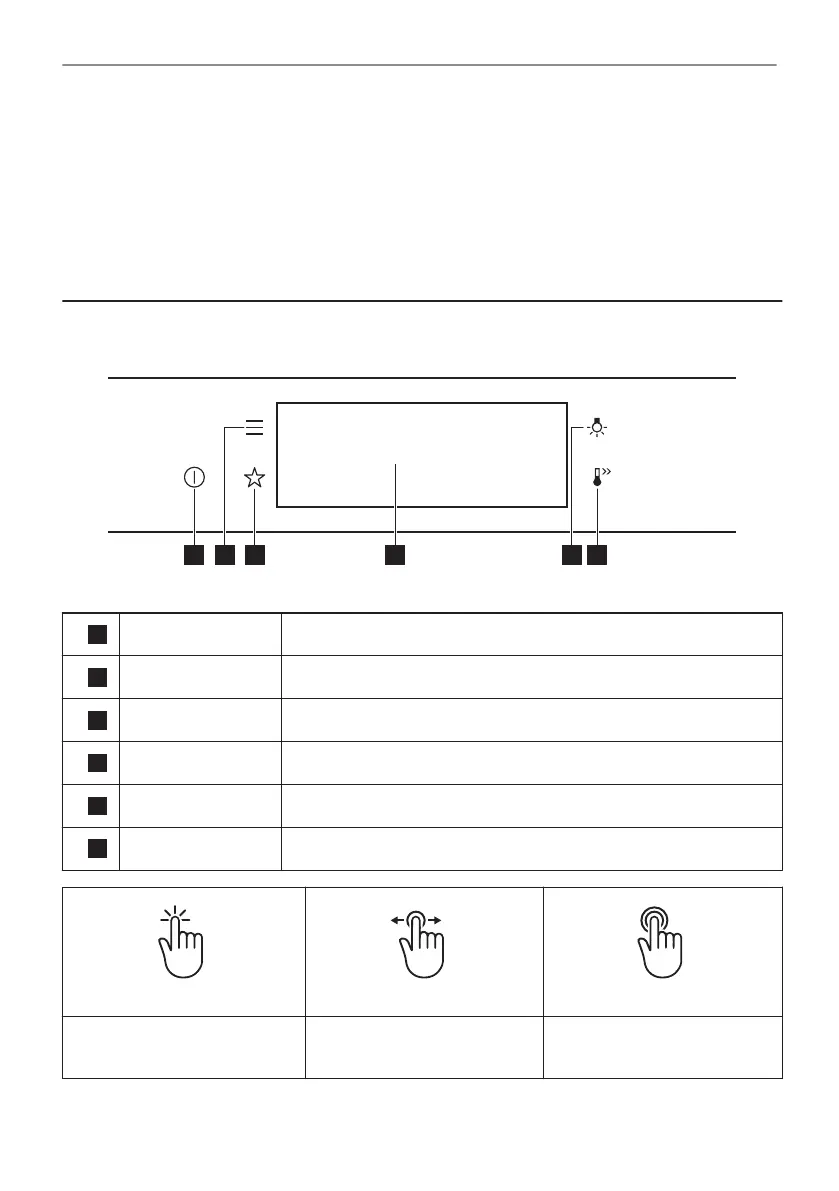
5.1 Control panel
1
ON / OFF Press and hold to turn the appliance on and off.
2
Menu Lists the appliance functions.
3
Favourites Lists the favourite settings.
4
Display Shows the current settings of the appliance.
5
Lamp switch To turn the lamp on and off.
6
Fast Heat Up To turn on and off the function: Fast Heat Up.
Press Move
Press and hold
Touch the surface with finger‐
tip.
Slide fingertip over the sur‐
face.
Touch the surface for 3 sec‐
onds.
12/48
HOW TO TURN APPLIANCE ON AND OFF





 To Next Page