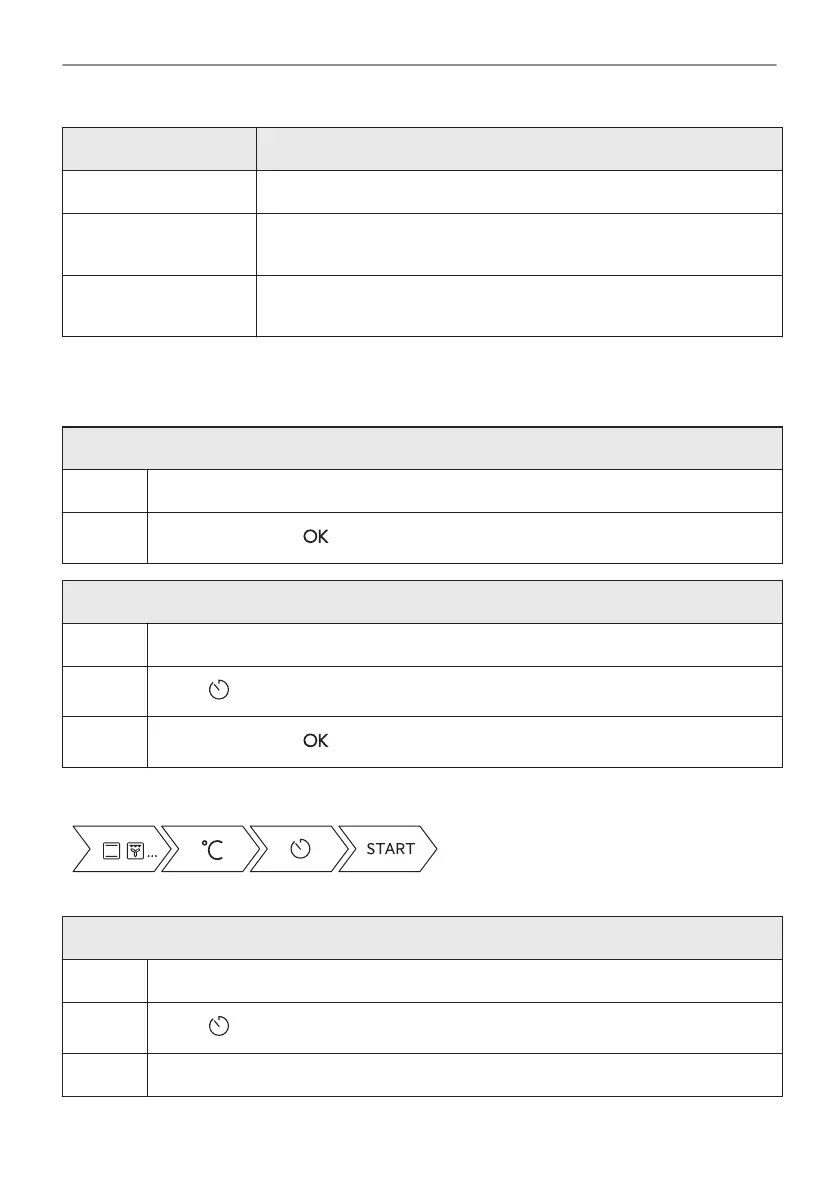
Clock function Application
Time extension To extend cooking time.
Reminder To set a countdown. Maximum is 23 h 59 min. This function has no ef‐
fect on the operation of the appliance.
Uptimer Monitors how long the function operates. Uptimer - you can turn it on
and off.
8.2 How to set: Clock functions
How to set the clock
Step 1 Press: Time of day.
Step 2
Set the time. Press: .
How to set cooking time
Step 1 Choose the heating function and set the temperature.
Step 2
Press: .
Step 3
Set the time. Press: .
Take a shortcut!
How to choose end option
Step 1 Choose the heating function and set the temperature.
Step 2
Press: .
Step 3 Set the cooking time.
20/48
CLOCK FUNCTIONS





 To Next Page