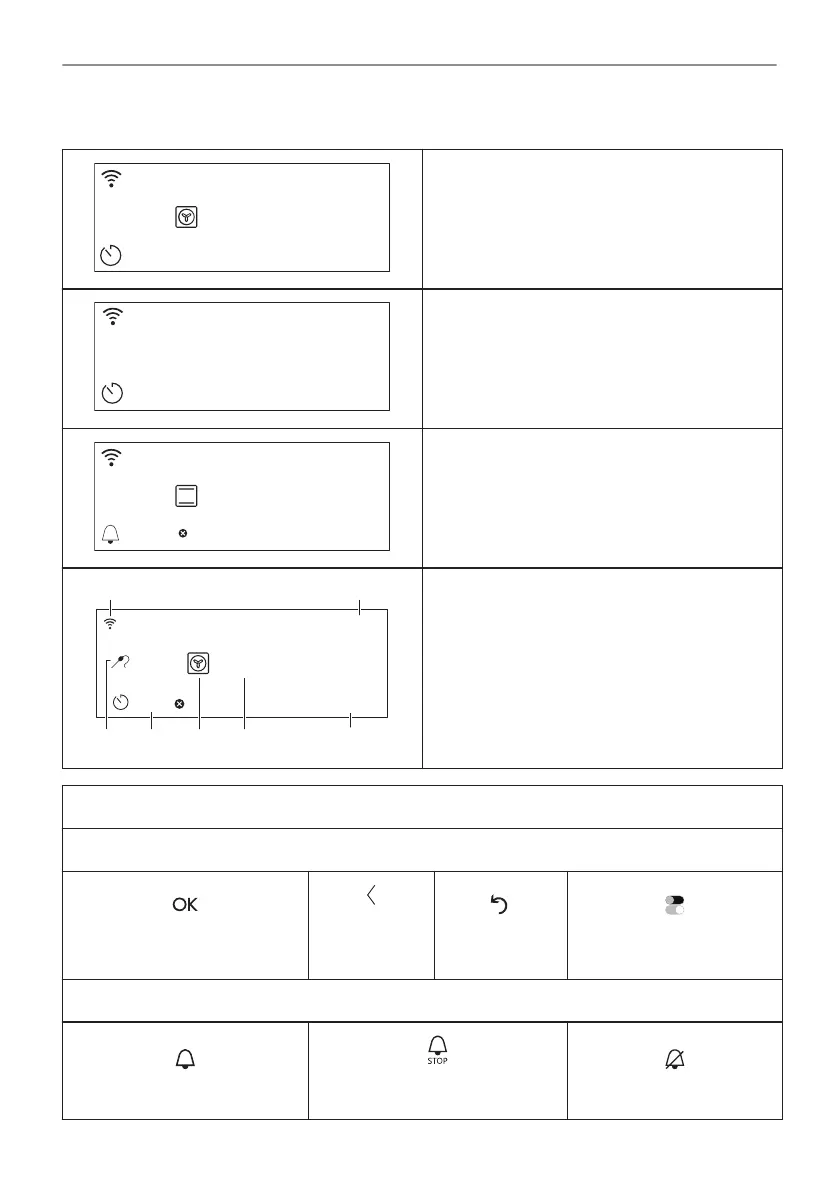
5.2 Display
STARTSTART
12:3012:30
150°C
After turning on, the display shows the main
screen with the heating function and the default
temperature.
If you do not use the appliance for 2 minutes,
the display switches to standby.
When you cook, the display shows the set
functions and other available options.
150°C
12:30
15min
START
85°C
G F DE
C
A B
Display with key functions set.
A. Wi-Fi
B. Time of day
C. START/STOP
D. Temperature
E. Heating functions
F. Timer
G. Food sensor (selected models only)
Display indicators
Basic indicators - to navigate on the display.
To confirm the selection / set‐
ting.
To go one
level back in
the menu.
To undo the
last action.
To turn the options on and
off.
Sound alarm function indicators - when the set time of cooking ends, the signal sounds.
The function is on.
The function is on.
Cooking stops automatically.
Sound alarm is off.
13/48
HOW TO TURN APPLIANCE ON AND OFF





 To Next Page