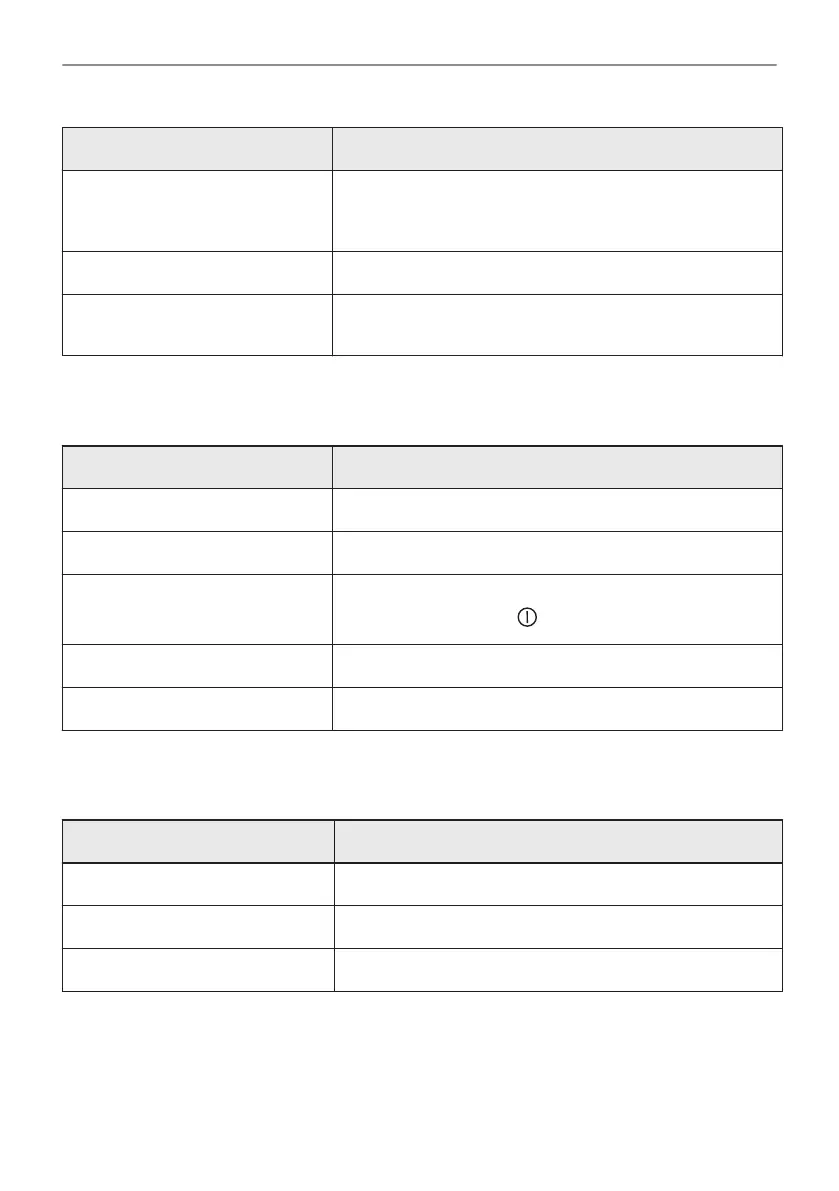
Submenu Description
Auto remote operation To start remote operation automatically after pressing
START.
Option visible only after you turn on: Wi-Fi.
Network To check network status and the signal power of: Wi-Fi.
Forget network To disable current network from auto connection with the
appliance.
15.5 Submenu for: Setup
Submenu Description
Language Sets the appliance language.
Display brightness Sets the display brightness.
Key tones Turns the tone of the touch fields on and off. It is not possi‐
ble to mute the tone for: .
Buzzer volume Sets the volume of key tones and signals.
Time of day Sets the current time and date.
15.6 Submenu for: Service
Submenu Description
Demo mode Activation / deactivation code: 2468
Software version Information about software version.
Reset all settings Restores factory settings.
41/48
MENU STRUCTURE





 To Next Page