Q&CI - Technical Support 14 599 83 20-19 Rev. 02
9 SERVICE MODE
9.1 Enter and exit service mode
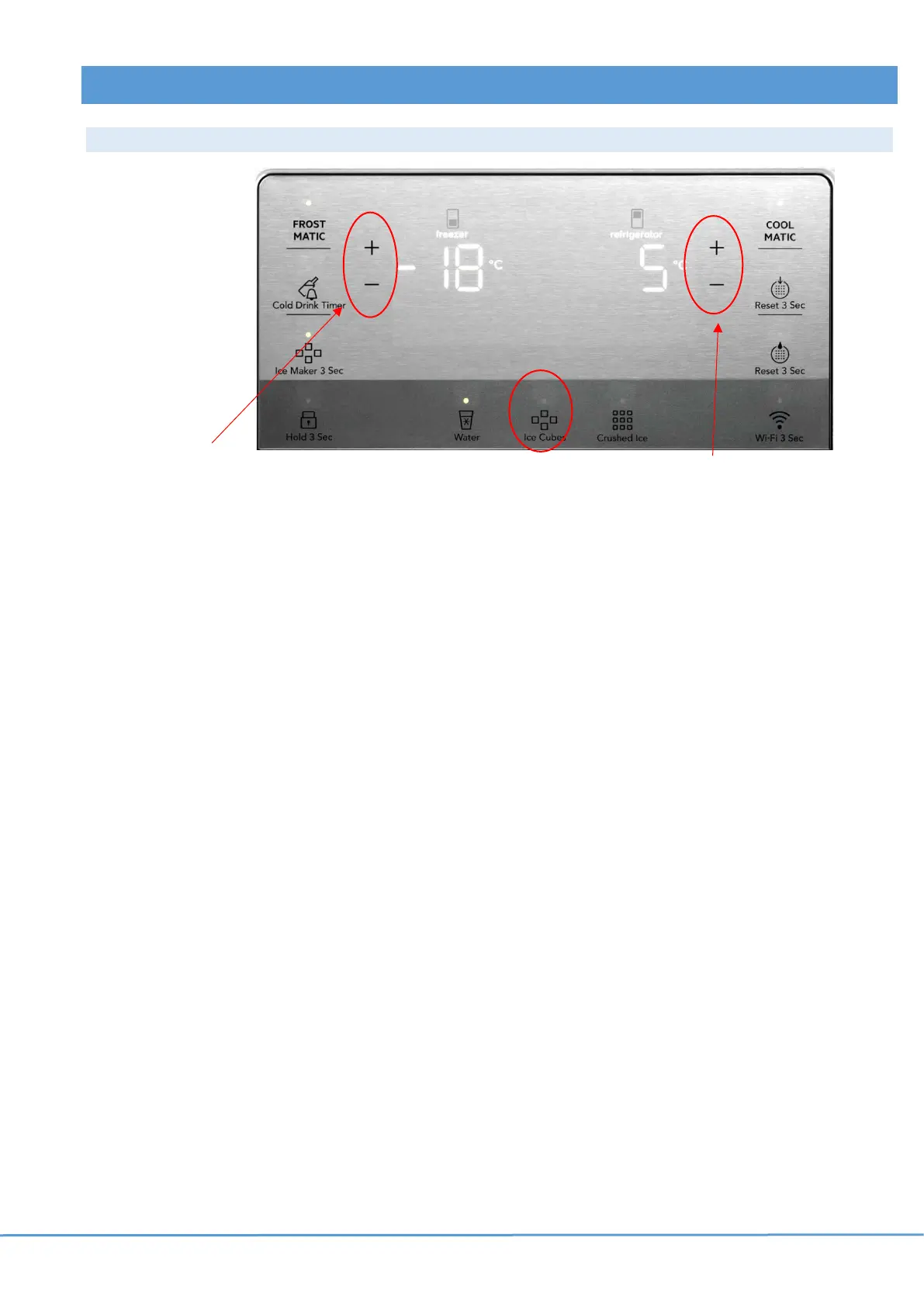
Activate/deactivate service mode Change status Progress through the different functions
Activate service mode:
Press and hold
+ (freezer) and
– (freezer) for 10 seconds.
All LEDs of the UI illuminates and a beep confirms that service mode is
activated.
Press + (refrigerator) icon to progress through the different functions.
Press – (refrigerator) icon to go back to the previous function.
Press “Ice cubes” icon to change the status of the function.
• Each function is associated with a number indicated on the freezer
display.
• Function status is indicated with intermittent time duration on the fridge
display.
• See List of functions in service mode table below for details
Extra information: Freezer display: Numbered item.
Refrigerator display: Status of the item, status/value of the extra information,
numbered item, status/value of the extra information.
Exit service mode:
Press and hold freezer + and – icons for 10 seconds.



 To Next Page