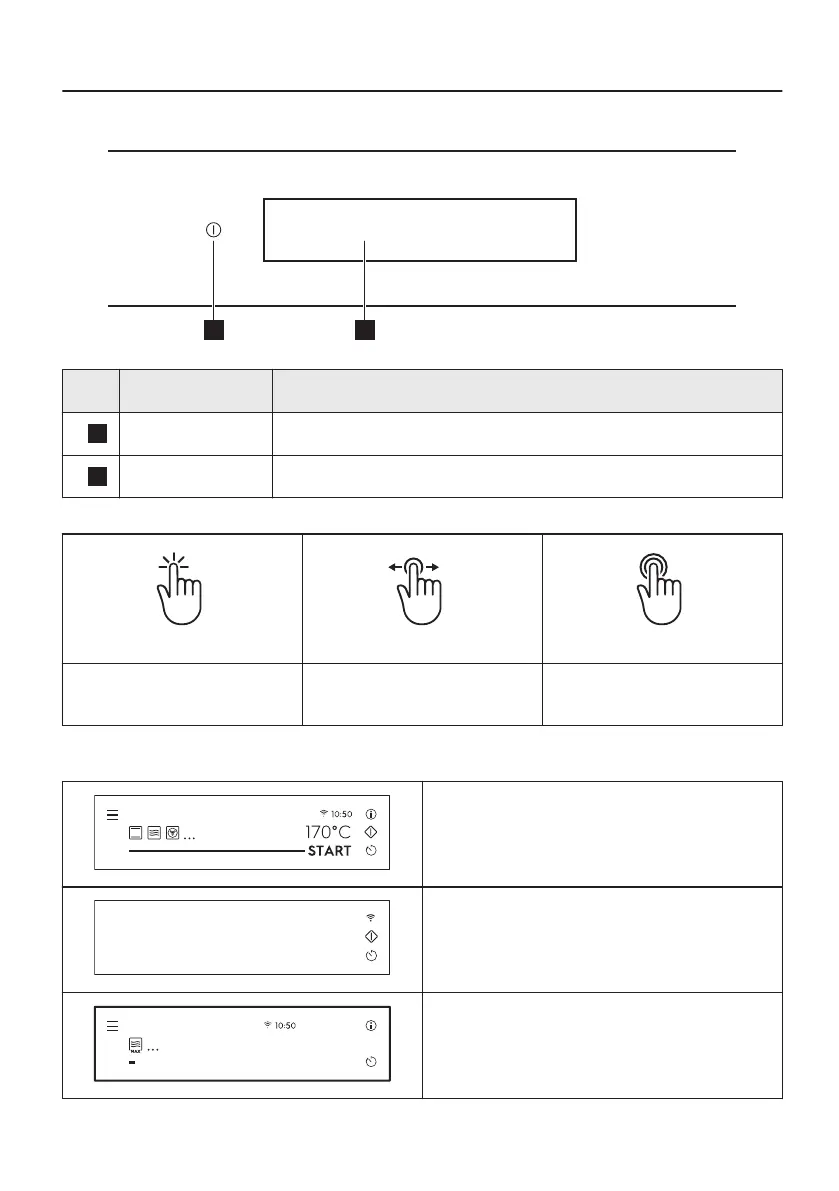
4. HOW TO TURN OVEN ON AND OFF
4.1 Control panel
Function Comment
1
On / Off Press and hold to turn the oven on and off.
2
Display Shows the current settings of the oven.
Gestures
Press Move
Press and hold
Touch the surface with finger‐
tip.
Slide fingertip over the surface
without losing contact.
Touch the surface for 3 sec‐
onds.
4.2 Display
After turning on, the display shows main screen
with heating functions and default temperature.
If you do not use the oven for 2 minutes, the
display goes to standby.
STOP
29sec
1000 W
+5 sec
+10 sec
+30 sec
Microwave
When you cook, the display shows the set
functions and other available options.
12/48







 To Next Page