CD/DVD OPERATION
MP3/JPEG PLAYBACK
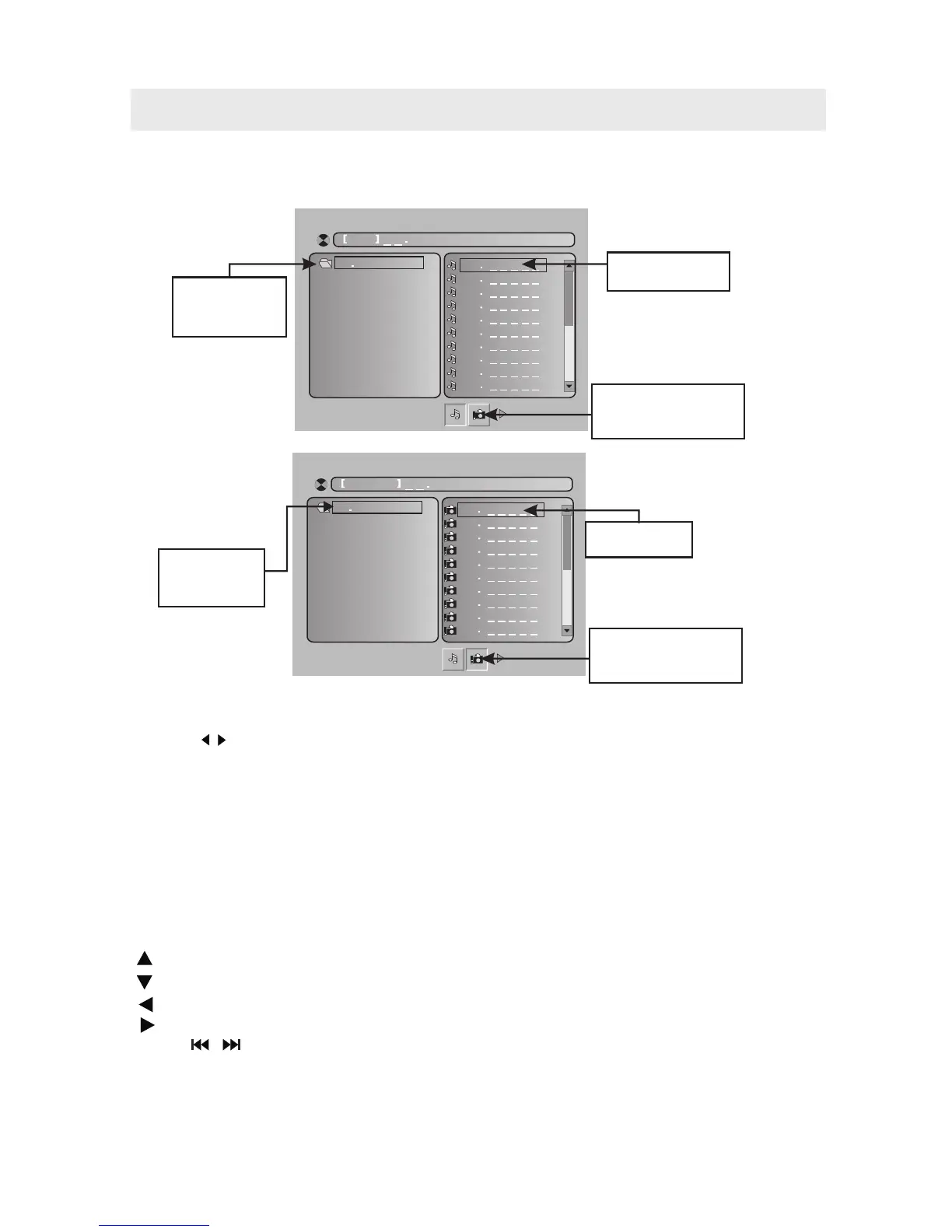
Then will firstly display the MP3 contents automatically and start to play the first file (highlighted file).
Screen as follow:
After loading the MP3 / JPEG disc, it wil start to scan for the stored MP3 /JPEG folders.
01
10
09
08
07
06
05
04
03
02
M P3 M P3
0 1 MP 3
Display current
MP3 playback
function
Highlight file for
current playback.
Buttons for switching
between MP3 and JPEG
playback function.
Using the navigation buttons to check you folder and playback or move to the file.
NOTE:
Press the , buttons to move the highlight to folders, documents or mode selection.
Press the numeric buttons to select the contents directly. For number over 10, press the 0 button first.
(e.g. File number 15, press 0 then 5.)
When playback MP3 files, there is no picture display, only audio output.
Playing the JPEG discs, press the PROGRAM button to select slide effects. There are 17 slide modes,
press the PROGRAM button to toggle among different modes in sequence.
(Wipe top, Wipe bottom, Wipe left, Wipe right, Diaginal wipe left top, Diaginal wipe right top, Diaginal
wipe left bottom, Diaginal wipe right bottom, Extend from center H, Extend from center V, Compress to
center H, Compress to center V, Window H, Window V, Wipe from else to center Random, None )
When play or pause with picture playback, you may use the navigation buttons to flip / rotate the picture.
button to flip horizontally.
button to flip vertically.
button to rotate left 90˚.
button to rotate right 90˚.
Press the / buttons to select next / previous page or press numeric buttons to
view the corresponding pictures.
The maximum JPEG image size that can be displayed is 1280 x 1024.
•
•
•
•
•
•
•
•
•
•
01
10
09
08
07
06
05
04
03
02
P IC T U R E
J PG
0 1 PI C T U R E
Display current
Picture playback
function
Scroll bar to view
next page.
Buttons for switching
between MP3 and JPEG
playback function.
26



 To Next Page