Using the remote control – Learning about remote control
11
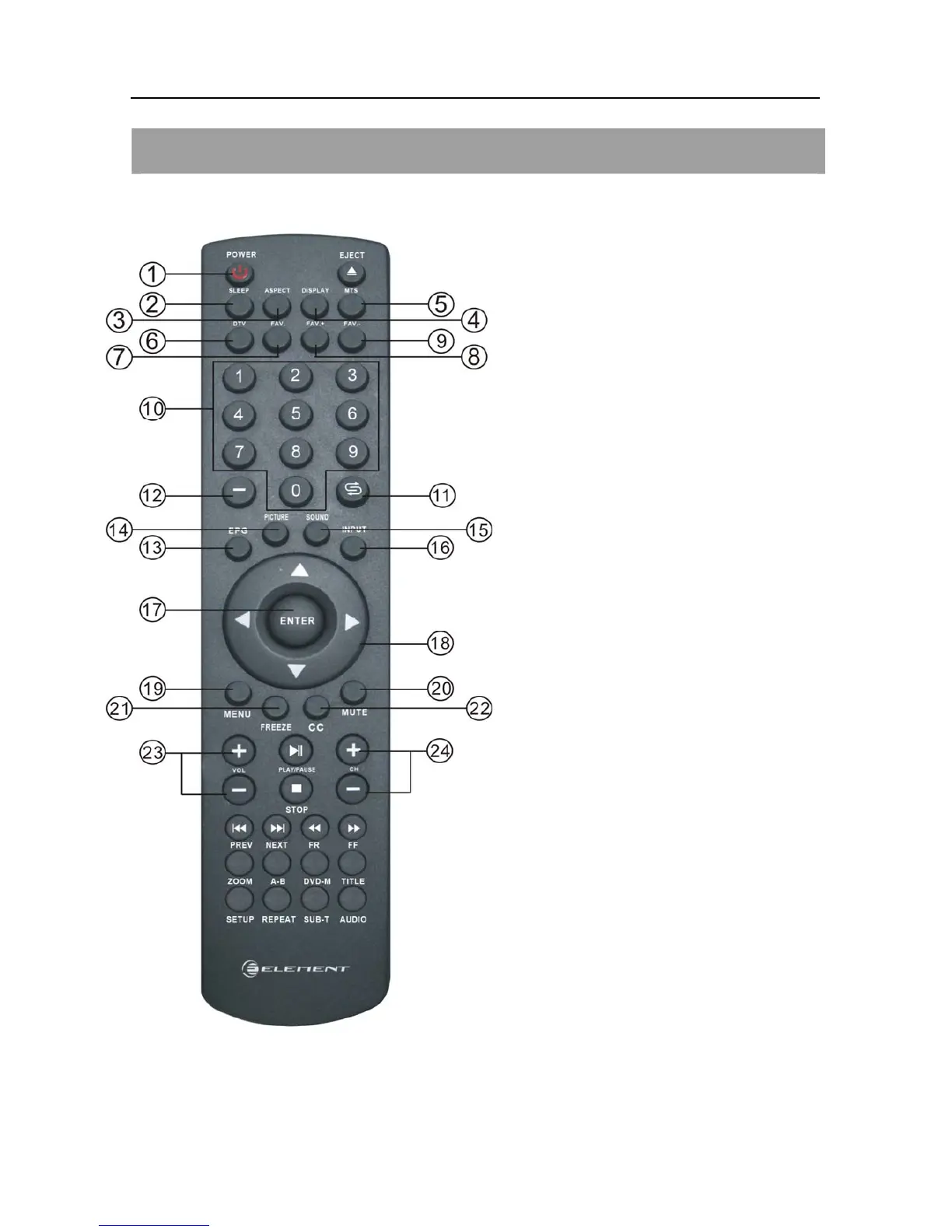
LEARNING ABOUT REMOTE CONTROL
1. POWER: Power on/off.
2. SLEEP: Press to select a preset time interval to
automatically shut the TV.
3. ASPECT: Press to adjust the screen size.
4. DISPLAY: Press to Check your current mode.
5. MTS: Press to select your favorite language in
digital broadcasting.
6. DTV: Press to change between Analog TV and
Digital TV.
7. FAV: Add/delete the current channel to your
favorite channel.
8. FAV.+: Press to view the next favorite channel.
9. FAV-: Press to view the previous favorite
channel.
10. Numberic Buttons: Press to change the
channel directly using the numberic buttons.
11. RECALL: Press to switch between the current
channel and the last channel.
12. -: When selecting a digital broadcast channel,
press the number, followed by “-” button,
followed by sub channel number.
13. EPG: One of signal channel EPG or Multi
channel EPG.
14. PICTURE: Press to change to a preset picture
mode.
15. SOUND: Press to change to a preset sound
mode.
16. INPUT: Press to Display a menu of all available
input sources, Also used to confirm your choice
in the on-screen menu.
17. ENTER: Enter and confirm button.
18. UP/DOWN
LEFT/RIGHT: The direction keys.
19. MENU: Press to display main menu.
20. MUTE: Press to temporarily switch the sound
off.
21. FREEZE: Press to freeze the current picture.
22. CC: Press to select Caption.
23. VOL+/-: Volume control buttons.
24. CH+/-: Channel control buttons.


 To Next Page