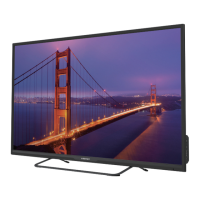
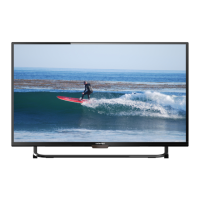
This document describes the Element E4SFT5017 Digital LED TV, a television designed for home entertainment with various connectivity and customization options.
Function Description:
The Element E4SFT5017 is a Digital LED TV that serves as a central hub for viewing broadcast television, streaming online content, and connecting external media devices. It offers a user-friendly interface for initial setup, channel selection, volume adjustment, and extensive customization of picture, audio, and network settings. The TV supports various input sources, including HDMI, AV/Component, VGA, and USB, allowing for versatile connectivity with Blu-ray players, gaming consoles, computers, and other devices. It also features built-in streaming capabilities for popular apps like Netflix, YouTube, VUDU, Pandora, and AccuWeather, providing access to a wide range of online entertainment. Parental control features are included to manage content access for different age groups.
Important Technical Specifications:
- Model: E4SFT5017
- Display Type: Digital LED TV
- Input Voltage: Matches the label at the rear of the product.
- Power Consumption: Not explicitly stated, but implies standard operation.
- Connectivity:
- HDMI Input (multiple ports, HDMI 1, HDMI 2, HDMI 3)
- AV/Component Input (shared ports for L/R Audio, Video/Y, Pb, Pr)
- VGA Input (PC IN) with PC Audio Input (PC AUDIO/AUDIO IN)
- Antenna Input (RF (75Ω) VHF/UHF)
- Optical Output (OPTICAL)
- USB Input (5V=500mA)
- Headphone Output
- Network Connectivity: Wired and Wireless (Wi-Fi)
- Audio Output: Digital Audio Output (PCM/RAW)
- Supported Resolutions/Modes: HD Video (1080p, 1080i, 480i) for HDMI and Component inputs. VGA mode with adjustable H-POS, V-POS, Clock, Phase, or Auto settings.
- Operating Temperatures: 32° to 95°F (0° to 35°C)
- Storage Temperatures: 32° to 122°F (0° to 50°C)
- Safety Certifications: Class II or double insulated electrical appliance, FCC compliant (Part 15).
- HDMI Technology: Utilizes HDMI High-Definition Multimedia Interface.
Usage Features:
- Remote Control: A comprehensive remote control is provided with dedicated buttons for power, mute, number input (0-9), previous channel, APP access (Netflix, YouTube, VUDU, Pandora), menu, source selection, navigation (arrows, OK), return, exit, aspect ratio, volume, channel up/down, TV mode, playback controls (play/pause, reverse, advance, skip to beginning/end, stop), freeze, add/erase favorite channels, favorite channel list, info, MTS (audio channels), closed caption, V-CHIP (parental control setup), picture mode, sound mode, and channel list.
- Initial Setup Wizard: Guides the user through language selection, data collection/firmware updates consent, time zone setting, connection device setup, and channel scanning (Antenna or Cable).
- Source Selection: Easy switching between TV, AV, Component, HDMI (1, 2, 3), VGA, and USB inputs via the SOURCE button on the remote or main unit.
- Channel Management: Supports scanning for Air and Cable channels, setting favorite channels, showing/hiding channels, and displaying channel numbers and labels.
- Volume Control: Adjustable via VOL+/- buttons; mute function available.
- Streaming Services: Direct access to Netflix, YouTube, VUDU, Pandora, and AccuWeather apps. The TV collects limited, non-personally identifiable information when connected to the internet for business and product analysis, and for automatic firmware/software updates.
- Media Playback (USB): Allows viewing photos, listening to music, and watching videos from an inserted USB drive. The interface provides navigation and playback controls for media files.
- TV Settings Customization:
- General Settings: Menu language (English, Français, Español), transparency (On/Off), zoom mode (Wide, Wide Zoom, Zoom, Standard, Just Scan, Dot by Dot), VGA settings (H-POS, V-POS, Clock, Phase, Auto), closed caption (On/Off, CC on Mute, CC1-CC4, TEXT1-TEXT4, Service1-Service6 with font style, size, edge style, edge color, FG color, BG color, FG opacity, BG opacity), INLINK (LINLINK Control, Device Power Off, TV Auto Power On, Audio Receiver, LINLINK Device List, Root Menu), Accessibility TTS (Voice Guide, Verbosity, Rate Support, Pitch Support, Voice, Video Description, VD Volume), DLC (On/Off), restore default, software update (USB/Network), end-user license agreement, and software information.
- Picture Settings: Picture mode (Dynamic, Standard, Movie, User), brightness, contrast, color, sharpness, tint, color temperature (Normal, Warm, Cool), and advanced options (noise reduction, white balance adjustments like Red Gain/Green Gain/Blue Gain/Red Offset/Green Offset/Blue Offset, backlight).
- Audio Settings: Sound mode (Standard, Music, Movie, User), bass, treble, balance, digital audio output (PCM/RAW), surround sound (On/Off), auto volume (On/Off), and audio language (English, French, Spanish).
- Network Settings: Wireless network type selection, display of current network, and IP address information.
- Time Settings: Sleep timer (Off, 5-240 min), OSD timer (Off, 15s-240s), time zone selection (Pacific, Alaska, Hawaii, Newfoundland, Atlantic, Eastern, Central, Mountain), and daylight saving time (On/Off).
- Lock Settings (Parental Control): Allows setting a 4-digit password (default "0000") to enable system lock. Provides options for USA (MPAA ratings: N/A, G, PG, PG-13, R, NC-17, X) and Canada (English: E, C, C8+, G, PG, 14+, 18+; French: E, G, 8 ans+, 13 ans+, 16 ans+, 18 ans+) parental ratings. Includes RRT (Rating Region Table) settings, reset RRT, and clear lock. The V-Chip automatically blocks more restrictive categories if a broader category is blocked.
- APP Settings: Deactivate Netflix and VUDU apps, view Electronic Serial Number (ESN), and show Netflix version.
- Wall Mounting: Instructions advise consulting a professional installer due to the TV's weight. Simple precautions are listed to prevent tip-over injuries when placing the TV on furniture.
Maintenance Features:
- Regular Cleaning: Advised to turn off and unplug the TV before cleaning.
- Screen Cleaning: Use a soft, dry cloth dampened with lukewarm water and a little fabric softener or dishwashing detergent. Wring the cloth until it's almost dry, then wipe the screen. Ensure no excess water is on the screen and allow it to air-dry before turning on the TV.
- Cabinet Cleaning: Wipe with a soft, dry, line-free cloth. Avoid wet cloths.
- Environmental Considerations: Avoid extreme temperatures (hot or cold), direct sunlight, or heat sources. Maintain at least 5cm (2") clearance around the TV for ventilation. Do not impede ventilation openings. Do not place naked flame sources (e.g., candles) on the apparatus. Attention should be drawn to environmental aspects of battery disposal.
- Troubleshooting Guide: Provides a table of common symptoms, possible causes, and remedies for issues like no power, no screen, poor picture/sound, remote control malfunction, and lost password. For persistent issues, contact technical support.


 To Next Page
 General