11
Channel Selection
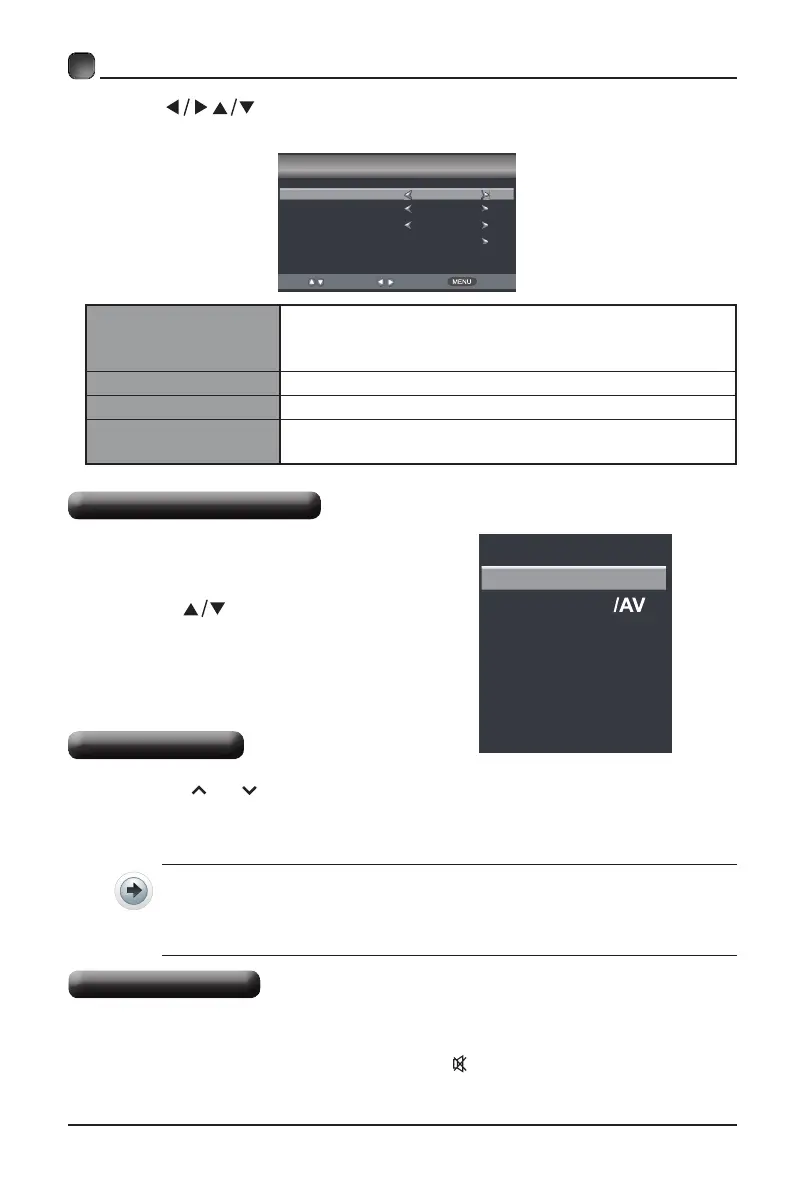
Selecting The Input Source
• Press the SOURCE button on the
main unit or on the remote control to
display the Input Source list.
• Press the
buttons to select
your desired input source among:
TV/Component&AV/HDMI1/HDMI2/
HDMI3/VGA/USB and then press OK
buttontoconrm.
• Press the CH
/CH buttons on the main unit or on the remote control repeatedly
to select the channel.
• Press the 0-9 buttons on the remote control to select the channel directly.
Press "4", and then press OK button to select channel 4.
Press "4" and "5", and then press OK button to select channel 45.
Press "1", "2" and "3", and then press OK button to select channel 123.
OPERATING YOUR TV
• Press the VOL+/- buttons on the main unit or on the remote control to adjust the
volume.
• If you wish to switch the sound off, press the MUTE button again or the VOL+
button to resume the sound.
Volume Adjustment
Menu Language
Select your desired language to be displayed on the
menu. The default on-screen menu language is set
as English.
Air/Cable Select antenna between Air and Cable.
Cable System Select Cable system: Auto, STD, IRC, HRC.
Auto Scan
Search and store the available
channels automatically.
Setup Wizard
Menu Language
Air/Cable
Cable System
Auto Scan
English
Cable
AUTO
Select
Move
Exit
• Press the buttons to select your desired mode and press OK button to
conrm.
INPUT SOURCE
TV
HDMI1
HDMI2
VGA
USB
Component
HDMI3



 To Next Page