16
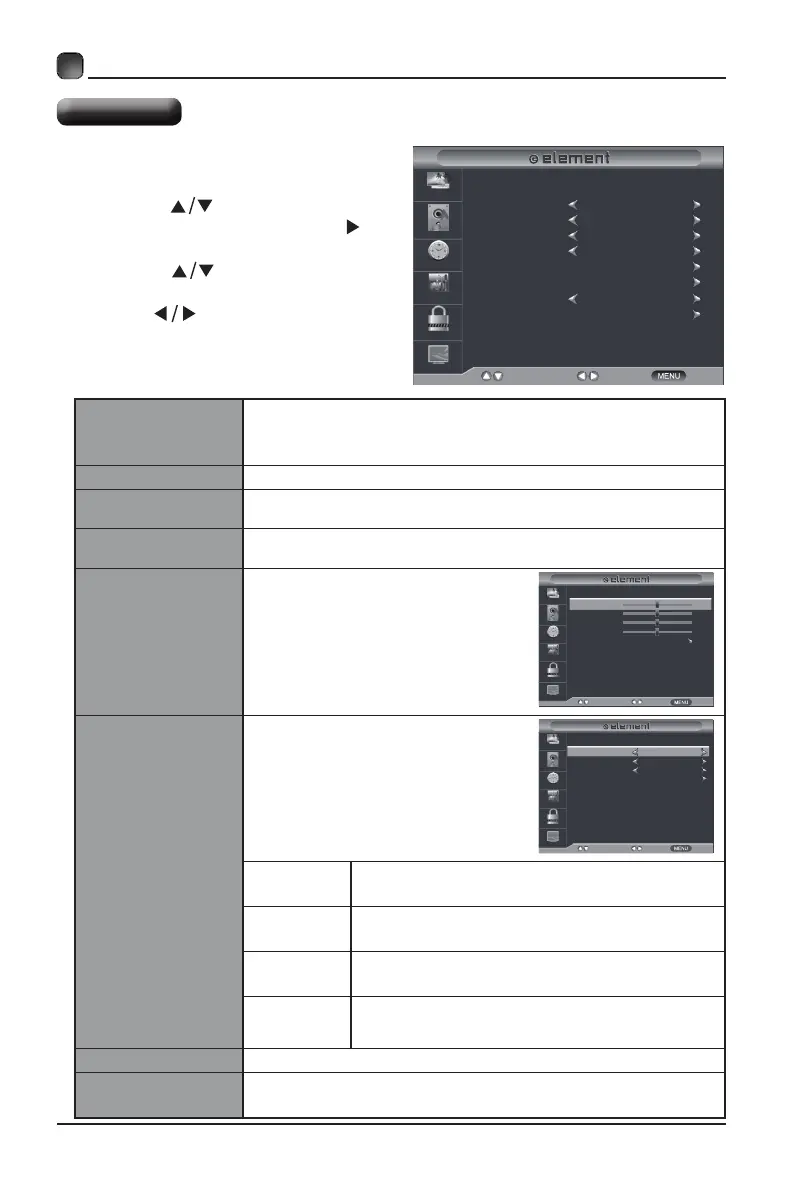
• Press the MENU button on the main
unit or on the remote control then
press the
buttons to select
SETUP menu and then press the or
the OK button to enter.
• Press the buttons to select
the following setup options and then
press the
buttons to adjust each
option’s setting.
CUSTOMIZING TV SETTINGS
Setup Menu
Menu Language
Select menu language among: English, Français or
Español. The default on-screen menu language is
English.
Transparency Select to turn On/Off transparency function.
Zoom Mode
Select zoom mode among: Normal/Wide/Zoom/Cinema/
Just Scan(
only for HDMI Source
).
Noise Reduction
Reduce the noise level of the connected device: Off/
Weak/Middle/Strong.
Advanced
Adjust the PC desktop content.
(VGAsourcemodeonly)
Closed Caption
Allows you to turn closed
captioning of audio on or off,
select analog or digital modes, or
personalize the captioning style.
CC Mode
Select CC mode among: On, Off or CC on
Mute.
Basic
Selection
Select analog mode among: CC1, CC2,
CC3, CC4, Text1, Text2, Text3, Text4.
Advanced
Selection
Select digital mode among: Service1~6.
Option
Personalize the captioning style,such as
the size and color of the digital caption.
DLC Select to turn On/Off the dynamic luminance control.
Restore Default
Restore the TV to factory default settings.(Except the lock
settings)
Menu Language
Transparency
Zoom Mode
Noise Reduction
SelectMove Exit
Picture
Audio
Time
Setup
Lock
Channel
Advanced
Closed Caption
DLC
On
English
Off
Wide
Middle
Restore Default
H-POS
V-POS
Clock
Phase
AdjustMove Return
Picture
Audio
Time
Setup
Lock
Channel
Auto
50
50
50
50
CC Mode
Basic Selection
Advanced Selection
Option
SelectMove Return
Picture
Audio
Time
Setup
Lock
Channel
CC1
Off
Service1



 To Next Page