EasyManua.ls Logo

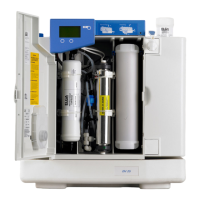
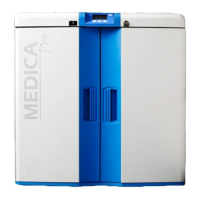
ELGA MEDICA Pro EDI - User Manual

ELGA MEDICA Pro EDI
37 pages
Print Icon
To Next Page IconTo Next Page
Loading...
MEDICA Pro EDI
Operator Manual

Other manuals for ELGA MEDICA Pro EDI

Questions and Answers

  • J
    john82Aug 18, 2025
    How to fix leak detection in ELGA MEDICA Pro EDI?
    • J
      James HallAug 18, 2025
      To address leak detection issues: first, you can silence the alarm by pressing mute. Then, remove the power, rectify the leak, and dry the sensors. Ensure to dry the contacts and power on to reset the equipment.
  • K
    kimberlywolfAug 20, 2025
    What to do if water purity alarm triggers in ELGA MEDICA Pro EDI?
    • M
      Mrs. Natasha WilliamsAug 21, 2025
      If a water purity alarm occurs, you can start by pressing mute to silence the alarm. Then, confirm that the displayed purity is suitable for your application. If the water purity is insufficient, change the LC207.
  • Z
    zwaltersAug 23, 2025
    How to resolve break tank low alarm in ELGA MEDICA Pro EDI?
    • V
      Victoria BryantAug 23, 2025
      If the break tank low alarm is triggered, first, press mute to silence the alarm. Next, confirm the pressure and flow of the potable supply. If the problem persists, you may need to contact your local service provider.
  • D
    darrylsheppardAug 26, 2025
    What to do if Protek L2 is incorrectly installed in ELGA MEDICA Pro EDI?
    • L
      Leslie GreenAug 26, 2025
      If the Protek L2 is incorrectly installed: press mute to silence the alarm. Confirm that the Protek is correctly installed and power off/on to reset.
  • K
    Kathy GarciaAug 27, 2025
    What to do if water temperature alarm triggers in ELGA Laboratory Equipment?
    • J
      Joseph TaylorAug 28, 2025
      If a water temperature alarm occurs: press mute to silence the alarm. Confirm that the temperature is suitable for the application and adjust the alarm setpoint or direct water to drain to introduce cool water.
  • T
    Terri JuarezAug 30, 2025
    How to fix reservoir level controls issue in ELGA MEDICA Pro EDI?
    • D
      David HeathAug 30, 2025
      To address reservoir level control issues: press mute to silence the alarm and remove the power. You may need to contact Technical Support for further assistance.
  • D
    Daniel PageSep 1, 2025
    How to fix high loop pressure in ELGA MEDICA Pro EDI Laboratory Equipment?
    • J
      Joseph BellSep 1, 2025
      To resolve high loop pressure: press mute to silence the alarm, and remove the power. You may need to contact Technical Support for further assistance.
  • B
    brittneyphillipsSep 3, 2025
    What to do if permeate purity alarm triggers in ELGA MEDICA Pro EDI Laboratory Equipment?
    • M
      Megan GarnerSep 3, 2025
      In case of a permeate purity alarm, press mute to silence the alarm. Confirm that the displayed purity is suitable for your application. Adjust the alarm setpoint or contact your local service provider for assistance.
  • B
    Barry ForbesSep 6, 2025
    What to do if permeate temperature alarm triggers in ELGA MEDICA Pro EDI?
    • J
      Jessica RobertsSep 6, 2025
      If a permeate temperature alarm occurs, press mute to silence the alarm. Confirm that the temperature is suitable for your application. Adjust the alarm setpoint or confirm the potable supply temperature is suitable.
  • C
    Chad JonesSep 8, 2025
    What to do if UV lamp fails in ELGA MEDICA Pro EDI Laboratory Equipment?
    • M
      Mark GarciaSep 8, 2025
      If the UV lamp fails, press mute to silence the alarm. Change the lamp at the next available opportunity.

Summary

INTRODUCTION

Use of this Manual

Guide on how to use the manual for installation, commissioning, and basic operation.

Customer Support

Information on obtaining service support and consumable items from local suppliers.

HEALTH AND SAFETY NOTES

Important warnings and cautions for safe operation and to prevent injury or equipment damage.

Electricity

Essential information about electrical supply isolation and earthing for safe maintenance.

Pressure

Instructions for isolating water supply and releasing residual pressure before maintenance.

Hydrogen

Safety note regarding hydrogen gas in the drain line, requiring a ventilated area.

Sanitization Chemicals

Information on using CT3 tablets for sanitization and the importance of safety data sheets.

Control of Substances Hazardous to Health (COSHH)

Details on obtaining material safety data sheets for replaceable components.

Consumables

Table listing consumables with their typical service life and maximum shelf life.

INSTALLATION AND COMMISSIONING

Installation

Guidance on unit installation, recommending a trained ELGA representative.

Commissioning

Explanation of the commissioning mode and recommending trained personnel for completion.

CONTROLS

User Recognition Keys

Details on Master, User, and Sanitization keys, their functions, and security.

System Preferences

Steps for setting up system preferences like clock, date, and alarms.

Setting Consumable Replacement Reminders

Procedure for setting reminders for replacing consumables like cartridges and filters.

OPERATION

Night service;Operational day (screen 030)

Programming the unit for specific operating days and times to optimize efficiency.

Continuous Recirculation (24;7) (screen 029)

Setting the unit for continuous recirculation, recommended for high water demand.

MAINTENANCE

Replacing Composite Vent Filter (L136)

Step-by-step guide for replacing the Composite Vent Filter (CVF).

Replacing Purification Cartridge LC207 or Conditioning Cartridge LC206.

Instructions for replacing purification and conditioning cartridges.

Replacing Ultra-Microfilter (LC109)

Procedure for replacing the Ultra-Microfilter (UMF).

Replacing UV lamp (LC105)

Detailed steps for replacing the UV lamp, including safety precautions.

Replacing Protek L2 (LC177) or Carbon Filter (LC123) Pre-treatment.

Guide for replacing pre-treatment cartridges like Protek L2 and Carbon Filter.

Replacing E- Cartridge (LC181)

Instructions on when and how to replace the E-Cartridge.

RO modules

Information on when to replace reverse osmosis modules and who to contact.

SANITIZATION

RO sanitization (Step 1)

Procedure for performing RO sanitization using CT3 tablets.

Sanitization chemical safety data

Safety information and first aid for CT3 sanitization tablets.

EMERGENCY BYPASS

Emergency bypass

Steps to put the unit into emergency bypass mode and safety considerations.

Calculation for DI Cartridge (LC207) Cartridge life

Method to calculate the lifespan of the DI cartridge during emergency bypass.

TROUBLE SHOOTING

Alarm Summary

Summary of common alarms, their icons, and recommended actions for troubleshooting.

TECHNICAL SPECIFICATION

Feedwater Specifications

Detailed specifications for feedwater quality and required pretreatment.

Unit Specifications and Features

Technical data including dimensions, connections, electrical requirements, safety features, and product water specs.

WARRANTY;CONDITIONS OF SALE

General Limited Warranty

Details of the general limited warranty for products against defects in materials and workmanship.

VWS (UK) Ltd. Warranty

Specific warranty terms for water systems, excluding membranes and purification packs.

USEFUL CONTACT DETAILS

ELGA LabWater -Global Operations Centre

Contact information for ELGA LabWater's Global Operations Centre, including address and phone numbers.

ELGA MEDICA Pro EDI Specifications

General IconGeneral
BrandELGA
ModelMEDICA Pro EDI
CategoryLaboratory Equipment
LanguageEnglish

Related product manuals