EasyManua.ls Logo

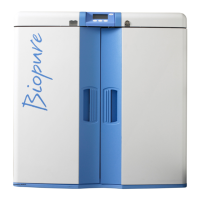
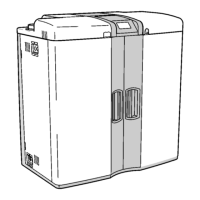
ELGA CENTRA-R 120 US - User Manual

Default Icon
47 pages
Print Icon
To Next Page IconTo Next Page
Loading...
CENTRA-R 60/120 -US
Operator Manual

Questions and Answers

  • A
    awilsonAug 19, 2025
    What to do if there is a leak detection in ELGA CENTRA-R 120 US?
    • M
      Monica RangelAug 19, 2025
      If the ELGA Laboratory Equipment detects a leak, first, press the mute button to silence the alarm. Then, isolate the power, rectify the leak, and dry the sensors. Ensure you also dry the contacts. Finally, power the system back on to reset it.
  • P
    Paige HensleyAug 21, 2025
    What to do if I get a water purity alarm on my ELGA CENTRA-R 120 US?
    • M
      Michael ReidAug 21, 2025
      If you encounter a water purity alarm with your ELGA Laboratory Equipment, start by pressing the mute button to silence the alarm. Then, confirm that the displayed purity level is suitable for your specific application. If the water purity is insufficient, replace the Labpure L1.
  • J
    Jennifer WilsonAug 23, 2025
    What should I do if the permeate temperature alarm goes off on my ELGA CENTRA-R 120 US Laboratory Equipment?
    • J
      Jessica JordanAug 23, 2025
      If your ELGA Laboratory Equipment's permeate temperature alarm is triggered, first press mute to silence the alarm. Next, confirm that the temperature is suitable for your application. You may also need to adjust the alarm setpoint or ensure that the potable supply temperature is appropriate.
  • J
    Jennifer GonzalezAug 26, 2025
    What should I do if the break tank is low in my ELGA Laboratory Equipment?
    • A
      Amber SimmonsAug 26, 2025
      If your ELGA Laboratory Equipment is showing a 'Break Tank Low' issue, first, press the mute button to silence the alarm. Next, confirm the pressure and flow of the potable supply. If the problem continues, it is recommended to contact your local service provider.
  • S
    Stephen ThomasAug 28, 2025
    What causes permeate over temperature in ELGA Laboratory Equipment?
    • J
      jacob15Aug 28, 2025
      If your ELGA Laboratory Equipment displays a permeate over temperature warning, and the potable feed temperature is unacceptably high (over 50°C), first, press the mute button to silence the alarm. Then, locate the source of the high temperature and rectify it.
  • K
    Kim BrownAug 30, 2025
    How to resolve high loop pressure in ELGA CENTRA-R 120 US?
    • J
      Jesus GilmoreAug 30, 2025
      If you are experiencing high loop pressure with your ELGA Laboratory Equipment, first, press the mute button to silence the alarm and isolate the power. If the issue persists, contact Technical Support.
  • V
    Valerie MendozaSep 1, 2025
    What to do if the UF / MF is incorrectly installed in ELGA CENTRA-R 120 US?
    • C
      Chad WolfeSep 2, 2025
      If the UF / MF is incorrectly installed in your ELGA Laboratory Equipment, first, press the mute button to silence the alarm. Then, confirm that the UF / MF is correctly installed. Finally, power the system off and on to reset it.
  • S
    samantha17Sep 4, 2025
    What to do if Labpure L1 is incorrectly installed in ELGA Laboratory Equipment?
    • M
      matthew48Sep 4, 2025
      If the Labpure L1 is incorrectly installed in your ELGA Laboratory Equipment, first, press the mute button to silence the alarm. Then, confirm that the Labpure L1 is correctly installed. Finally, power the system off and on to reset it.
  • T
    timothy32Sep 6, 2025
    What to do if Protek is incorrectly installed in ELGA CENTRA-R 120 US?
    • D
      David WhiteSep 6, 2025
      If the Protek is incorrectly installed in your ELGA Laboratory Equipment, first, press the mute button to silence the alarm. Then, confirm that the Protek L1 / L2 is correctly installed. Finally, power the system off and on to reset it.
  • N
    Nancy RileySep 8, 2025
    How do I fix a water temperature alarm on my ELGA CENTRA-R 120 US Laboratory Equipment?
    • C
      Cody CastilloSep 8, 2025
      If you're getting a water temperature alarm on your ELGA Laboratory Equipment, start by pressing the mute button to silence the alarm. Then, confirm that the temperature is suitable for your application. You can also adjust the alarm setpoint or direct water to drain to introduce cool water.

Summary

1. Introduction

Health and Safety Notes

Important warnings and cautions for safe operation and maintenance.

Electricity and Pressure Safety

Safety precautions for electrical supply and pressure release.

System Preferences - Clock and Date Setup

System Preferences - Alarm and Unit Settings

System Preferences - Water Quality Alarms

System Preferences - Temperature and Cartridge Alarms

System Preferences - Operational Modes

System Preferences - Operational Settings

3.3 Setting Consumable Replacement Reminders

Consumable Replacement Reminders - UV Lamp

Consumable Replacement Reminders - Protek Cartridge

Consumable Replacement Reminders - Micro Filter

5. Maintenance

Replacing Composite Vent Filters (LC136)

Step-by-step guide for replacing composite vent filters.

Installing Optional Labpure L1 Purification Cartridge (LC187)

Replacing Labpure L1 Purification Cartridge (LC187)

Installing Optional Micro Filter (LC204)

Replacing Micro Filter (LC204)

Replacing Ultraviolet Lamp (LC118)

Replacing Protek L1 or L2 Pre-treatment Cartridge (LC175; LC177)

Replacing E-cartridge (LC181)

6. Sanitization

Liquid Sanitization - RO Sanitization

Procedure for performing RO sanitization using liquid sterilant.

Liquid Sanitization - Recirculation Sanitization

Tablet Sanitization - RO Sanitization

Tablet Sanitization - Recirculation Sanitization

7. Trouble Shooting

ELGA CENTRA-R 120 US Specifications

General IconGeneral
TypeWater purification system
ModelCENTRA-R 120 US
Feed Water RequirementsPotable tap water
Resistivity18.2 MΩ·cm
TOC<5 ppb
Bacteria< 1 CFU/mL
Power Supply100-240 V, 50/60 Hz
DescriptionCentralized water purification and distribution system
Flow Rate120 L/hr
Typical Resistivity18.2 MΩ·cm
Particle Size0.22 μm
WeightVaries depending on configuration. Consult manufacturer's datasheet.

Related product manuals