Note
Note: Disposal of all end-of-life consumable items should be in accordance with local statutory
regulations.
3.2 Replacing the Pre-treatment Pack LC241
Follow the instructions below.
Chorus 2 Operator Manual MANU40003 Version 03 3/19 Page 4
3. MANTENANCE
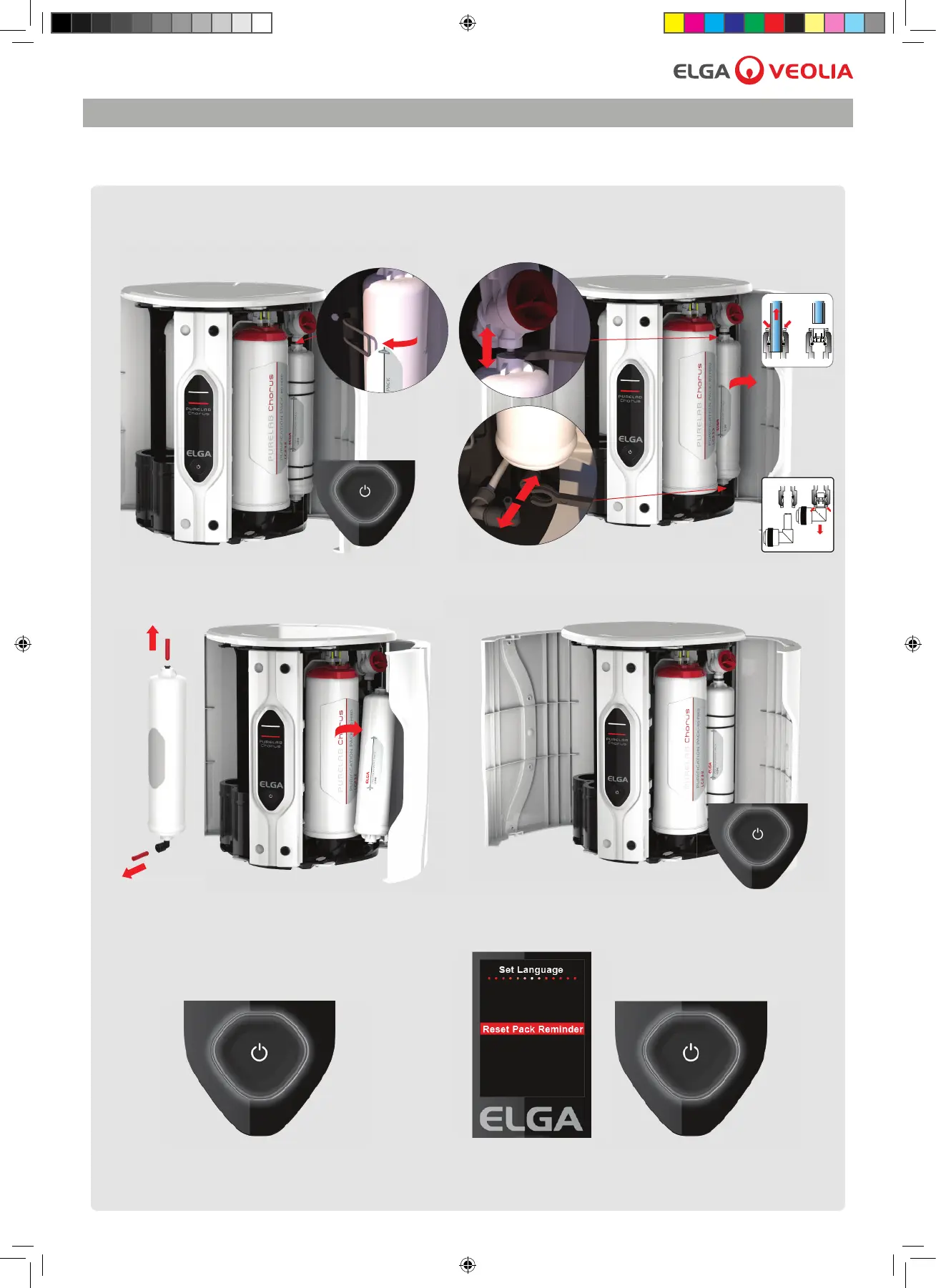
1. Press once, Process button (OFF) and
unclip Pre-treament cartridge LC241.
2. Disconnect and remove Pre-treatment cartridge.
3. Remove transit plugs and insert a new
Pre-treatment cartridge.
When 4380 hours (6 mths) is reached the lter change reminder is active. Status light will be
blinking white showing system needs attention. There is no reminder for replacing the RO Modules
(LC240) but it is recommended that they are replaced during this procedure when their service life
has expired (2 Yrs).
5. Press for 10 seconds to enter menu. 6. Press to scroll, press and hold to con rm
the reset pack reminder. Normal operation resumes.
4. Press once, Process button (ON).



 To Next Page