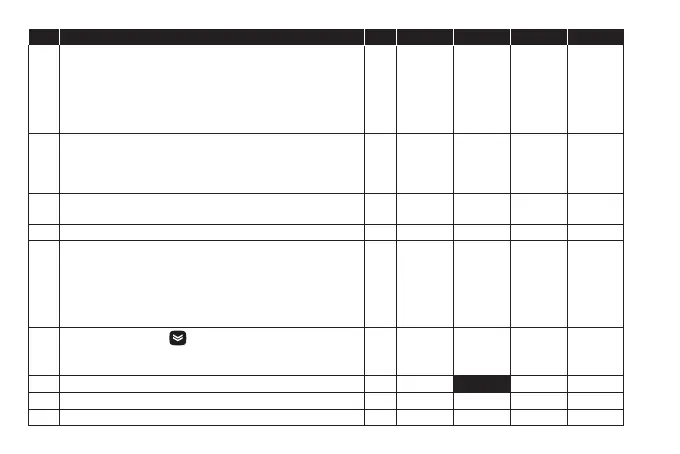
PAR. DESCRIPTION M.U. RANGE EZ-HT EZ-MT EZ-LT
ddL
Display mode during defrost.
0 = Displays the temperature read by probe Pb1;
1 = Locks the reading at the temperature value read by probe Pb1
when defrosting starts and until the next time the SEt is reached;
2 = Displays the label deF during defrosting and until the next time
the SEt is reached.
num 0/1/2 2 0 0
dro
Select the unit of measurement used when displaying the
temperature recorded by the probes. 0 = °C, 1 = °F.
NOTE: switching from °C to °F or vice versa DOES NOT modify the
setpoint, differential, etc. (e.g. set=10 °C becomes 10 °F).
flag 0/1 0 0 0
ddd
Selects type of value to display.
0 = Setpoint; 1 = Probe Pb1; 2 = Probe Pb2; 3 = Not used.
num 0 ... 3 1 1 1
H00 Probe type selection. 0 = PTC; 1 = NTC; num 0/1 1 1 1
H11
Configuration of digital input 1/polarity (D.I.):
0 = Disabled; ± 1 = Defrost; ± 2 = Reduced set; ± 3 = AUX;
± 4 = Door switch; ± 5 = External alarm; ± 6 = Stand-by (ON-OFF);
± 7, ± 8, ± 9, ±10 = Not used.
NOTE: -
The ‘+’ sign indicates that the input is active when the contact is closed.
- The ‘−’ sign indicates that the input is active when the contact is open.
num -10 ... 10 0 0 0
H32
DOWN key configuration .
0 = Disabled; 1 = Defrost; 2 = AUX;
3 = Reduced set; 4 = Stand-by
;
5,6 = Not used.
num 0 ... 6 0 0 0
H42 Presence of Evaporator probe (Pb2). n(0) = Not present; y(1) = Present. flag n/y y y
UL Upload. Transfer programming parameters from instrument to Copy Card. / / / / /
Fr Formatting. Deletes data on Copy Card. / / / / /



 To Next Page