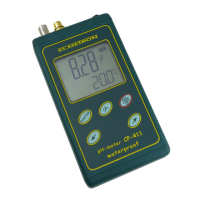
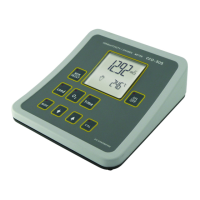
The ELMETRON CP-511 is a laboratory pH-meter designed for precise and easy-to-use measurements of hydrogen ion concentration in pH units, redox potential in mV units, and temperature of solutions or air in degrees Celsius. This waterproof pH-meter belongs to the newest generation of measuring devices, offering a wide range of additional functions, high accuracy, repeatability of readings, and ease of use. Its electronic components ensure that the memory is independent of the power supply. The meter is equipped with a large custom LCD display that shows pH or redox potential and temperature readings.
Function Description:
The CP-511 pH meter is designed for various applications across different industries, including food, chemical, pharmaceutical, power, water treatment stations, laboratories, agriculture, universities, and scientific research. It is compatible with all types of combination pH electrodes and redox electrodes equipped with a BNC-50 connector. A special adapter, available as additional equipment, allows for connection with two electrodes (measuring and reference). The meter also works with a Pt-1000 temperature probe equipped with a Chinch connector.
Usage Features:
- Display: The front panel features an LCD display (Pic. 1) that shows pH readings in pH units or redox potential readings in mV, depending on the selected function. The temperature value in °C is displayed simultaneously, with corresponding unit symbols next to the readout.
- Measurement Function Selection: Measurement functions are chosen by pressing appropriately marked buttons, indicated by a lighting diode above the button.
- Temperature Compensation:
- Automatic Temperature Compensation (ATC): The meter automatically switches to ATC mode when a temperature probe is connected. A thermometer symbol appears next to the temperature reading, and measurements are compensated based on the probe's temperature.
- Manual Temperature Compensation (MTC): Disconnecting the temperature probe switches the meter to MTC mode. The thermometer symbol disappears, and a hand symbol appears. In this mode, the up/down arrow buttons are unlocked, allowing the user to manually change the temperature value. Pressing both arrow buttons simultaneously sets the compensation temperature to 20 °C.
- Calibration:
- The CP-511 supports pH electrode calibration in 1 to 3 points using buffer solutions with manufacturer-determined values: 4.00, 7.00, and 10.00 pH, which are automatically detected.
- Calibration can be performed in any order of buffer solutions.
- Starting the calibration process irreversibly erases previously stored calibration data.
- Automatic Temperature Compensation Calibration: In pH measurement mode, press and hold the CAL button until the "CAL" symbol appears on the display. Immerse the electrode and temperature probe into a standard solution. The meter will recognize the pH value and display "P1" (for the first calibration point). After the reading stabilizes, press the CAL button to record the value. If the buffer solution is not recognized or the electrode is broken, "Err" will appear. Calibration can be finished by pressing the pH button or continued with additional standard solutions.
- Manual Temperature Compensation Calibration: Disconnect the temperature probe to switch to MTC mode. Connect the pH electrode and follow the same calibration steps as for ATC.
- Electrode Parameters Readout: After calibration, the meter allows checking the electrode's condition, including zero offset and slope.
- In pH measurement mode, pressing the MODE button once displays the electrode's zero offset (e.g., "-0.23 pH") with "bUFF" in the lower row (Pic. 6).
- Pressing the MODE button again displays the electrode's percentage slope (e.g., "98 %") with "SLOP" in the lower row (Pic. 7).
- The lower row also indicates the calibration points used (P1, P2, P3).
- If calibration data is deleted or not performed, lines will be displayed instead of digital values for electrode parameters.
- pH Measurement:
- Ensure the meter and pH electrode are prepared (chapters 6 and 7).
- Turn on the meter and select pH measurement mode.
- Connect the temperature probe and pH electrode.
- Calibrate the electrode if necessary (chapter 8).
- Insert the electrode and temperature probe into the measured solution, avoiding contact with the bottom and walls of the vessel. An electrode stand is recommended.
- Read the result after stabilization (Pic. 9).
- Accurate laboratory measurements may require a stirrer.
- Exceeding the temperature compensation range is indicated by blinking pH readout and a thermometer symbol.
- Redox Potential Measurement: The CP-511 measures redox potential using a special redox electrode or during titration. The mV button selects this mode (Pic. 11).
- Temperature Measurement:
- Connect the temperature probe to the Chinch connector.
- Turn on the meter.
- Insert the temperature probe into the measured solution.
- Read the result after stabilization.
- Lack of the thermometer symbol indicates a disconnected or broken temperature probe. A blinking -50°C value in positive temperatures signals a short-circuit in the probe.
- Software Version Readout: To check the software version, turn the meter off, then hold the MODE button while pressing the ON/OFF button. The software version (e.g., "r.1.10") will appear on the upper row (Pic. 12) for about 1.5 seconds before the meter enters measurement mode.
Important Technical Specifications:
- pH Measurement:
- Range: -2.00 ÷ 16.00 pH
- Resolution: 0.01 pH
- Accuracy (±1 digit): ±0.01 pH
- Input Impedance: >10^12 Ω
- Temperature Compensation: Automatic
- Range of Compensation: -5.0 ÷ 110.0 °C
- pH Electrode Calibration: Automatic, in 1 ÷ 3 points
- Thermal Stability of Zero: 0.001 pH/°C
- Redox Potential Measurement:
- Range: -1999 ÷ 1999 mV
- Resolution: 1 mV
- Accuracy (±1 digit): ±1 mV
- Temperature Measurement:
- Range: -50.0 ÷ 199.9 °C
- Resolution: 0.1 °C
- Accuracy* (±1 digit): ±0.1 °C (*Final accuracy depends on the applied Pt-1000 probe)
- Temperature Probe: Pt-1000 platinum resistor
- Accuracy of the Probe in Range 0 ÷ 100 °C:
- For Pt-1000b resistor: ±0.8 °C
- For Pt-1000 1/3b resistor: ±0.3 °C
- Other:
- Operating Temperature: 0 ÷ 40 °C
- Power: 12V/100mA power adapter
- Power Consumption: 120 mW
- Display: LCD 69 x 73 mm
- Dimensions: 200 x 180 x 50 mm
- Weight: 600 g
Maintenance Features:
- Electrode Preparation:
- New electrodes should be soaked in saturated KCl solution for about 5 hours.
- Before measurements, remove protecting rings (if present). The lower ring on the junction is essential to remove for proper measurement. The upper ring protects the KCl refilling hole and should be removed during high-temperature measurements or when measuring solutions with deposits/oils.
- Use an electrode holder for laboratory measurements.
- Wash the electrode with distilled water after every measurement.
- Gently remove excess liquid by touching the glass with tissue paper.
- Store the electrode in KCl solution after use, with protecting rings on the junction and upper hole.
- For long breaks, store the electrode dry in its packaging.
- If the electrode has been stored dry, remove any deposits with water and soak it in saturated KCl solution for about 1 hour before use.
- If the electrode is refillable, periodically control and refill the electrolyte (usually KCl solution) through the upper hole.
- If the electrode has a protective bottle on its end, remove it by unscrewing the nut and sliding the bottle down before measurements. Reattach it after use. These electrodes typically do not have junction rings and do not require membrane activation.
- Note: Storing the electrode in distilled water shortens its lifespan and may increase measurement error.
- Troubleshooting Unstable Readings: Unstable measurement results, slow drifting, or long stabilization times are often caused by a clogged, contaminated, or broken electrode, or using an inappropriate electrode type for the solution.
- Soaking the electrode in distilled water for a few hours or in water with detergent may help, especially if measurements involved deposits, fats, or oils.
- KCl crystals clogging the junction of an unused electrode can be removed by placing it in distilled water.
- Heavily contaminated electrodes can be cleaned with chloroform, and iron deposits with 2N HCl.
- Accuracy Considerations:
- Differences in multiple pH measurements of the same solution at stable temperature can be due to electrode quality, premature stabilization (average electrode stabilizes in about 40s), non-homogeneous solutions (requiring a stirrer), or chemical reactions in sewage measurements.
- The CP-511 has an accuracy of ±0.01 pH, ±1 digit.
- One-point calibration only eliminates "zero offset." For higher accuracy across the range, three-point calibration is recommended. For acidic measurements, 4.00 and 7.00 pH buffers are advised; for alkaline measurements, 7.00 and 10.00 pH buffers are advised.
- Warranty: ELMETRON provides a 24-month warranty for the CP-511 pH meter and a 12-month warranty for the electrode. The warranty covers repairs within 14 days of delivery but excludes damages from non-conformant usage, wrong power adapters, mechanical damage, or unauthorized repairs. For service, contact the firm by phone and include the electrode, temperature probe, and power adapter when sending the meter. After-warranty repair service is also available.

 Need help?
 General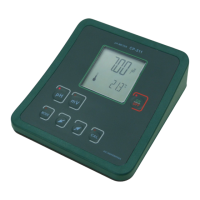

 To Next Page