PDF Studio
-
PDF Editor for Mac, Windows, Linux. For Evaluation. https://www.qoppa.com/pdfstudio
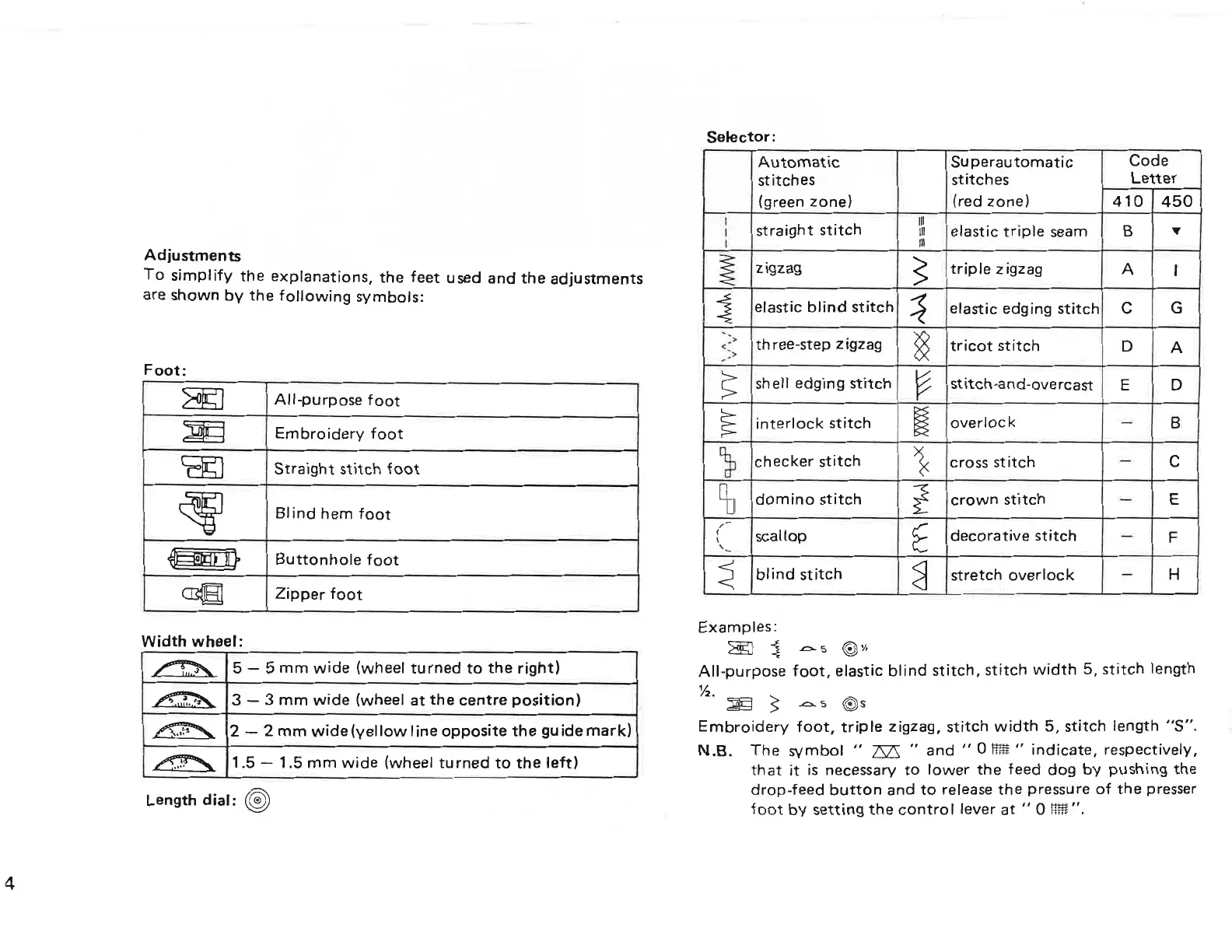
Adjustments
To simplify the explanations, the feet used and the adjustments
are
shown by
the
following symbols:
Foot:
All-purpose
foot
Embroidery
foot
Straight stitch
foot
Blind hem
foot
Buttonhole
foot
sgeeee
Zipper
foot
Width
wheel:
&
5
—
5
mm
wide (wheel turned
to
the right)
3
—
3
mm
wide (wheel
at
the
centre
position)
↴↘⋅⇁⊳∣⋮≖ 2
—
2
mm
wide(yel|ow line opposite the guide mark)
1.5
—
1.5
mm
wide
(wheel turned
to
the left)
Length
dial:
Selector:
Automatic
Superautomatic Code
stitches stitches Letter
(green zone) (red zone)
410
450
)1 straight Stitch elastic triple
seam
B
V
⋛ zigzag ≧ triple zigzag A I
⋛ elastic
blind
stitch ∶≤ elastic edging ⊱↥⋮↥∘⊦↿
∁
⊂∃
⋥⋮∑ three—step zigzag §
tricot
stitch D A
≩ sh ell edging
stitch
E stitch-and-overcast E D
E
interlock
stitch
E overlock
—
B
033 checker stitch ⊳≦≺
cross
stitch
∙−
∁
Eb
domino
stitch ≧⋚
crown
stitch
—
E
ii scallop E decorative
stitch
—
F
≦ blind stitch ∃ stretch overlock
—
H
Examples:
E3
≦
A
⋮ ⋐⊃⋅∕≖
All-purpose foot, elastic blind stitch, stitch
width
5, stitch length
↿∕⋜⋅
E
≧
As
s
Embroidery foot, triple zigzag,
stitch
width
5, stitch length
"S".
N.B.
The symbol
"
E’;
"
and
"
⊙≸⇞⇠⊳⇇≣
⊔
indicate, respectively,
that
it
is necessary
to
lower
the
feed dog by pushing the
drop-feed
button
and
to
release
the
pressure
of
the
presser
foot
by setting the
control
lever
at
"
O Flfé".
PDF Studio - PDF Editor for Mac, Windows, Linux. For Evaluation. https://www.qoppa.com/pdfstudio



 To Next Page