PDF Studio
-
PDF Editor for Mac, Windows, Linux. For Evaluation. https://www.qoppa’.com/pdfstudio
.102
Maintenance
Your machine
will
always
serve
you
faithfully if
it
is cared
for
properly.
Disconnect the machine according
to
the "Safety” recommenda-
tions
on
page 3.
—
Turn
the flywheel
until
the needle reaches its highest posi-
tion.
Open the
shuttle
race
cover, and
remove
the
bobbin
case.
—
Brush the feed dog and the
area
around
it.
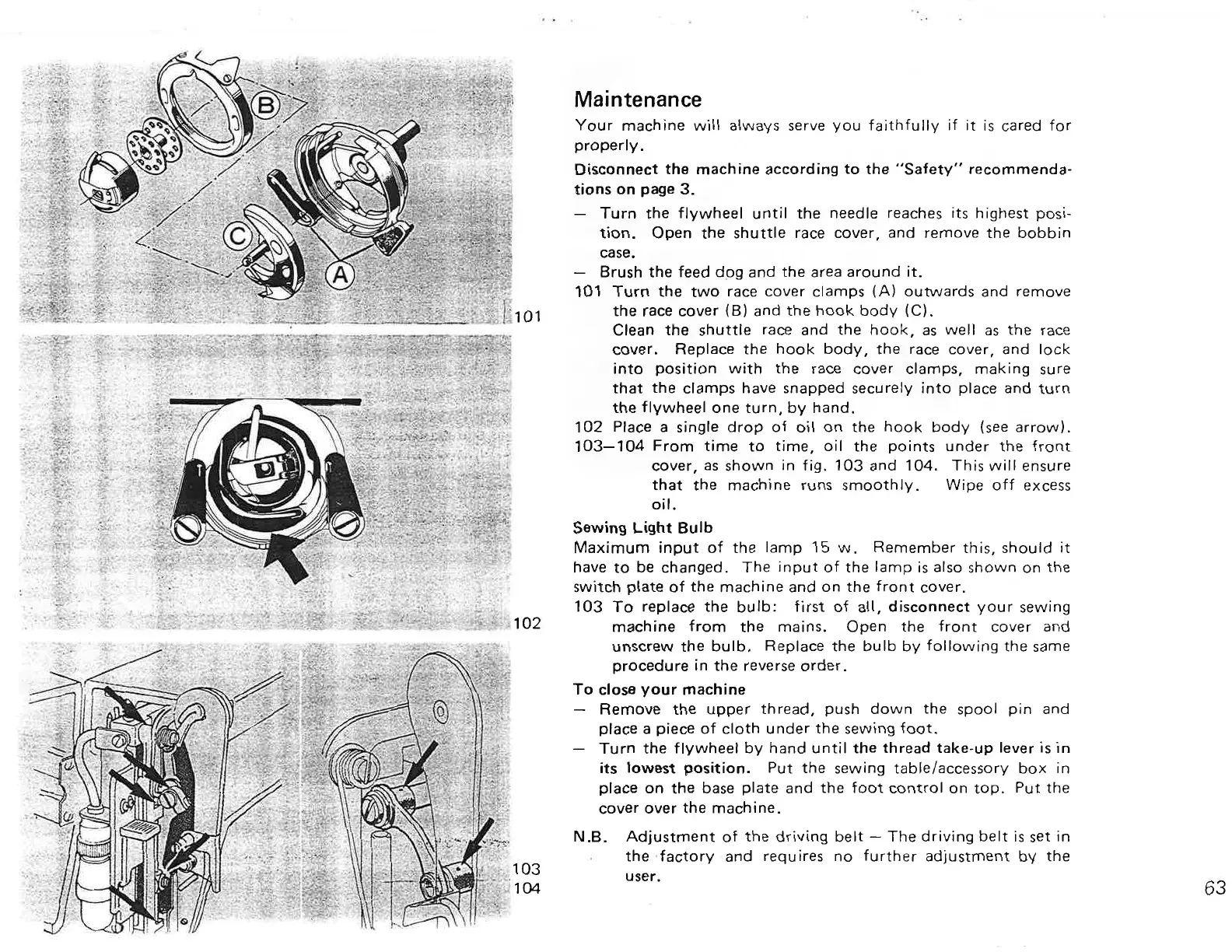
101
Turn
the
two
race
cover
clamps (A)
outwards
and
remove
the
race
cover
(8) and the
hook
body (Cl.
Clean the
shuttle
race
and the hook,
as
well
as
the
race
cover.
Replace the hook body, the
race
cover,
and
lock
into
position
with
the
race
cover
clamps, making
sure
that
the clamps have snapped securely
into
place and
turn
the flywheel
one
turn,
by hand.
102 Place a single drop
of
oil
on
the
hook
body (see arrow).
103-104
From
time
to
time,
oil
the
points
under
the
front
cover,
as
shown in fig. 103 and 104. This
will
ensure
that
the machine
runs
smoothly. Wipe
off
excess
oil.
Sewing Light Bulb
Maximum input of the lamp 15
w.
Remember this, should
it
have
to
be changed. The input
of
the lamp is also shown
on
the
switch plate
of
the machine and
on
the
front
cover.
103 To replace the
bulb:
first
of all, disconnect
your
sewing
machine from the mains. Open the
front
cover
and
unscrew
the
bulb.
Replace the
bulb
by following
the
same
procedure in the
reverse
order.
To close
your
machine
—
Remove the
upper
thread, push
down
the
spool pin and
place a piece
of
cloth
under
the sewing
foot.
—
Turn the flywheel by hand
until
the thread take—up lever is
in
its lowest position. Put the sewing table/accessory
box
in
place
on
the base plate and the
foot
control
on
top.
Put the
cover
over
the machine.
N.B. Adjustment
of
the driving
belt
—
The driving
belt
is
set
in
the factory and requires
no
further
adjustment by the
user.
63
PDF Studio - PDF Editor for Mac, Windows, Linux. For Evaluation. https://www.qoppa.com/pdfstudio



 To Next Page