14
Removing and Attaching the Foot Holder
q
w
w
e
q
e
e
r
q
w
Dual Feed Foot
z
x
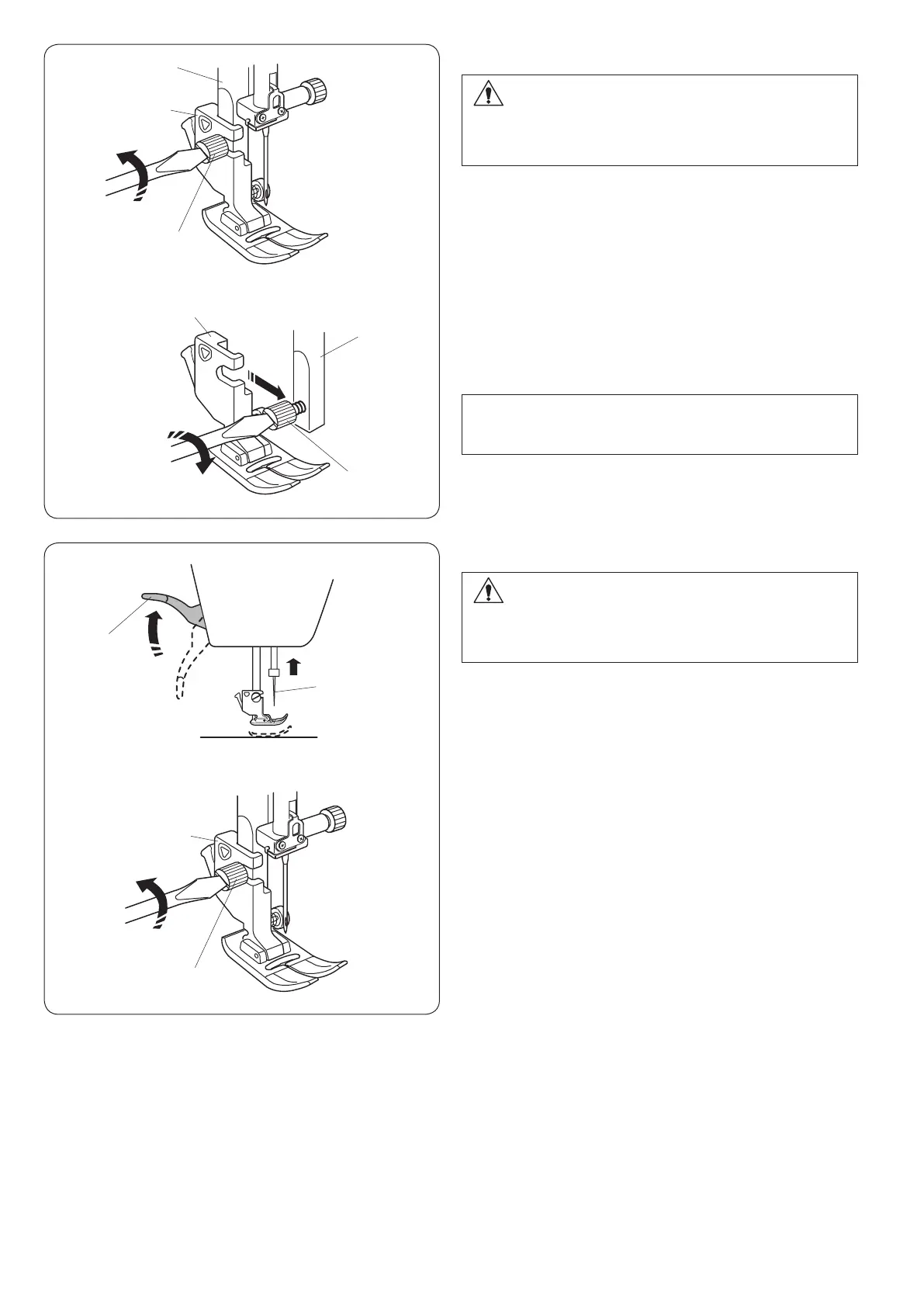
Attaching the foot holder
Attach the foot holder to the presser bar from the rear.
Tighten the thumbscrew securely with the screwdriver.
CAUTION:
Always make sure to press the lockout key to lockout
the machine or turn the power switch off before
replacing the presser foot.
z Raise the needle to its highest position.
Raise the presser foot lifter.
q Presser foot lifter
w Needle
x Loosen the setscrew.
Remove the foot holder.
e Foot holder
r Setscrew
NOTE:
Lower the presser foot when loosening and tightening
the thumbscrew if it is hard to access.
CAUTION:
Always make sure to press the lockout key to lockout
the machine or turn the power switch off before
replacing the presser foot.
Removing the foot holder
Raise the needle to its highest position.
Raise the presser foot and loosen the setscrew.
Remove the foot holder.
q Presser bar
w Foot holder
e Setscrew












 To Next Page