12
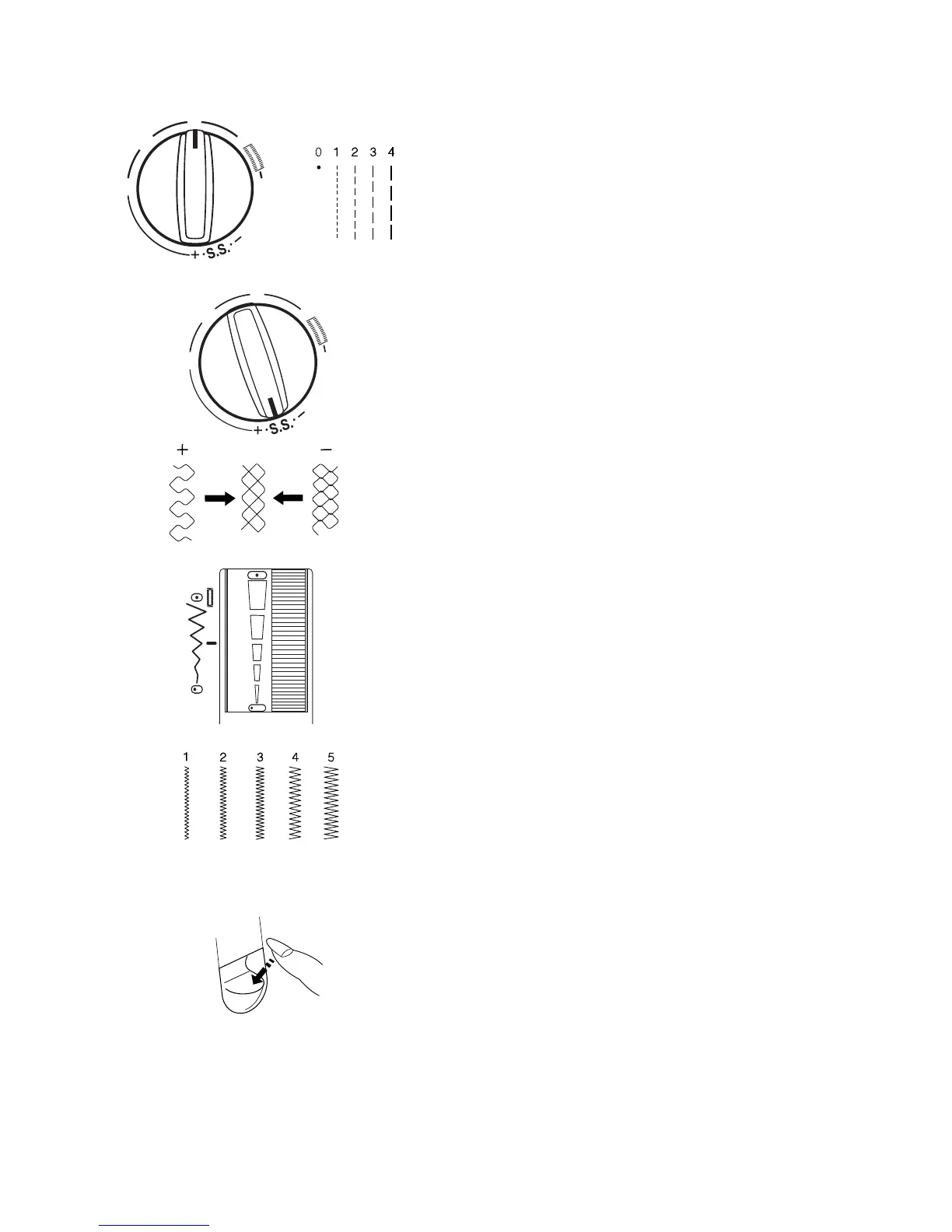
Stitch Length Knob
Turn the stitch length knob. The lower the number,
the shorter the stitch length. The higher the number,
the longer the stitch length.
Each stitch will have a suggested length range.
Fine Tuning Stretch Stitches
If the stretch stitch doesn’t look right, you can
adjust it.
If stitches are too short, correct by turning the knob
toward the “+”.
If stitches are too long, correct by turning the knob
toward the “-“.
Stitch Width/Needle Position Dial
The needle must be at a high position before chang-
ing stitch width. Turn the flywheel toward you to raise
the needle.
The lower the number, the narrower the stitch. The
higher the number, the wider the stitch. The widest
width this machine can sew is 5 mm.
Straight Stitch and Triple Seam can sew from differ-
ent needle positions.
• center needle position – set dial between 3
and 5
• left needle position – set dial between 3 and 0,
with 0 being the farthest left
Reverse Stitch Lever
The machine will sew backwards while you press
down the reverse stitch lever.
0
1
2
3
4
0
1
2
3
4
1
0
3
4
5
2














 To Next Page