70
Edit
Font
A Z
AB
OK
M
L
S
AB
Mode
G
H
IJKL
M
N
OP
Q
RST
U
V
W
X
YZ
A
B
C
DEF
2 Letters
AB
A(F)
A Z
Edit
Font
A Z
AB
OK
M
L
S
AB
Mode
G
H
IJKL
M
N
OP
Q
RST
U
V
W
X
YZ
A
B
C
DEF
2 Letters
AB
A Z
A(F)
Edit
Font
A Z
AB
OK
M
L
S
AB
Mode
G
H
IJKL
M
N
OP
Q
RST
U
V
W
X
YZ
A
B
C
DEF
Gothic
AB
A(F)
A Z
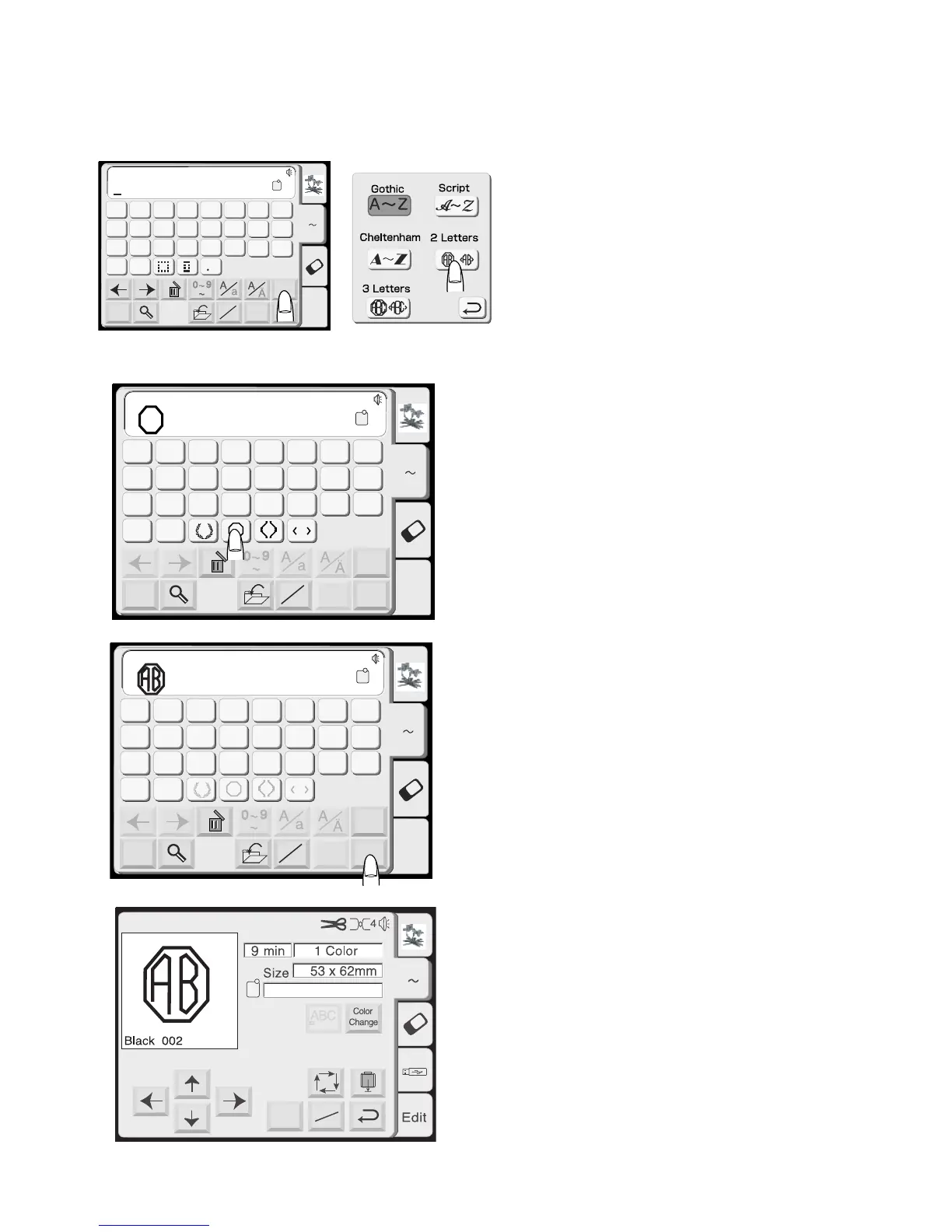
2 Letter or 3 Letter Monograms
Example: 2 letters and frame for crest
The alphabet selection window should be open.
See page 60.
Touch the “Font” key and select “2 Letters” key.
Select one of the frames.
Select “A” and “B”.
Touch “OK” key. Touch the “Return” key in the
hoop size warning message. Sew 2 letter crest.
NOTE: The starting point for 2 letter and 3 letter
monograms is the center of the hoop.
Mode
Ready to Sew
Jog
ST
AZ
A(F):126 x 110mm














 To Next Page