74
MyDesign
Mode
USB Memory Stick
A Z
Mode
USB Memory Stick
A Z
A-001
B-002
C-003
Cancel
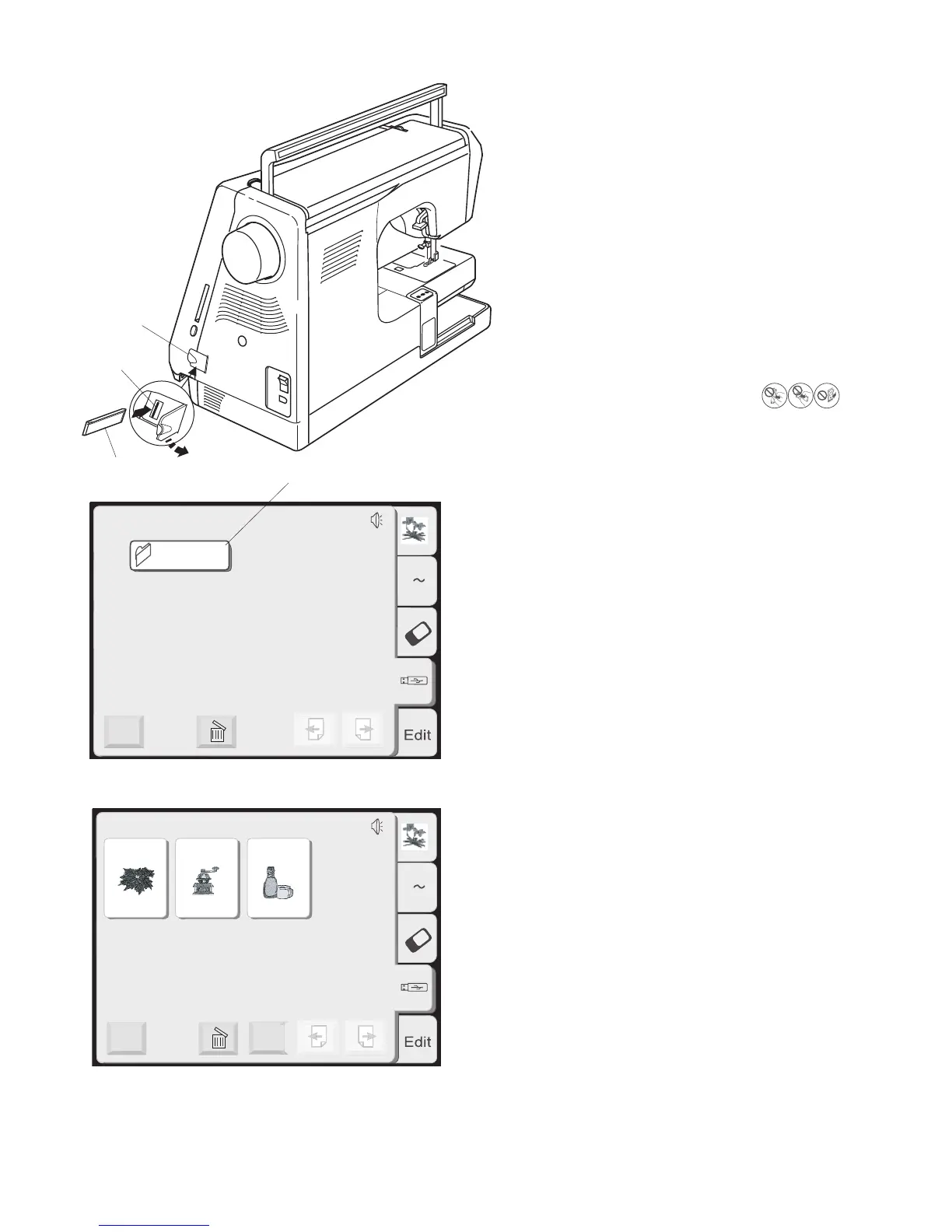
USB Memory (optional item)
The USB memories can be used to save stitch data
and transfer the embroidery designs between the
sewing machine and your PC.
The USB memory is available at camera shops, PC
supplies stores etc. in various sizes and forms.
Open the small door under the card slot.
Insert
the USB memory into the USB socket on the
machine.
q Small door
w USB memory (optional item)
e USB socket
CAUTION: Do not turn the power off or disconnect
the USB memory while the warning sign
or hourglass is displayed.
Opening the designs on USB memory
Touch the USB memory key.
The folder list is displayed in the window.
Touch the desired Folder selection key to open.
r Folder selection key
The designs stored in the selected folder will be
displayed on the Design selection keys.
Touch the Design selection key to select the desired
design.
q
w
e
r














 To Next Page