User Manual – IDS ET3203L/ET4303L/ET5053L
UM600265 Rev. C, page 18 of 33
On-Screen Display (OSD) (Optional Elo Part Number – E483757)
Connected Through the RJ45 Connection
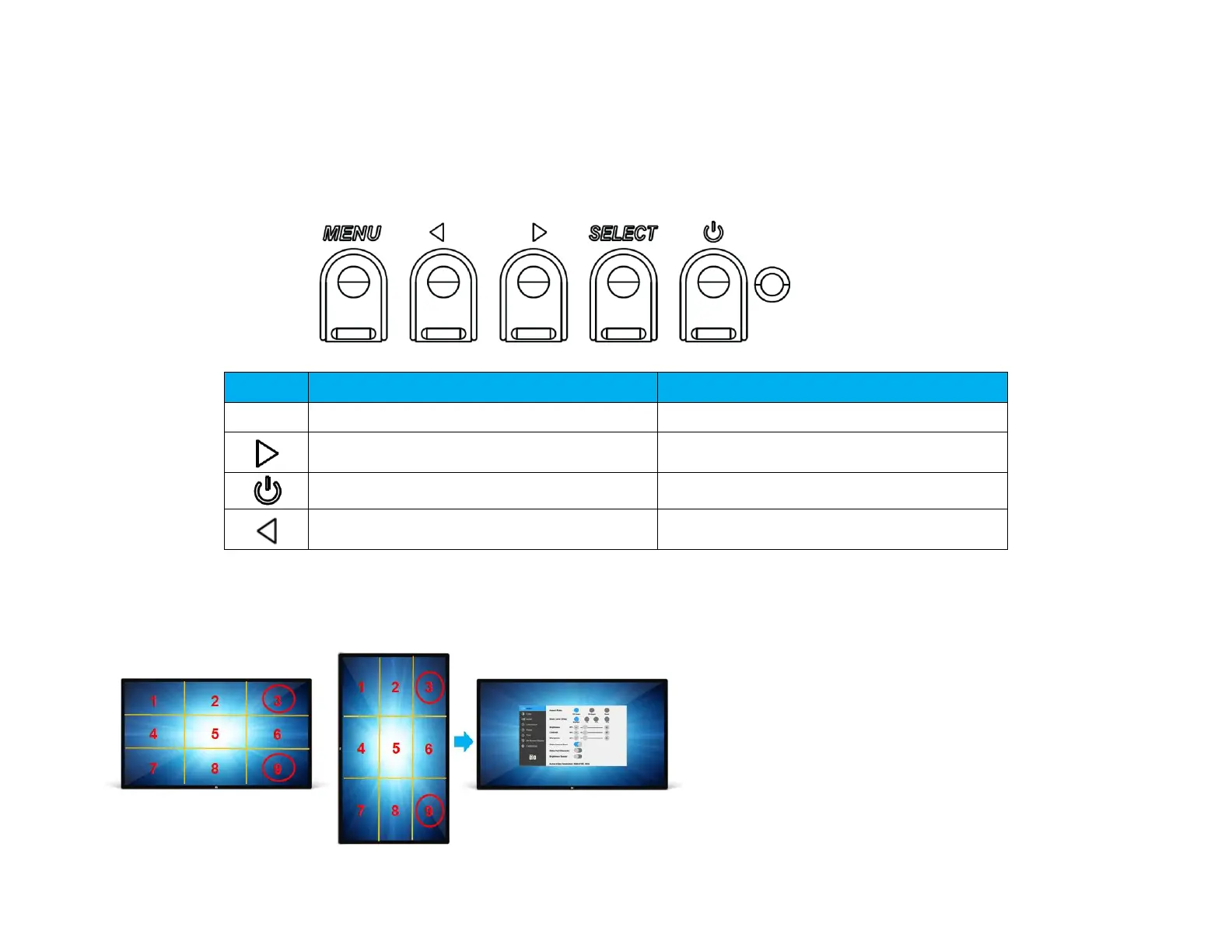
Five OSD buttons can be found on the OSD remote. There is an LED light which shows the current state of the monitor. The
following are the functions that relate to the designated button.
Note: Opening the OSD menu from the remote will disable the touch functions on the OSD menu.
The buttons and their functionality are:
Function when OSD is not displayed:
Function when OSD is displayed:
Return to previous OSD menu
Increase value of selected parameter /
select next menu item
Toggles the power status of the monitor
Decrease value of selected parameter /
select previous menu item
Touch Activated OSD (for ET3203L and ET5053L)
IDS ET3203L/ET5053L can activate OSD menu by clicking 4 character (3 → 9 → 3 → 9).
*Note that only accept single touch to activate OSD menu and each click no longer than 3 seconds.
*Note that this function is not active under OSD Lock enabled.


 To Next Page