Page 44
4.4.3 Network Settings
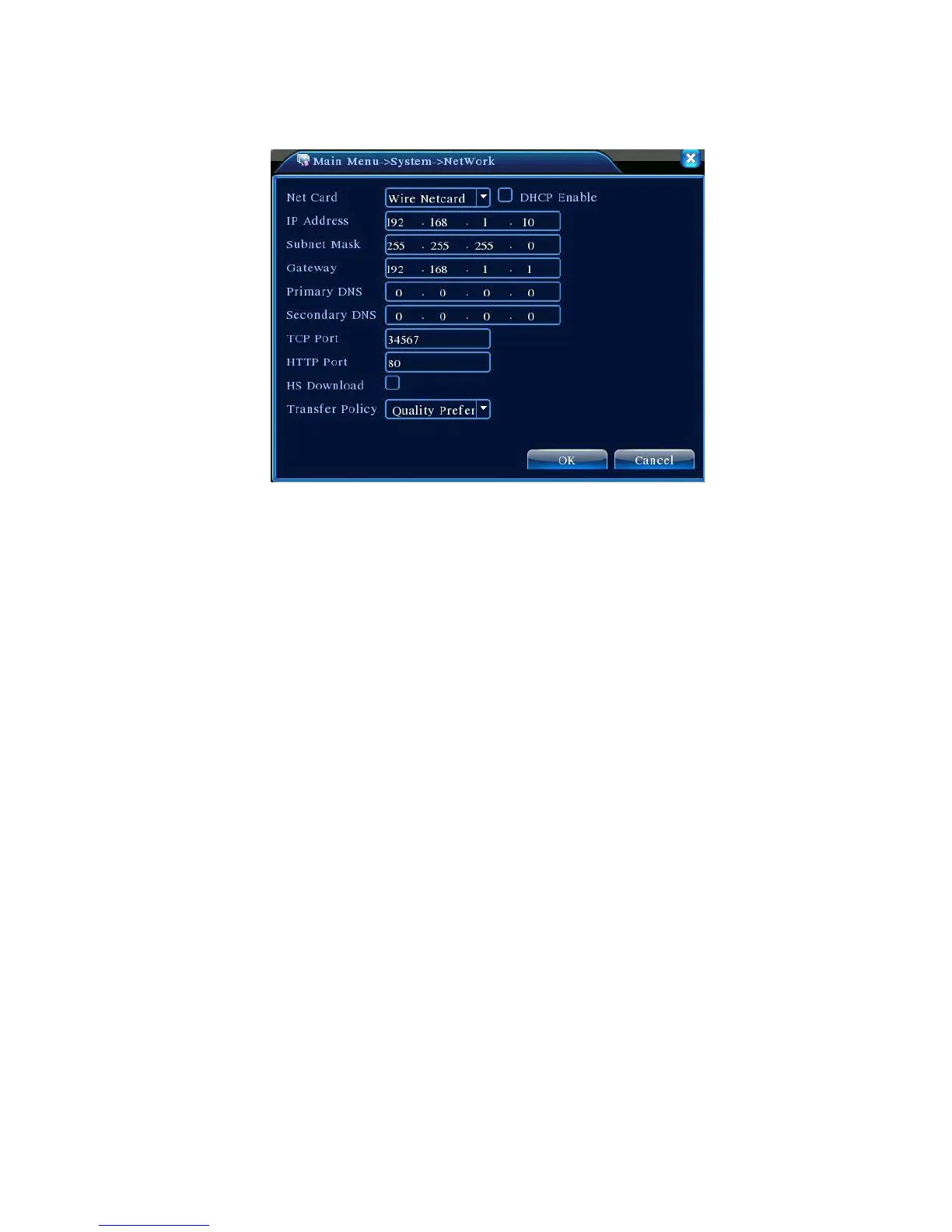
Figure 4.16 Network Settings
【Net Card】May choose from wired or wireless network cards;
【Obtain IP Address Automatically】Obtain IP address automatically (not recommended);
Note: Installation of DHCP server is required in advance
【IP Address】Set DVR’s IP address. Default IP address: 192.168.1.10;
【Subnet Mask】Set subnet mask. Default subnet mask settings:255.255.255.0;
【 Gateway】Set Default Gateway for the device. Default setting:192.168.1.1;
【DNS Settings】DNS server, analyzes and identifies the IP address provided by your local network
provider. Restart the system after set the address;
【TCP Port】Default is 34567;
【HTTP Port】Default is 80;
【Network High Speed Download】Network high speed download;
【Network Transmission Strategies】Three strategies:Self-adaptive, Picture Quality Preferred,
Fluency Preferred. Depending on the settings, network transmission will automatically adjust the bit rate.
Self-adaptive strategy balances the quality and fluency, providing fluent transmission without
compromising too much on the quality. Fluency Preferred and Adaptive strategies will only take effect
when sub-stream is enabled. In the case that sub-stream is not enabled, Quality Preferred sets the
priority according to the network quality.



 To Next Page