Step ➊ Open the top cover and remove the spindle
from the printer. Place the spindle inside the
roll of labels or tags.
Cutting the corners off the end of the roll allows
for easier insertion into the feed slot.
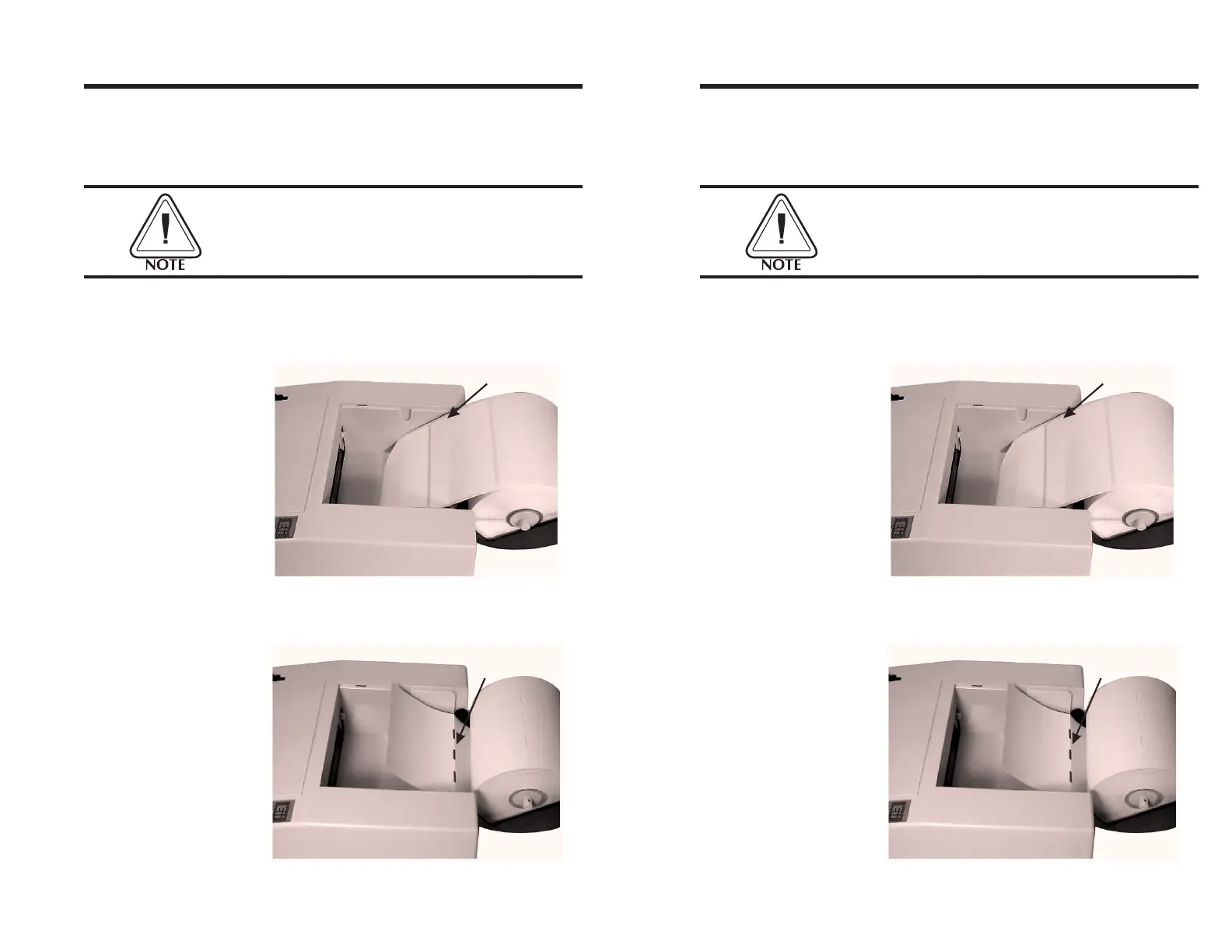
If loading labels, place the roll in the top cover
so that the end feeds from the top as shown in
Figure 2-2.
If loading tags, place the roll in the top cover so
that the end feeds from the bottom as shown
in Figure 2-3.
Top Feed
Figure 2-2
Loading Labels
Bottom
Feed
Figure 2-3
Loading Tags
Operation
980090-001 Rev.B 11
Step ➊ Open the top cover and remove the spindle
from the printer. Place the spindle inside the
roll of labels or tags.
Cutting the corners off the end of the roll allows
for easier insertion into the feed slot.
If loading labels, place the roll in the top cover
so that the end feeds from the top as shown in
Figure 2-2.
If loading tags, place the roll in the top cover so
that the end feeds from the bottom as shown
in Figure 2-3.
Top Feed
Figure 2-2
Loading Labels
Bottom
Feed
Figure 2-3
Loading Tags
Operation
980090-001 Rev.B 11



 To Next Page