Step ➋
Remove The Print
Head
The most common location of stuck labels is at
the print head. Check this area first before
checking the remainder of the print mecha-
nism.
The discharge of electrostatic energy that accu-
mulates on the surface of the human body or
other surfaces can damage or destroy the print
head or electronic components used in this
device. Before touching the print head, you
should be wearing a grounding wrist strap or
should touch a metal part of another piece of
equipment that is properly grounded.
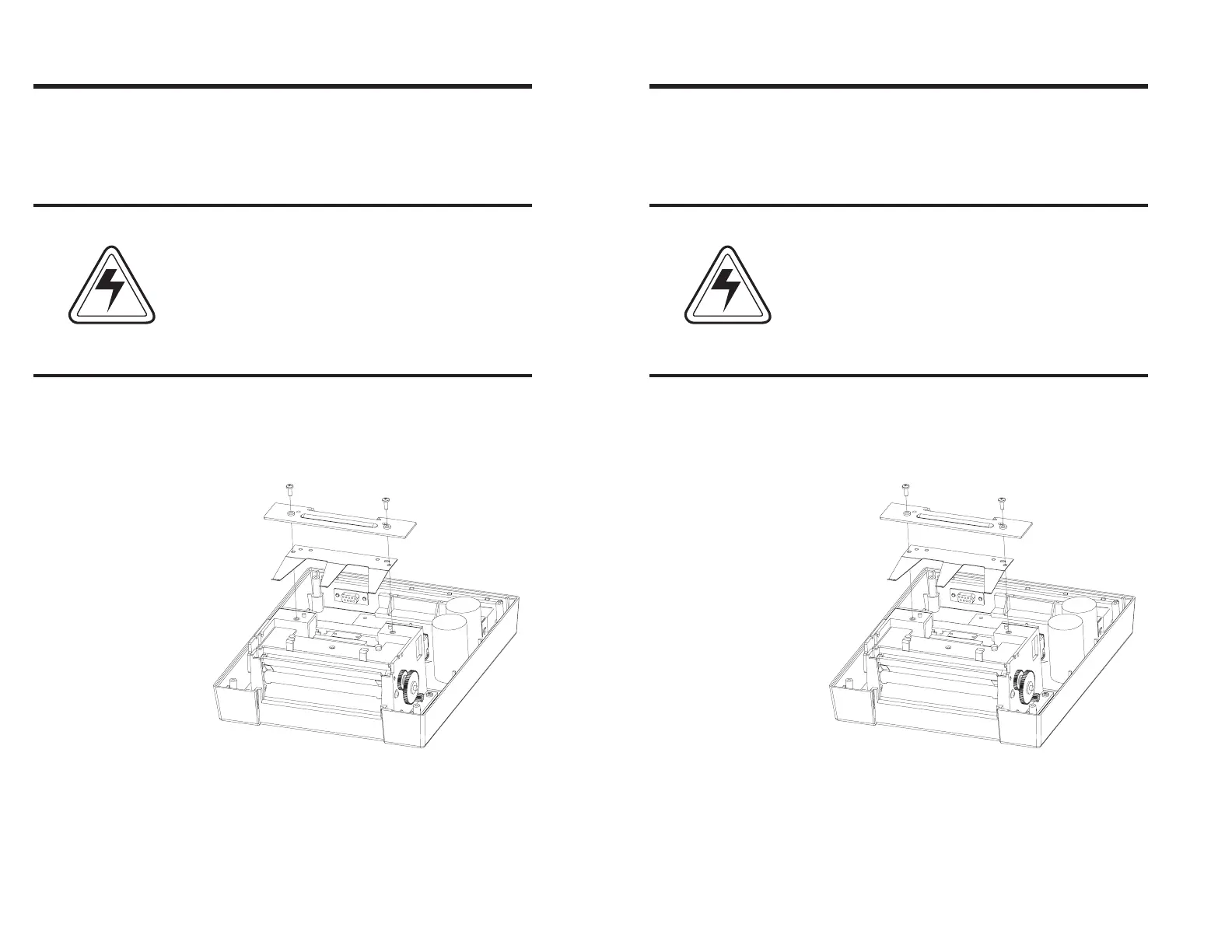
Using a #1 Phillips screwdriver, remove the
two screws that secure the top print head
bracket. Remove the bracket and the head
tension spring.
CAUTION
Troubleshooting
44 980090-001 Rev. B
Step ➋
Remove The Print
Head
The most common location of stuck labels is at
the print head. Check this area first before
checking the remainder of the print mecha-
nism.
The discharge of electrostatic energy that accu-
mulates on the surface of the human body or
other surfaces can damage or destroy the print
head or electronic components used in this
device. Before touching the print head, you
should be wearing a grounding wrist strap or
should touch a metal part of another piece of
equipment that is properly grounded.
Using a #1 Phillips screwdriver, remove the
two screws that secure the top print head
bracket. Remove the bracket and the head
tension spring.
Troubleshooting
44 980090-001 Rev. B



 To Next Page