24
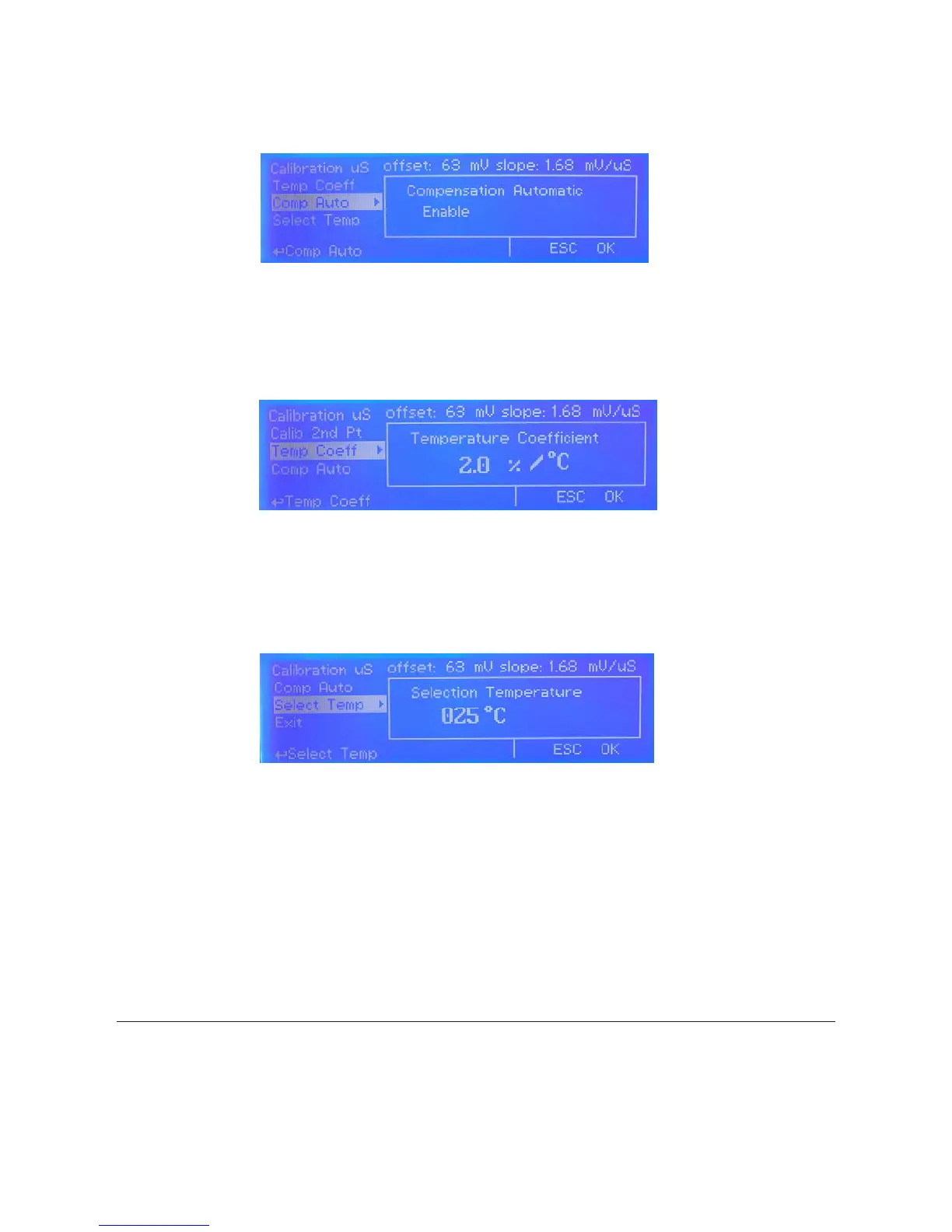
4) Move cursor on “Comp Auto” then press wheel. Rotate wheel to Enable or disable automatic temperature compensation.
Enabling this option will override “Select Temp” setup then move cursor on “ESC” or “OK” and press wheel to conrm.
5) Move cursor on “Temp Coeff” then press wheel. This option set conductivity % variation based on temperature. To
disable it enter 0.0 % as value. Move cursor on “ESC” or “OK” and press wheel to conrm.
6) Move cursor on “Select Temp” then press wheel. If a temperature probe is not connected, pool temperature must be
set manually. Rotate wheel to set it and conrm by pressing wheel. Move cursor on “ESC” or “OK” and press wheel to
conrm.
Measurement temperature has a signicant inuence on conductivity readings; but appropriate temperature compensation is a powerful tool to allow meaningful comparison of
readings taken at different temperatures. The analyst must ensure that the type of temperature compensation utilized is appropriate for both the type of sample being analyzed
and the required test accuracy. This is an essential factor for determining the suitability of a conductivity instrument for measurement applications. A conductivity measurement
taken with the sample at the reference temperature will always be more accurate than a temperature compensated reading taken away from the reference temperature – this
point is essential for critical applications requiring high accuracy of measurements.
g. 41
g. 42
g. 43


 To Next Page