30
GSM MODEM
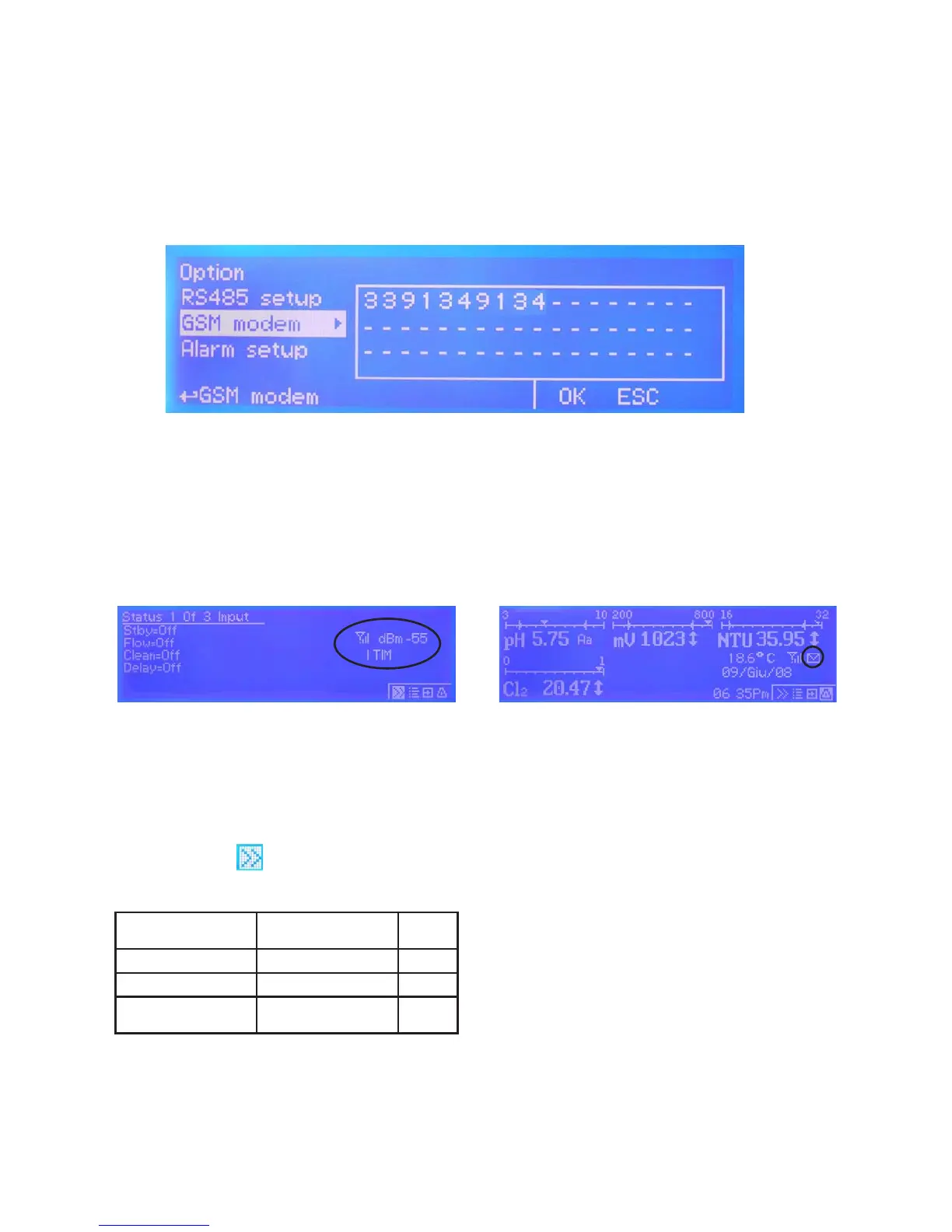
MAX5 may remotely send SMS alarm messages using its own modem (where available). Options can be congured as
follows:
SMS1 / SMS2 /SMS3: Using the wheel enter a mobile phone that will receive alert SMS messages if something wrong
occurrs. Log level (and SMS frequency alert) may be set using options in “Log setup” menu. SMS number must be set
using local number format. For example : 3391349134 will send an SMS message to mobile phone.
- TO AVOID UNDESIRED MESSAGES USE CAREFULLY LOG SETUP -
- WARNING: THIS FUNCTION COULD NOT BE FREE OF CHARGE. DEPENDING ON YOUR OPERATOR CONTRACT IT
COULD GENERATE PAYING SMS TRAFFIC !
g. 26
GSM SIGNAL STATUS
Before to congure SMS phone number ensure that
internal gsm modem has enough signal to operate
correctly.
To check this press twice from main menu and
verify signal strength as following:
0 or 1 bar (-113dBm to -103dBm) no signal or very low signal re-orient
antenna
1 or 2 bars (-103dBm to -95dBm) low signal slow conn.
2 or 3 bars (-95dBm to -85dBm) good signal ok
3 or 4 bars (-85dBm to -51dBm
or more)
optimum signal ok
MAX GSM MODEM VERSION
Antenna icon on MAX5 display means that modem is
correctly installed.
Blinking envelope means that MAX5 is trying to
send an alert message to preferred numbers (SMS1
and/or SMS2 and/or SMS3). If this condition stays for
more that 1 minute it could be an error while sending
message. Check modem status or instrument condition.
Fixed envelope means that MAX5 has successfully
sent an alert message to preferred numbers.


 To Next Page