33
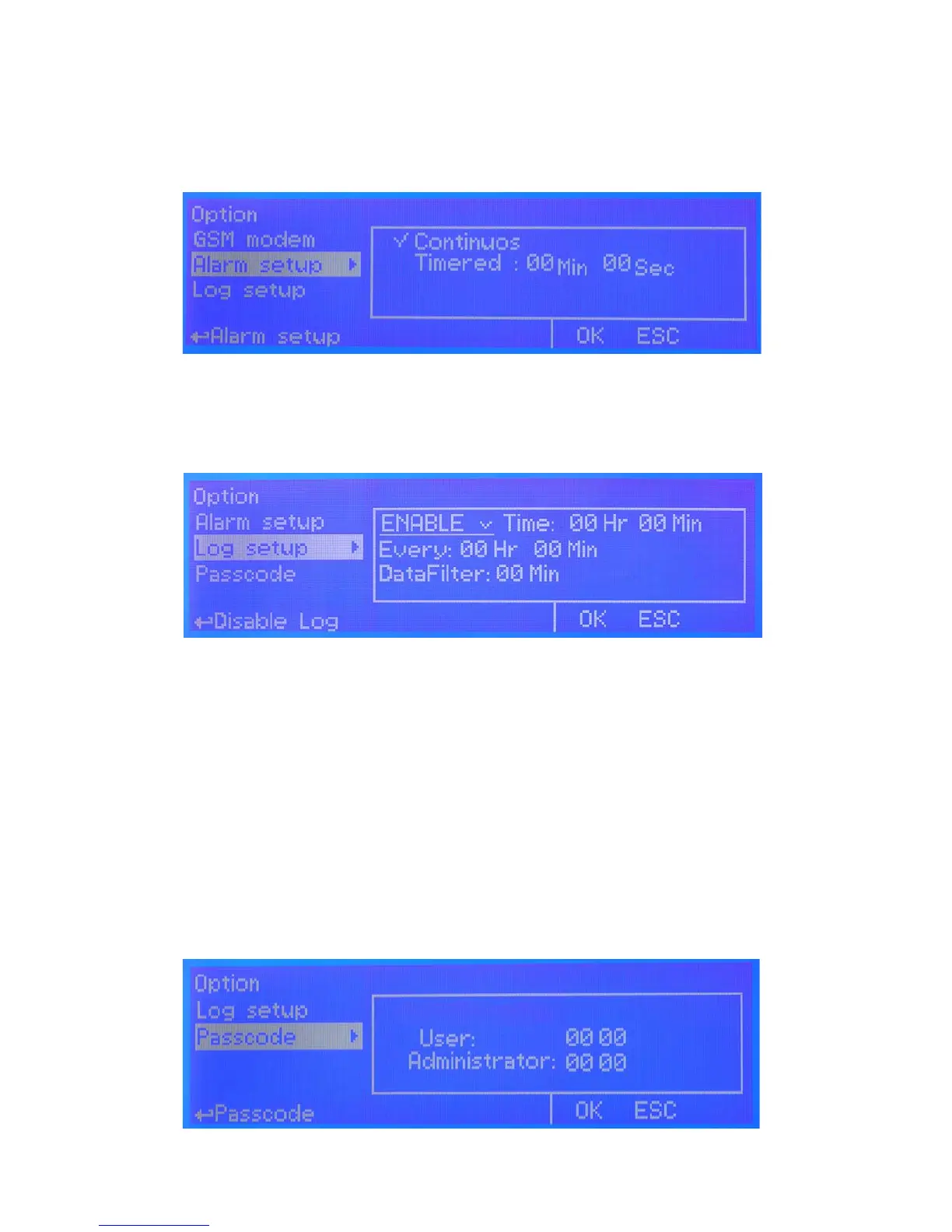
LOG SETUP
Log setup stores instrument activities when an alarm (ow, level, general) occurs or after a set
time.
ENABLE: enable or disable log function
TIME: log starting time (format 23h 59min)
EVERY: frequency of recording (format 23h 59min)
OUTPUT ON: Enable / disable Log For Outputs
DATA FILTER: lter that allows you to avoid repeating for the same alarm (max 59 minutes). If the
same alarm is repeated during set time the instrument won’t send any SMS.
SET DATE & TIME BEFORE TO ENABLE LOG. IF NOT POWERED FOR ABOUT 30 DAYS THE INSTRUMENT WILL
LOOSE DATE/TIME
PASSCODE
Change default passcode (“00 00”) by rotating wheel on each of two-digits groups. Press “OK” to conrm or “ESC”
to exit without saving. Administrator can also set passcode for “User” with limited access (no instrument reset / mA
setpoint unavailable).
g. 31
g. 32
ALARM SETUP
When an alarm condition is displayed and general alarm output is possible to choose between two working modes.
Continuos: alarm condition never stops until “ESC” is pressed.
Timered: alarm condition ends after set time.
g. 30


 To Next Page