7
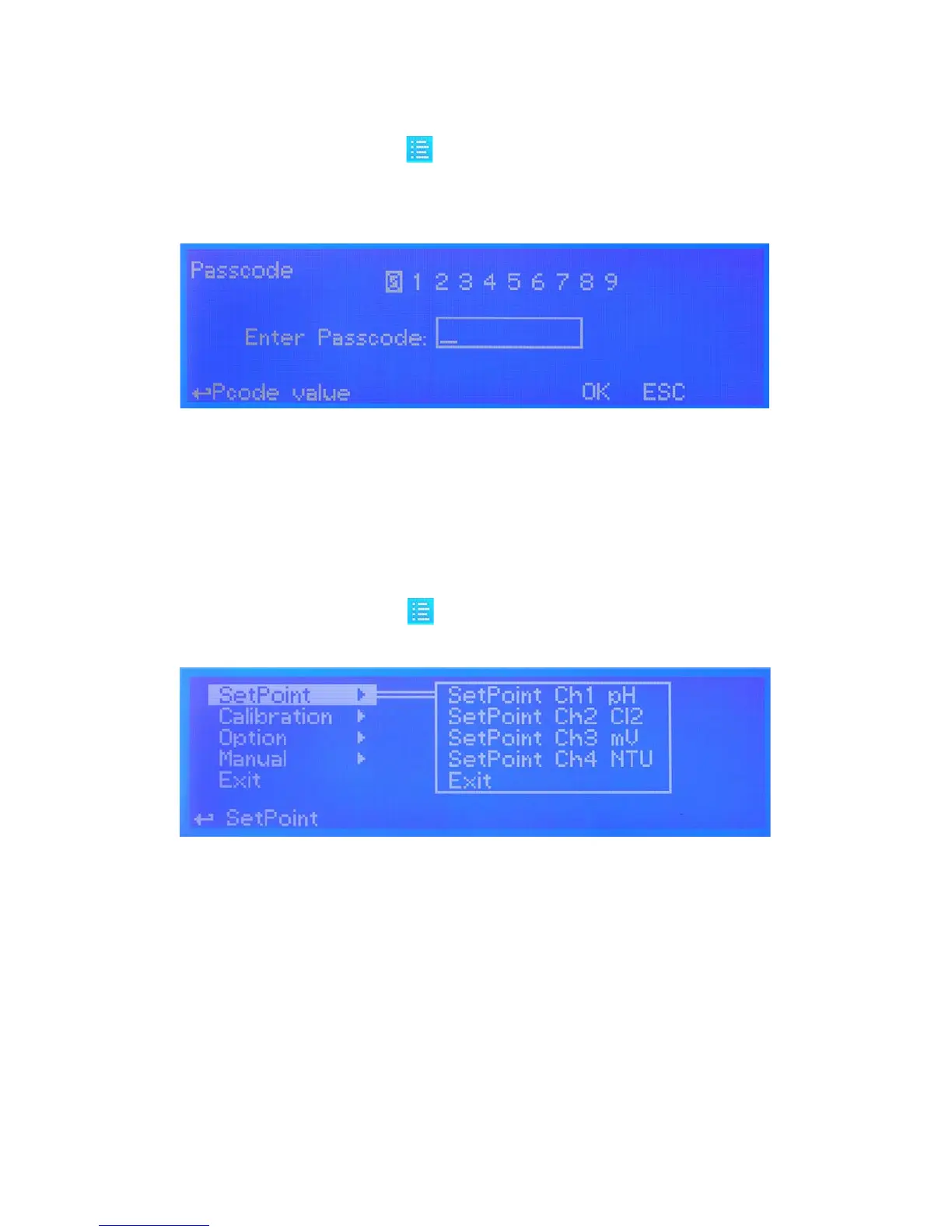
Passcode.
From main screen rotate wheel until to highlight then press wheel.
Note: This is a passcode protected area. For this reason every time this menu is reached, the instrument will ask for a
passcode as shown.
If this is a “rst time visit” the default passcode is “0000” (both Administrator and User).
Just press four times the wheel. Otherwise rotate wheel to move through digits and press wheel to choose.
Rotate wheel to ESC and press wheel to go back to main screen without accessing setup menu.
Setup.
From main screen rotate wheel until to highlight then press wheel. Enter passcode as described in previous para-
graph.
Rotate wheel to scroll through all options and press wheel to enter into menu of selected option.
Setpoint option. Use this menu to dene instrument operating mode, output conguration, alarm condition, mA outputs.
Calibration option. Use this menu to calibrate main instrument readings (pH, ORP Chlorine, Turbidity and, Temperature ).
Option. Use this menu for TAU setup, delay output, ow detect, clock setup, probe clean, reset, RS485 setup, alarm setup,
log setup, passcode setup.
Manual. Use this menu for manual outputs activation (Relay, pulse, mA, level).
Exit. Use this option to go back to main screen.
g. 2
g. 3


 To Next Page