EasyManua.ls Logo

Emerson 1F95-1277 - User Manual

Emerson 1F95-1277
14 pages
Print Icon
To Next Page IconTo Next Page
Loading...
Model Programming Choices
1F95-1277
7 Day 5+1+1 Day Non-Programmable
white-rodgers.com
emersonclimate.com
Blue Universal Touchscreen Thermostat with
Automatic Heat/Cool Changeover Option
PART NO. 37- 6753E
Replaces 37-6753D
1517
Single Stage, Multi-Stage, Heat Pump
Installation and Operating Instructions
APPLICATIONS
SPECIFICATIONS
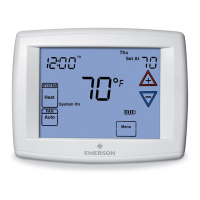
1F95-1277 Touchscreen Thermostat
Save these instructions for future use!
FAILURE TO READ AND FOLLOW ALL INSTRUCTIONS
CAREFULLY BEFORE INSTALLING OR OPERATING THIS
CONTROL COULD CAUSE PERSONAL INJURY AND/OR
PROPERTY DAMAGE.
THERMOSTAT APPLICATION GUIDE
Thermostat
Configuration Options
Thermostat
Applications
Maximum
Stages
Heat/Cool
Single Stage 1
No Heat Pump (SS1)
Gas, Oil, Electric, Heat Only,
Cool Only or Heat/Cool
Systems, 2 or 3 wire Hydronic
Zone (Hot Water or Steam)
Systems, 24 Volt or Millivolt
1+1
Multi Stage 2
No Heat Pump (MS2)
2+2
Heat Pump 1
Single Stage Compressor
Heat Pump (HP1)
Single Stage Compressor
Heat Pump Systems - up to 2
Stages Aux./Emergency Heat
3+1
Heat Pump 2
Two Stage or Two
Compressor Heat Pump
(HP2)
Two Stage or Two Compressor
Heat Pump systems - up to 2
Stages Aux./Emergency Heat
4+2
ATTENTION: MERCURY NOTICE
This product does not contain mercury. However, this
product may replace a product that contains mercury.
Mercury and products containing mercury must not be
discarded in household trash. Do not touch any spilled
mercury. Wearing non-absorbent gloves, clean up any
spilled mercury and place in a sealed container. For proper
disposal of a product containing mercury or a sealed
container of spilled mercury, place it in a suitable shipping
container. Refer to www.thermostat-recycle.org for
location to send the product containing mercury.
Index Page
Installation 2
Wiring Diagrams 3
Thermostat Quick Reference 4
Installer Configuration Menu 5
Operating Your Thermostat 9
Programming 10
Troubleshooting 13
Electrical Rating:
Battery Power .......................... mV to 30 VAC, NEC Class II, 50/60 Hz or DC
Input-Hardwire ......................... 20 to 30 VAC
Terminal Load ............................. 1.5A per terminal, 2.5A maximum all terminals combined
Setpoint Range ............................ 45 to 99°F (7 to 37°C)
Rated Differentials: Fast. Slow
Heat (Single Stage/Multi-Stage) ............ 0.6°F 1.5°F
Cool (Single Stage/Multi-Stage) ............ 1.2°F 1.7°F
Heat Pump ............................ 1.2°F 1.7°F
Emer Heat ............................ 0.6°F 1.7°F
Operating Ambient.......................... 32°F to +105°F (0 to +41°C)
Operating Humidity ......................... 90% non-condensing max.
Shipping Temperature Range ................. -40 to +150°F (-40 to +65°C)
Dimensions Thermostat...................... 4-9/16"H x 5-13/16"W x 1-3/16"D
To prevent electrical shock and/or equipment damage,
disconnect electric power to system at main fuse or
circuit breaker box until installation is complete.

CAUTION
!

Questions and Answers

Summary

SPECIFICATIONS

Electrical Rating

Electrical characteristics and limits for system operation.

Setpoint Range

Defines the adjustable temperature limits for heating and cooling.

Rated Differentials

Specifies temperature differences for system cycling in various modes.

Operating Ambient

Outlines temperature and humidity limits for thermostat operation.

INSTALLATION

Remove Old Thermostat

Procedures for safely disconnecting and removing the existing thermostat.

Installing New Thermostat

Step-by-step guide for physically mounting the new thermostat base and unit.

Battery Location

Identifies the location and recommended type for backup batteries.

Power Stealing Switches

Explains the function of switches that draw power from the HVAC system.

WIRING DIAGRAMS

Single Stage and Multi-Stage Connections

Wiring schematics for standard HVAC systems without heat pumps.

Heat Pump Connections

Wiring diagrams specifically for various heat pump system configurations.

THERMOSTAT QUICK REFERENCE

Home Screen Description

Overview of the main display elements and their meanings.

Programming and Configuration Items

Summary of key features and settings available for user configuration.

INSTALLER;CONFIGURATION MENU

Configuration Menu Options

Comprehensive list of advanced settings for system setup and customization.

Select Reversing Valve

Configuration for the heat pump's reversing valve operation mode.

Programs per week

Selection of the scheduling format: 7-day, 5+1+1-day, or non-programmable.

System Switch Configuration

Definition of the thermostat's system modes (Heat, Cool, Auto, etc.).

OPERATING YOUR THERMOSTAT

Check Thermostat Operation

Basic steps to verify the thermostat is functioning correctly.

Fan Operation

How to control and test the HVAC system's fan.

Heating

Instructions for operating and testing the heating system.

Cooling

Instructions for operating and testing the cooling system.

Choose the System Setting

Guidance on selecting the appropriate operating mode (Heat, Cool, Auto, Off).

PROGRAMMING

Manual Operation (Bypassing the Program)

How to manually set a temperature that overrides the schedule.

Set Current Time and Day

Procedure for setting the thermostat's internal clock and calendar.

Automatic Daylight Saving Calculation

Feature for automatically adjusting the clock for DST.

Programming Tip: Copy Program

Method for efficiently copying program settings to other days.

Enter the Cooling Program

Steps to define cooling schedules and temperature setpoints.

Automatic Schedule

Utilizing the feature for simplified, automated temperature scheduling.

Energy Saving Factory Pre-Program

Overview of the default energy-saving programmed schedule.

Wired Remote Temperature Sensing

Setup and use of external sensors for room temperature monitoring.

TROUBLESHOOTING

Comfort Alert Codes

Interpretation of diagnostic codes indicating HVAC system faults.

Reset Operation

Procedure to reset the thermostat to factory defaults or resolve issues.

Symptom: No Heat;No Cool;No Fan (common problems)

Common issues and their likely causes and solutions.

Symptom: Furnace (Air Conditioner) Cycles Too Fast or Too Slow

Troubleshooting for HVAC system cycling frequency problems.

Overview

The White-Rodgers Blue Universal Touchscreen Thermostat with Automatic Heat/Cool Changeover Option (Model 1F95-1277) is a versatile control system designed for various heating and cooling applications, including single-stage, multi-stage, and heat pump systems. It offers flexible programming choices, including 7-day, 5+1+1 day, and non-programmable modes, catering to diverse user needs and schedules.

Function Description

This thermostat provides precise control over your home's climate. It can manage gas, oil, electric, heat-only, cool-only, or heat/cool systems, as well as 2- or 3-wire hydronic zone systems (hot water or steam) operating on 24 Volt or millivolt power. For heat pump systems, it supports single-stage compressor heat pumps (HP1) with up to two stages of auxiliary/emergency heat, and two-stage or two-compressor heat pumps (HP2) with up to two stages of auxiliary/emergency heat.

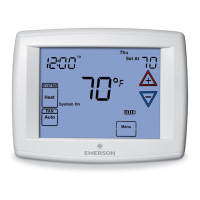
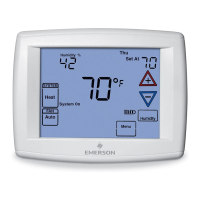
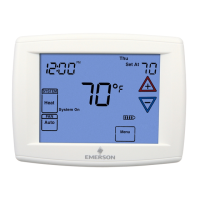
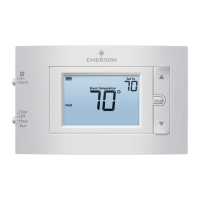
The thermostat features an intuitive touchscreen interface for easy operation. The home screen displays the current time, day of the week, and room temperature. It also indicates when the thermostat is actively calling for heat or cool. Users can adjust the setpoint temperature using dedicated up/down arrows. A "Menu" key provides access to various modes, including Cleaning, Configuration, Set Time, and Set Schedule.

Key functions include:

  • System Control: Users can select between "Cool," "Off," "Heat," "Em" (Emergency Heat for heat pumps), and "Auto" modes. "Auto" mode allows the thermostat to automatically switch between heating and cooling based on indoor temperature and setpoints, ideal for climates with fluctuating temperatures.
  • Fan Control: The fan can be set to "Auto" (runs only when heating or cooling is active), "On" (runs continuously), or "Prog" (Comfort Circulating fan feature, which cycles the fan on for 10 minutes and off for 20 minutes if no heating/cooling call has occurred in the past 60 minutes, ensuring moderate air circulation).
  • Programming: The thermostat supports 7-day, 5+1+1 day, and non-programmable modes. In programmable modes, users can set different temperatures for various periods of the day (e.g., Morning, Day, Evening, Night) to optimize energy savings and comfort. The "Copy" feature simplifies programming by allowing users to duplicate schedules from one day to others.
  • Automatic Schedule (Auto Schedule): This feature provides a quick way to program temperatures. For heating, it sets a comfortable daytime temperature and lowers it by 6° at night. For cooling, it sets a comfortable temperature for all cooling periods. This is available when the thermostat is first powered on, after a reset, or when enabled in the Configuration Menu.
  • Energy Management Recovery (EMR): When enabled, EMR causes the thermostat to begin heating or cooling early to ensure the desired program setpoint is reached by the scheduled time.
  • Cool Savings™: This energy-saving feature provides a temperature offset (1-6 degrees) under peak cooling load conditions (high outdoor temperatures). When active, it gradually offsets the indoor temperature downward, taking advantage of lower indoor humidity to maintain comfort at slightly higher temperatures.
  • Dual Fuel Feature: Applicable to heat pump systems (HP1, HP2), this feature allows the thermostat to determine when to switch to gas heat and shut down the compressor based on outdoor temperature (if an outdoor remote sensor is available) or software logic. It also allows for a compressor delay after auxiliary heat is energized to minimize cool air blowing.
  • Compressor Lockout (CL): This feature introduces a 5-minute delay between cooling cycles to protect the compressor from short cycling.
  • Compressor Optimization (CO): This feature provides a delay in circulator fan operation after the compressor turns on or off. When the compressor turns on, the fan is delayed for five seconds. After the compressor turns off for cooling, the fan continues to run for 20 seconds to capture additional cooling.
  • Comfort Alert with Active Protection: This feature enables the thermostat to identify fault codes from a Comfort Alert module, turning off the compressor if damage is possible. Fault codes are flashed on the thermostat display as "Call For Service."
  • Keypad Lockout: This security feature allows users to lock the keypad partially or totally, or set temperature limits, preventing unauthorized adjustments.

Usage Features

The touchscreen interface is designed for ease of use. The "Menu" key serves as a central point for accessing various settings and programming options. The up/down arrows are used for adjusting setpoints and navigating menus.

  • Setting Time and Day: The thermostat allows for easy adjustment of the current hour, AM/PM designation, minutes, year, month, and day of the week.
  • Daylight Saving Time Calculation: The Real Time Clock automatically adjusts for daylight saving time, incrementing one hour at 2 AM on the second Sunday of March and decrementing one hour at 2 AM on the first Sunday of November. This feature can be enabled or disabled in the installer configuration menu.
  • Manual Operation (Bypassing Program): Users can temporarily override the programmed schedule by adjusting the temperature. The thermostat will maintain this new setpoint indefinitely (Hold mode) or for a temporary override period (Program Override), which can be adjusted from 15 minutes to 7 days.
  • Remote Temperature Sensing: The thermostat supports an optional wired remote temperature sensor, which can be installed indoors or outdoors. When enabled, the display will alternate between the time and the remote temperature. This allows for temperature sensing in a different location than the thermostat itself, or for outdoor temperature monitoring. The local sensor can also be disabled if an indoor remote sensor is used.
  • Averaging or Weighting Remote Sensors: When both the local and an indoor remote sensor are enabled, the thermostat can average or weight their readings to determine the displayed room temperature, providing a more representative temperature for the space.
  • Audible Beeper: The thermostat provides audible prompts (beeps) for key presses, which can be turned on or off in the configuration menu.
  • Continuous Display Backlight: The display backlight can be set to be continuously on, improving contrast in low lighting conditions.

Maintenance Features

The thermostat includes several features to assist with system maintenance and troubleshooting:

  • Battery Level Indicator: The home screen displays a battery level indicator, showing full, half, or low power. When the battery level is low, "Change" is displayed, prompting users to replace the two "AA" alkaline batteries.
  • Change Filter/Change UV Lamp Reminders: The thermostat can be configured to display "Change Filter" or "Change UV Lamp" after a set period of blower operation or UV bulb operation, reminding users to perform routine maintenance. These reminders can be cleared by pressing "Clean Display."
  • Call for Service Indicator: If a fault occurs in the heating/cooling systems, "Call for Service" will be displayed. This indicates a system malfunction, not a thermostat fault.
  • Troubleshooting Guide: The manual provides a comprehensive troubleshooting guide for common issues such as no heat/cool/fan, constant running, incorrect temperature readings, or fast/slow cycling. It offers possible causes and corrective actions, including resetting the thermostat.
  • Comfort Alert Codes: For systems equipped with a Comfort Alert module, the thermostat can display specific flash codes (e.g., Long run time, System pressure trip, Short cycling) to help diagnose compressor-related issues.

The White-Rodgers 1F95-1277 thermostat is designed to be a reliable and user-friendly control for managing your home's comfort and energy usage, with features that simplify programming, enhance system protection, and aid in maintenance.

Emerson 1F95-1277 Specifications

General IconGeneral
TypeProgrammable Thermostat
DisplayBacklit LCD
Wi-Fi ConnectivityNo
Voltage24 VAC
ColorWhite
Power SourceBattery or C-Wire
Programmability7-day programmable
Featuresfilter change reminder

Related product manuals