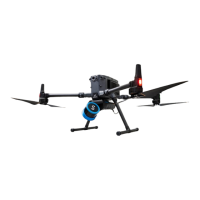
DJI M300/M350 preparation for Hovermap operation
Release date: 30 Apr 2024
Revision: 2.2
3. Compatible Aircraft and Firmware
Table 1 Hovermap-supported drone firmware
Airframe Approved firmware
DJI M300 V03.00.0101 and above
DJI M350 V07.00.0101 and above
3.1 DJI M300/M350 activation
If you are using a new drone, it needs to be activated, configured, and prepared for standard
operations, as per DJI’s instructions. We recommend that you read DJI’s user manual and ensure that
you have a good working knowledge of local and federal regulations for safe operations in your region,
regardless of whether you’re using the drone with Hovermap.
3.1.1 Install DJI Assistant 2 (Enterprise Series)
The DJI onboard SDK allows communication between the Hovermap and the drone. To enable this
communication, do the following:
•
•
•
•
•
Warning
Drone settings may be reset after a DJI firmware update.
Do not upgrade your drone beyond the Emesent-approved firmware
version.
Recheck all your settings after updating the firmware.
You are responsible for safe operation and compliance with local
regulations.
Updating the firmware on a Baro modified aircraft results in the loss of the
modification.


 To Next Page