Menu
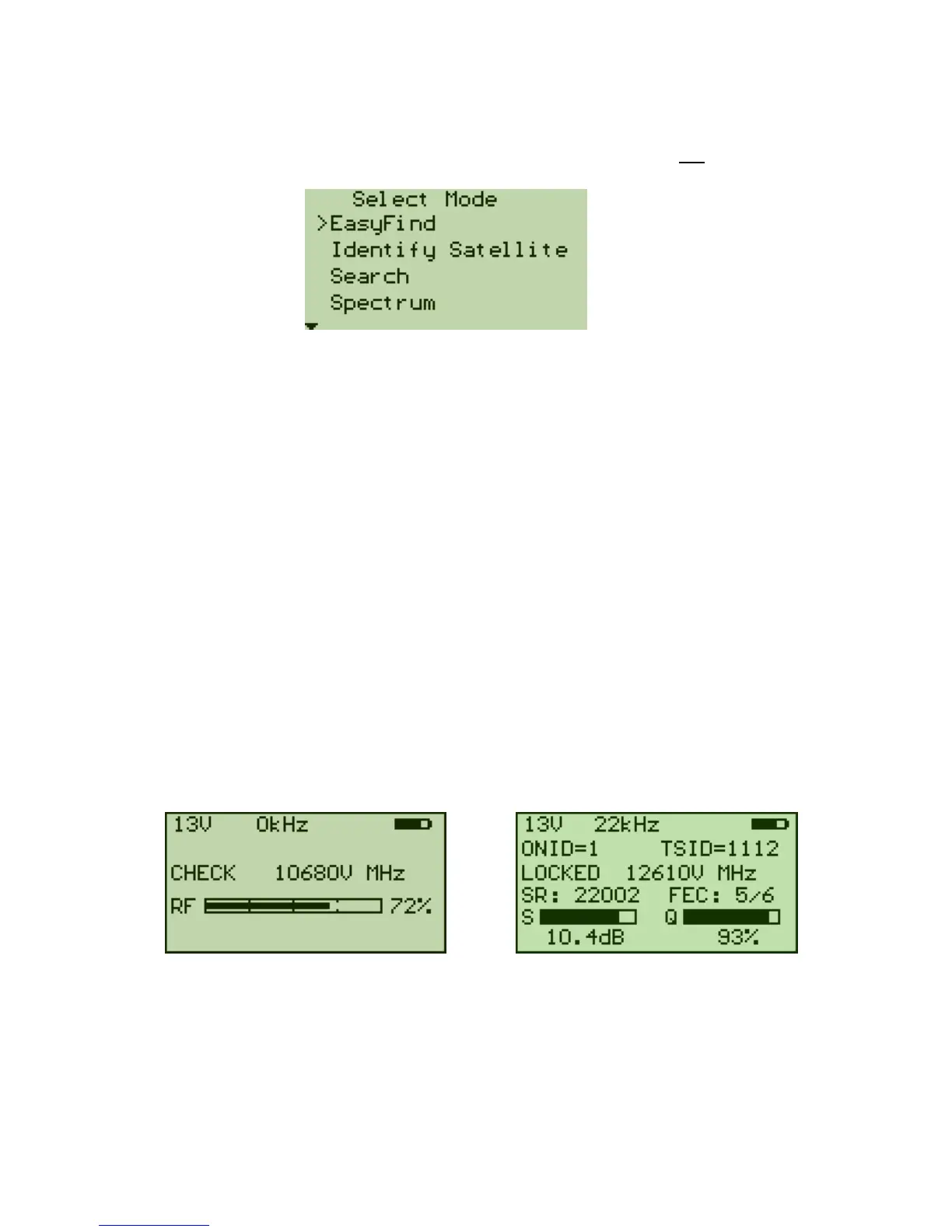
The following menu is shown on the display when pressing down the "OK" button in
the "EasyFind" mode:
This is the Main Menu. Use the "UP"/"DOWN" buttons to scroll up and down in the
menu system. Use the "OK" button to choose the selected function.
Pressing the "OK" button when the arrow “>” is pointing towards "EasyFind" will return
to the "EasyFind" mode. In this mode, the satellite to be used can be selected by
pressing Up/Down.
Identify Satellite
This function uses the satellite list and tunes each entry momentarily. If there is a lock,
then the TSID and ONID are checked for a match. If these match, then the satellite is
identified.
Search
This function searches for a DVB-S signal every 10Mhz. It starts at the lowest
frequency for the LNB type (10670MHz for Universal) and samples every 10MHz until a
signal is detected. The "UP"/"DOWN" buttons select the direction of the search. When
the Search function is entered, it asks for the LNB Voltage and Polarisation. (The
polarisation is only requested to display on the LCD and has no other purpose.) Once
13V or 18V has been selected, searching starts.
When a DVB-S signal has locked, the display changes to show the Symbol Rate and
FEC. When the NIT information is available, it is also shown. (ONID is “Original
Network ID”, and TSID is “Transport Stream ID”)


 To Next Page