Appendix A – Using LiteEdit to Edit Satellites
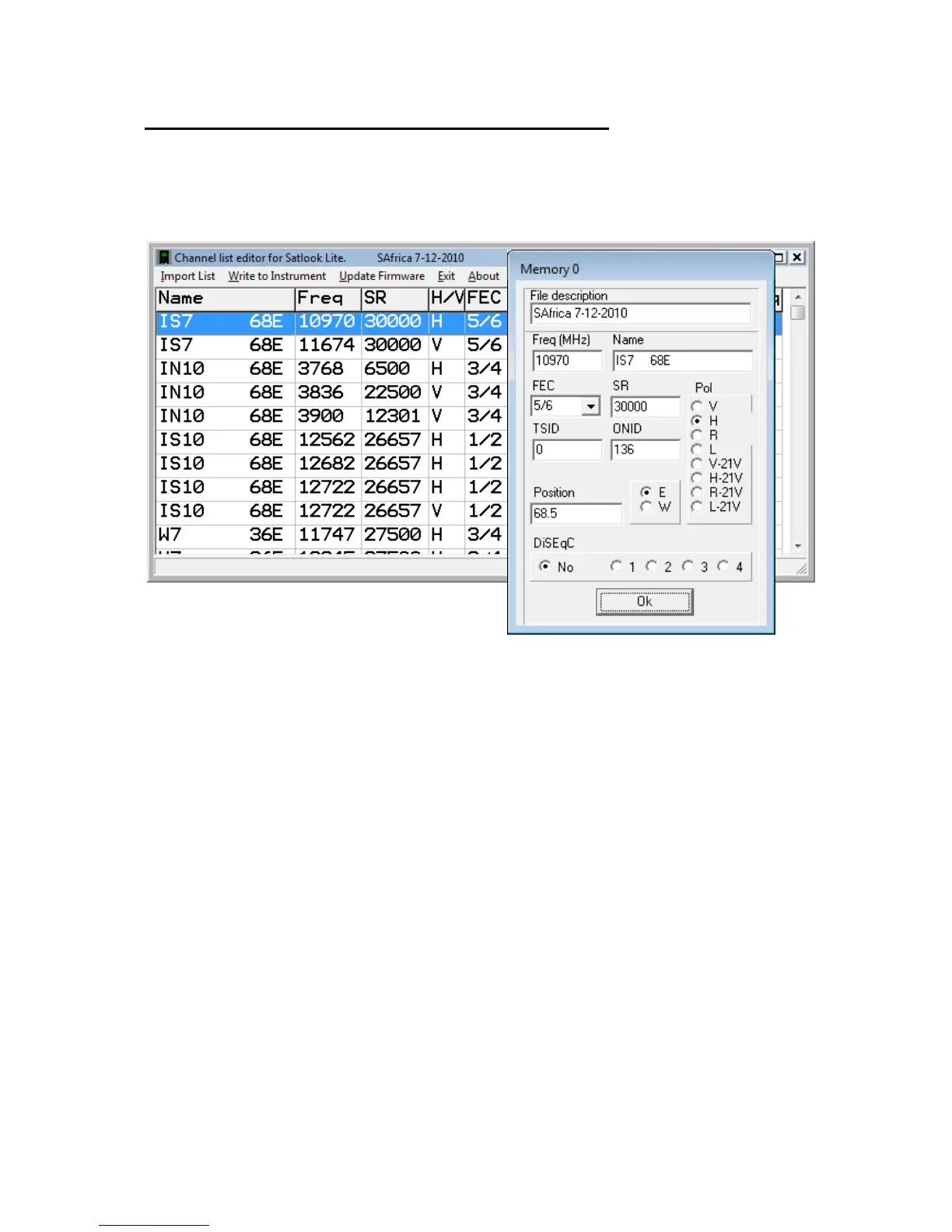
The Satellite list (Satlist) stored in the Satlook Lite can be changed using the LiteEdit
program. When the LiteEdit program is loaded, it will show the last edited satellite
list. Use “Import List” to load a satellite list to edit.
Clicking on a name allows editing the details for this entry. The “satlist.lst” files are
stored as *.csv files with the details below for each line.
Name: Satellite Name (up to 11 characters)
DVB/DSS: Transponder DVB encoding or DSS (DirecTV) encoding
(Stored in *.csv file as: “DVB” or “DSS”
Freq: Transponder Frequency in MHz
SR: Transponder Symbol Rate in ksym/sec
Pol: Polarisation and LNB Voltage
(Stored in file as 0 =V-13V, 1=H-18V, 2=R-13V, 3=L-18V, 4 =V-23V, 5=H-21V,
6=R-21V, 7=L-21V)
FEC: Transponder FEC 1/2, 2/3 etc.
(Stored in the file as 0=1/2, 1 = 2/3, 2=3/4, 3=5/6 4=6/7, 5=7/8)
22kHz: Should the 22kHz signal be on
(Stored in file as 0=off and 1=on)
TSID: Transponder Transport Stream ID transmitted in Network Identification Table
ONID: Transponder Original Network ID transmitted in Network Identication Table
(if the TSID and ONID are both 0, then when a transponder locks, the TSID and
ONID will be displayed instead of “Wrong Satellite”)
Pos: Satellite Position in Degrees and tenths
(stored in file as X 10 )
E/W: Satellite position as East/West
(Stored in file as “E” or “W”)


 To Next Page