32
ASET
P
PSET
°C
°F
PO
AO
PS
AS
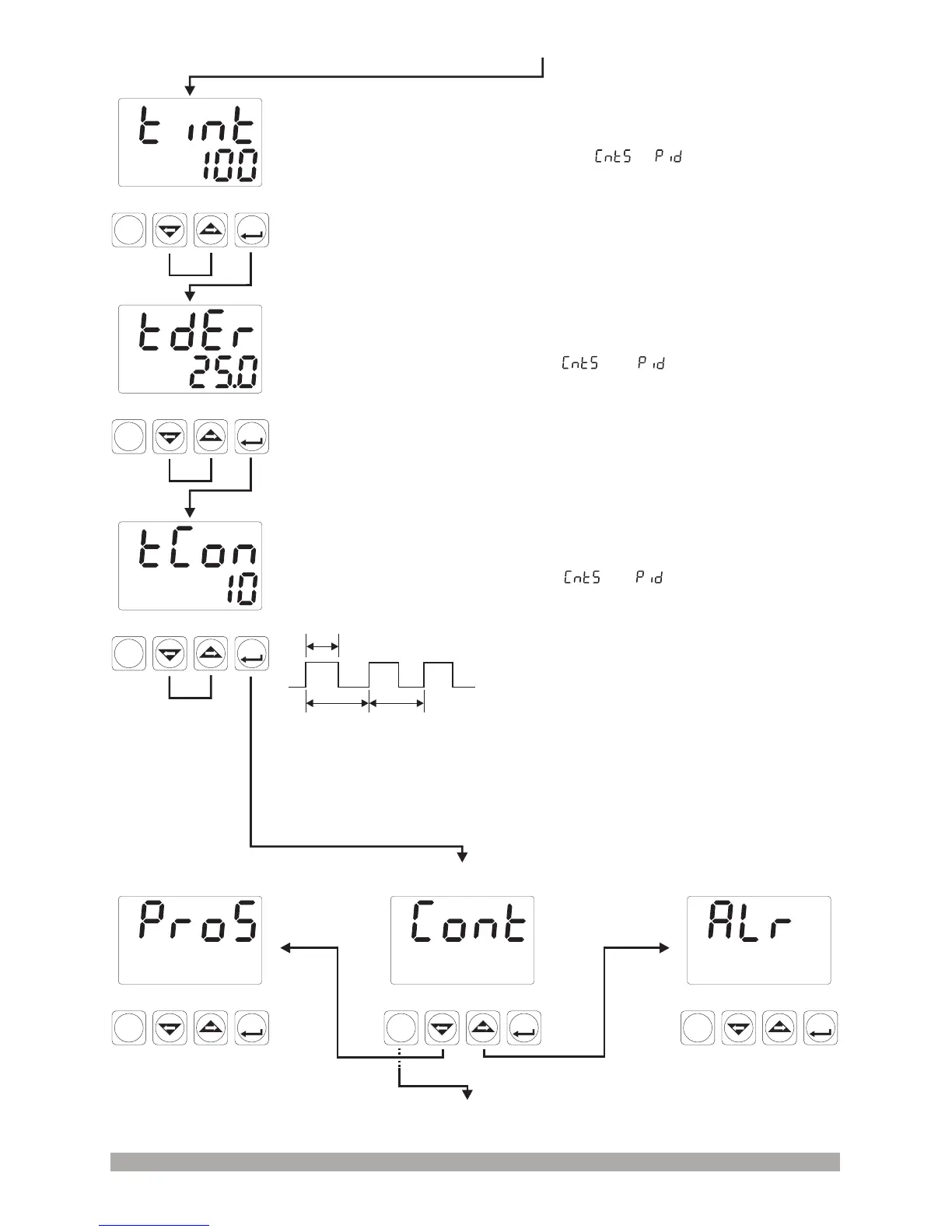
Output Control Period
It can be adjusted from 1 to 150 with increment and decrement buttons.
If Process Control Type selection = , then this parameter
can be observed.
ASET
P
PSET
°C
°F
PO
AO
PS
AS
Control Menu
ASET
P
PSET
°C
°F
PO
AO
PS
AS
Alarm Menu
Next menu can be accessed by
pressing right-arrow button.
Former menu can be accessed
by pressing left-arrow button.
ASET
P
PSET
°C
°F
PO
AO
PS
AS
Process Menu
Press PSET/P button to exit from menu list and
turn to the operation screen.
OUTPUT : ON
OUTPUT
PERIOD
OUTPUT
PERIOD
Relay Output :
SSR Output :
Output period must be short for
stable process control. Relay must not be used
in short output periods because of limited life of
their relay contact (number of open/close
events). Relay output must be used as control
output in values near to 30 seconds or greater
than this value.
If short output period is needed
in a system (approximately 1-2 seconds) SSR
driver output module as last control
Press ASET/OK
button for saving the
parameter and
accessing to the next
parameter.
ASET
P
PSET
°C
°F
PO
AO
PS
AS
Integral Time
It can be adjusted from 0 to 3600 seconds with increment and decrement
buttons.If Process Control Type selection = , then this parameter
can be observed.
ASET
P
PSET
°C
°F
PO
AO
PS
AS
Derivative Time
It can be adjusted from 0.0 to 999.9 seconds.
If Process Control Type selection = , then this parameter
can be observed.
Press ASET/OK button to save the value and access to the next
parameter.
Press ASET/OK button for saving the parameter and accessing to the next
parameter.


 To Next Page