© 2024 EMM Labs, All Rights Reserved. EMM Labs reserves the right to amend specifications & design without notice.
024
Network & Streaming
DA2i STEREO D/A CONVERTER OWNER’S MANUAL
Network & Streaming
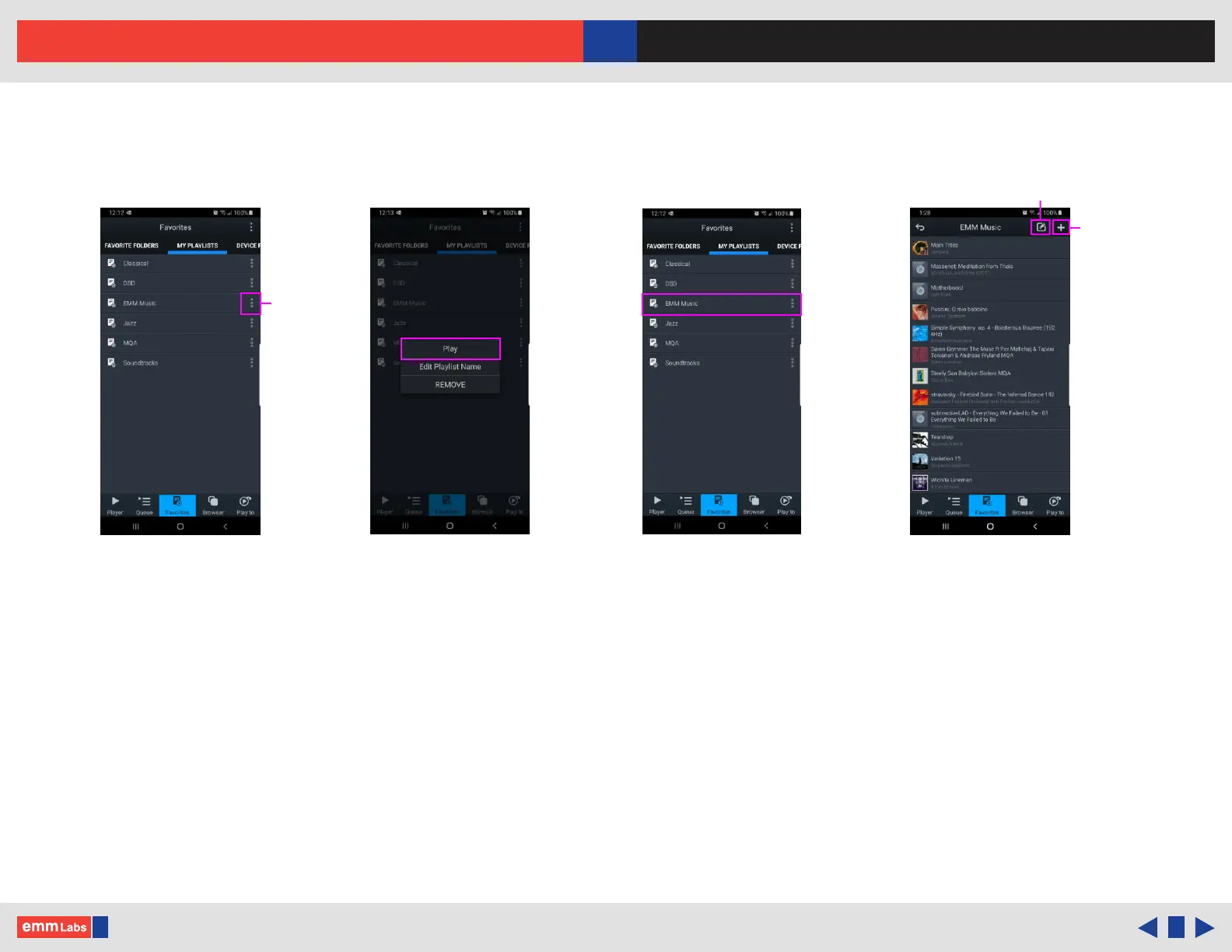
mConnect Control App - Making a Playlist (Cont’d)
5. In the “Favourites” page select “MY PLAYLISTS” tab and locate a specic playlist
and press the function button to the right of the playlist. Press “PLAY” to start
playback.
6. From this function list you can also edit playlist name or remove/delete the playlist.
7. If you select a playlist you will be able to see its contents. Use add tracks function,
“+” button located at the top right of the display to add tracks to the specic selected
playlist.
8. To the le of the add tracks function is the remove/edit playlist function. is allows
for the removal of specic tracks in the playlist.
Function list Select a playlist Edit and add a playlistPlaylists
Playlist
specic
function
Add
tracks
Edit
playlist



 To Next Page